Design Thinking
Structured Problem-Solving Framework: The 7-Step Approach
Master the 7-step system design framework: clarify requirements, define constraints, sketch architecture, evaluate trade-offs, and summarize with numbers—before you pick technologies.
Most candidates jump straight to boxes and databases when they hear "design a URL shortener." Interviewers are testing whether you can follow a repeatable process—clarify, quantify, sketch, trade off, summarize—without skipping the steps that prevent over-engineering. The 7-step framework is that process: the same sequence senior engineers use in design reviews, adapted for a 45-minute interview.
This guide walks each step with a URL shortener example, a notification-system thinking-aloud walkthrough, and an Instagram feed case study. Use it after What Is Design Thinking and alongside Real-World Design Templates for fill-in-the-blank structure.
The overview below is the spine—cover every step, even briefly, before the interviewer steers you into a deep dive.
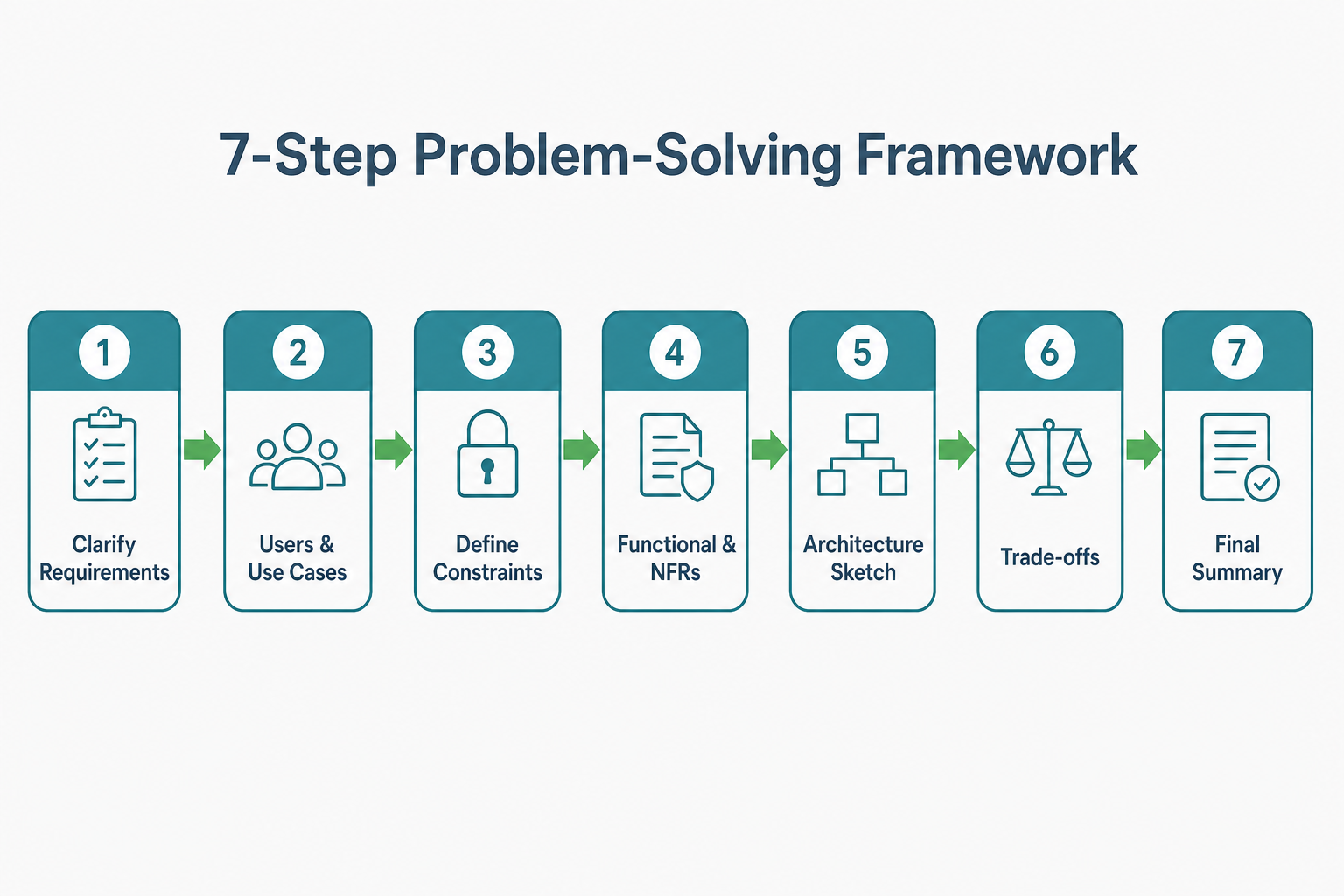
Cover all seven steps systematically—depth varies by problem, but skipping Step 1 or Step 6 is what separates junior from senior signal.
The 7-Step Framework
- Clarify Requirements
- Identify Users & Use Cases
- Define Constraints
- Functional & Non-Functional Requirements
- Architecture Sketch
- Trade-offs
- Final Design Summary
Let's dive into each step with examples.
Step 1: Clarify Requirements
Goal: Understand what you're building before designing how to build it.
Questions to ask:
- What exactly are we building?
- Who are the users?
- What problem are we solving?
- What's in scope? What's out of scope?
- Are there any assumptions we should validate?
Example: Design a URL Shortener
Clarifying questions:
- "Are we building a service like bit.ly or a custom solution for internal use?"
- "Do we need analytics (click tracking, referrer tracking)?"
- "Do we need custom aliases (e.g., bit.ly/mycompany)?"
- "What's the expected scale? 1M URLs/day or 1B URLs/day?"
- "Do URLs expire, or are they permanent?"
Output: A clear problem statement with scope boundaries.
Step 2: Identify Users & Use Cases
Goal: Understand who will use the system and how.
Questions to ask:
- Who are the primary users?
- What are the main use cases?
- What are the edge cases?
- What are the read vs write patterns?
Example: Design a URL Shortener
Users:
- End users (clicking shortened URLs)
- API users (creating shortened URLs)
- Analytics users (viewing click statistics)
Use Cases:
- Create short URL: User provides long URL → System returns short URL
- Redirect: User clicks short URL → System redirects to long URL
- View analytics: User requests click statistics for a short URL
Read vs Write:
- Write: Create short URL (low volume, ~100K/day)
- Read: Redirect (high volume, ~100M/day)
- Read: Analytics (medium volume, ~1M/day)
Output: List of users, use cases, and read/write patterns.
Step 3: Define Constraints
Goal: Understand the limits and boundaries of the system.
Types of constraints:
- Scale: How many users? How much data?
- Performance: Latency, throughput requirements
- Availability: Uptime requirements (99.9%, 99.99%?)
- Consistency: Strong consistency vs eventual consistency
- Budget: Cost constraints
- Team: Team size, expertise
- Timeline: Launch date, milestones
Example: Design a URL Shortener
Constraints:
- Scale:
- 100M URLs created per day
- 10B redirects per day
- URLs stored permanently (no expiration)
- Performance:
- Redirect latency: < 10ms (p99)
- URL creation latency: < 100ms (p99)
- Availability: 99.9% uptime
- Consistency: Eventual consistency acceptable for analytics
- Storage: Need to store billions of URLs
Output: Clear list of constraints with specific numbers.
Step 4: Functional & Non-Functional Requirements
Goal: Define what the system must do (functional) and how well it must do it (non-functional).
Functional Requirements
What the system must do:
- Create short URL from long URL
- Redirect short URL to long URL
- Support custom aliases (optional)
- Track click statistics (optional)
Non-Functional Requirements
How well the system must perform:
- Latency: Redirect < 10ms, Creation < 100ms
- Throughput: 10B redirects/day, 100M creations/day
- Availability: 99.9% uptime
- Scalability: Handle 10x growth
- Reliability: No data loss
- Security: Prevent abuse, rate limiting
Output: Clear list of functional and non-functional requirements.
Step 5: Architecture Sketch
Goal: Design the high-level architecture with components and data flows.
Components to consider:
- API Layer: REST API, GraphQL, gRPC
- Application Layer: Business logic, services
- Data Layer: Databases, caches, message queues
- Infrastructure: Load balancers, CDN, monitoring
Example: Design a URL Shortener
Key Components:
- URL Shortener API: Handles URL creation requests
- Redirect Service: Handles redirect requests (high throughput)
- Database: Stores URL mappings (sharded for scale)
- Cache: Redis for fast redirects (sub-10ms latency)
- Message Queue: Async processing for analytics
- Analytics Service: Processes click events
- Load Balancer: Distributes traffic
- CDN: Serves static assets, edge caching
Data Flow:
- Create URL: Client → API → Database → Return short URL
- Redirect: Client → Redirect Service → Cache (hit) → Redirect
- Redirect (cache miss): Client → Redirect Service → Database → Cache → Redirect
- Analytics: Redirect → Message Queue → Analytics Service → Analytics DB
Output: High-level architecture diagram with components and data flows.
Step 6: Trade-offs
Goal: Evaluate the pros and cons of architectural decisions.
Key trade-offs to consider:
- SQL vs NoSQL: Consistency vs Flexibility
- Cache vs Database: Speed vs Freshness
- Synchronous vs Asynchronous: Simplicity vs Scalability
- Monolith vs Microservices: Simplicity vs Scalability
- Strong Consistency vs Eventual Consistency: Correctness vs Performance
- Vertical Scaling vs Horizontal Scaling: Simplicity vs Cost
Example: Design a URL Shortener
Trade-off 1: SQL vs NoSQL for URL Storage
SQL (PostgreSQL):
- ✅ Strong consistency
- ✅ ACID transactions
- ✅ Mature ecosystem
- ❌ Harder to scale horizontally
- ❌ More complex sharding
NoSQL (Cassandra/DynamoDB):
- ✅ Easy horizontal scaling
- ✅ Built-in sharding
- ✅ High write throughput
- ❌ Eventual consistency
- ❌ More complex querying
Decision: Use NoSQL (Cassandra) for URL storage because:
- Need to store billions of URLs
- High write throughput (100M/day)
- Eventual consistency acceptable (rare conflicts)
- Easy horizontal scaling
Trade-off 2: Cache Strategy
Option 1: Cache-aside (Lazy Loading):
- ✅ Simple to implement
- ✅ Cache only what's accessed
- ❌ Cache miss penalty (database query)
- ❌ Potential cache stampede
Option 2: Write-through:
- ✅ Always consistent
- ✅ No cache miss for writes
- ❌ Slower writes (write to cache + DB)
- ❌ Wastes cache on rarely accessed URLs
Decision: Use cache-aside with:
- TTL: 7 days (most URLs accessed within 7 days)
- Pre-warming: Cache top 1M URLs
- Fallback: Database query on cache miss
Output: List of trade-offs with decisions and justifications.
Step 7: Final Design Summary
Goal: Summarize the design with key decisions, numbers, and next steps.
Include:
- Architecture overview: High-level components
- Key decisions: Major trade-offs and choices
- Scale numbers: Storage, throughput, latency
- Failure handling: How system handles failures
- Next steps: What to build first, what to optimize later
Example: Design a URL Shortener
Architecture Overview:
- URL Shortener API for creation
- Redirect Service for high-throughput redirects
- Cassandra for URL storage (sharded)
- Redis for caching (sub-10ms redirects)
- Message queue for async analytics
- CDN for edge caching
Key Decisions:
- NoSQL (Cassandra) for horizontal scaling
- Cache-aside pattern with 7-day TTL
- Async analytics processing
- Sharding by hash of short URL
Scale Numbers:
- Storage: 100M URLs/day × 365 days = 36.5B URLs/year
- Throughput: 10B redirects/day = ~115K redirects/second
- Latency: Redirect < 10ms (p99), Creation < 100ms (p99)
- Cache hit rate: Target 80% (8B cache hits, 2B DB queries)
Failure Handling:
- Database failure: Redirect service falls back to cache (degraded mode)
- Cache failure: Redirect service falls back to database (slower but functional)
- Analytics service failure: Events queued, processed when service recovers
Next Steps:
- Build MVP: API + Database + Basic redirect
- Add caching: Redis cache for redirects
- Add analytics: Message queue + Analytics service
- Scale: Sharding, load balancing, CDN
Output: Comprehensive design summary.
Thinking Aloud Like a Senior Engineer
Let me walk you through how I'd actually approach a design problem using the 7-step framework. This isn't a polished answer—it's the messy, real-time reasoning that happens before you arrive at a solution.
Problem: "Design a notification system that sends emails, SMS, and push notifications to users."
My first instinct: "Okay, I'll just create a service that takes a notification request and sends it. Simple, right?"
But wait—I need to follow the framework. Let me start with Step 1: Clarify Requirements.
Step 1 - Clarifying questions I'm asking:
- "What's the expected scale? 1K notifications/day or 1M?"
- "What's the latency requirement? Do notifications need to be sent immediately or can they be delayed?"
- "Do we need to track delivery status? Read receipts?"
- "What happens if a service (email/SMS/push) is down?"
Assuming we clarify: 1M notifications/day, 5-second latency requirement, 99.9% reliability, need delivery tracking.
Step 2 - Users & Use Cases:
- Users: End users receiving notifications, API users sending notifications
- Use cases: Send notification, track delivery, handle failures
- Read vs Write: Write-heavy (1M notifications/day), read-light (status checks)
Step 3 - Constraints:
- Scale: 1M notifications/day = ~12 notifications/second (but spikes could be 10K/second)
- Performance: 5-second latency requirement
- Availability: 99.9% uptime
- Reliability: Can't lose notifications
My next thought: "I could use a simple API that calls email/SMS/push services directly. That's synchronous and simple."
But that violates the latency constraint: If email service takes 2 seconds, SMS takes 1 second, and push takes 0.5 seconds, that's 3.5 seconds total. But what if email is slow? We'd exceed 5 seconds. Also, if one service fails, the whole request fails.
So I reject synchronous: "We need asynchronous processing. The API should accept the request, return immediately, and process in the background."
Step 4 - Functional & Non-Functional Requirements:
- Functional: Send notification, track delivery, handle failures
- Non-functional: 1M notifications/day, < 5s latency, 99.9% availability
Step 5 - Architecture Sketch: My thinking: "I need an API, a queue, workers, and notification services. Let me sketch this out..."
- API receives request → Enqueue to message queue
- Workers consume from queue → Check user preferences → Send via appropriate service → Update status
Now I'm thinking: "How do we handle the async processing? We could use a message queue—RabbitMQ or Kafka. But wait, do we need Kafka's durability and replayability? Or is RabbitMQ simpler?"
For 1M notifications/day: That's about 12 notifications/second. RabbitMQ can easily handle that. Kafka would be overkill unless we need event replay or multiple consumers with different processing speeds.
I'm choosing RabbitMQ: "It's simpler, handles our scale, and has good durability. This is the trade-off I'm consciously accepting—simpler operations over Kafka's advanced features."
Step 6 - Trade-offs:
- Synchronous vs Asynchronous: Chose async for scalability (accepting delay)
- RabbitMQ vs Kafka: Chose RabbitMQ for simplicity (accepting less advanced features)
- Single queue vs Multiple queues: Chose single queue for simplicity (accepting less granular control)
Step 7 - Final Design Summary:
- Architecture: API → Queue → Workers → Notification Services
- Key decisions: Async processing, RabbitMQ, single queue
- Scale: 1M notifications/day, 12/second average, 10K/second spikes
- Failure handling: Retry with exponential backoff, dead letter queue for failed notifications
This is the trade-off I'm making: Simpler architecture (single queue) over more complex routing (separate queues per channel). For our scale, single queue is fine. If we needed different processing speeds per channel, we'd need separate queues.
Notice how I didn't jump to "microservices" or "Kafka" or "event sourcing." I started with the framework, clarified requirements, identified constraints, made trade-offs explicit, and built up complexity only where needed.
How a Senior Engineer Uses This Framework
A senior engineer doesn't just follow the steps mechanically. They:
- Spend time on Step 1: Don't rush to solutions. Ask clarifying questions.
- Quantify everything in Step 3: Use real numbers, not vague statements.
- Think in flows in Step 5: How does data move? Where are bottlenecks?
- Justify trade-offs in Step 6: Explain why, not just what.
- Be honest about unknowns in Step 7: "We'll measure X and optimize Y later."
Real-World Example: Instagram's Feed System
Step 1: Clarify Requirements
- Build a feed that shows posts from users you follow
- Support real-time updates
- Handle 500M+ users, billions of posts
Step 2: Identify Users & Use Cases
- Users: Instagram users viewing their feed
- Use cases: View feed, refresh feed, see new posts
- Read-heavy: 10B reads/day, 100M writes/day
Step 3: Define Constraints
- Scale: 500M users, billions of posts
- Latency: Feed load < 200ms
- Availability: 99.9% uptime
Step 4: Functional & Non-Functional Requirements
- Functional: Show posts from followed users, sorted by time
- Non-functional: < 200ms latency, handle 10B reads/day
Step 5: Architecture Sketch
- Option 1: Fan-out on write (pre-compute feeds)
- Option 2: Fan-out on read (compute on-demand)
- Option 3: Hybrid (pre-compute for active users, on-demand for others)
Step 6: Trade-offs
- Fan-out on write: Fast reads, slow writes, high storage
- Fan-out on read: Slow reads, fast writes, low storage
- Hybrid: Balance of both
Step 7: Final Design Summary
- Chose hybrid approach
- Pre-compute feeds for top 20% active users
- On-demand for others
- Use Redis for pre-computed feeds
- Use Cassandra for post storage
Best Practices
- Don't skip steps: Each step builds on the previous one.
- Quantify constraints: Use real numbers, not "high scale" or "low latency."
- Think in flows: How does data move? Where are bottlenecks?
- Justify trade-offs: Explain why, not just what.
- Be honest about unknowns: "We'll measure X and optimize Y later."
- Start simple, then optimize: Don't over-engineer from day 1.
Common Interview Questions
Beginner
Q: What are the 7 steps of the design framework?
A:
- Clarify Requirements
- Identify Users & Use Cases
- Define Constraints
- Functional & Non-Functional Requirements
- Architecture Sketch
- Trade-offs
- Final Design Summary
Intermediate
Q: Why is it important to clarify requirements before designing architecture?
A: Jumping to architecture too early leads to over-engineering or under-engineering. Clarifying requirements ensures you understand the problem, scope, and constraints before making architectural decisions. It's the difference between building the right thing vs building the thing right.
Senior
Q: How do you handle conflicting requirements or constraints?
A: I make trade-offs explicit. For example, if latency and cost conflict, I:
- Quantify the trade-off: "Lower latency requires more caching, increasing cost by X%"
- Propose alternatives: "Option A: Higher latency, lower cost. Option B: Lower latency, higher cost."
- Recommend based on priorities: "Given our SLA, I recommend Option B, but we can optimize costs later."
- Document the decision: "We chose Option B because latency is critical for user experience."
Summary
The 7-step framework keeps you from jumping to architecture too early: clarify what you are building, identify users and use cases, define constraints with numbers, separate functional from non-functional requirements, sketch components and data flows, evaluate trade-offs with explicit gain/lose reasoning, and close with a speakable summary of decisions and scale. Follow the sequence every time—depth per step varies, but skipping clarification or trade-offs is what makes designs sound memorized instead of reasoned.
Key Takeaways
- Never skip Step 1 — Clarifying questions and scope boundaries prevent the most common over-engineering mistakes.
- Quantify in Step 3 — "High scale" is not a constraint; users, RPS, and latency targets are.
- Separate functional from non-functional in Step 4 — What the system does vs how well it must do it drives different design forks.
- Think in flows in Step 5 — Follow one request end-to-end; bottlenecks and single points of failure appear on the path.
- Step 6 is senior signal — Name what you gain and lose for each option; silent preference sounds like habit, not judgment.
- Step 7 closes the loop — Storage, throughput, failure handling, and "build first vs optimize later" in one minute recap.
- Start simple, add complexity with evidence — RabbitMQ before Kafka, single DB before sharding—unless constraints prove you need more.
Apply This Thinking
Run the full seven steps on timed practice problems:
- Design a URL Shortener — Walk Steps 1–7 explicitly; quantify redirect RPS and cache hit rate in Step 3.
- Design a Notification System — Replay async vs sync and queue choice in Steps 5–6 under interview timing.
- Design Instagram — Feed fan-out is a classic Step 5–6 trade-off (write vs read path).
- Ambiguity Handling & Problem Framing — Sharpen the clarifying questions you use in Step 1.
- Communication & Interview Strategy — Map each step to minutes on the 45-minute interview clock.
Related Topics
- What Is Design Thinking — hub intro: mental model behind the seven steps.
- Real-World Design Templates — fill-in templates for Steps 3–5 (requirements, API, reliability).
- Ambiguity Handling & Problem Framing — deeper Step 1 playbook when prompts are vague.
- Trade-Off Thinking — expand Step 6 with constraint-driven decision matrices.
- Non-Functional Requirements Deep Dive — deepen Step 4 when latency, availability, and consistency dominate.
FAQs
Q: Do I need to follow all 7 steps in every design?
A: Yes, but the depth varies. For simple systems, you might spend 5 minutes on each step. For complex systems, you might spend 30 minutes on each step. The key is to cover all areas systematically.
Q: What if I don't know the constraints?
A: Make reasonable assumptions and state them explicitly. For example: "Assuming 1M users, 10M requests/day, and 99.9% availability requirement." The interviewer will correct you if needed.
Q: Can I skip steps if I'm short on time?
A: No. Skipping steps leads to incomplete designs. It's better to cover all steps briefly than to skip steps entirely.
Q: How do I know if my architecture is good?
A: A good architecture:
- Meets all requirements
- Handles scale
- Has clear trade-offs
- Handles failures gracefully
- Can evolve incrementally
Q: What if the interviewer asks me to skip to architecture?
A: Politely explain that you'd like to clarify requirements first. Say: "I'd like to understand the requirements and constraints before designing the architecture. This ensures I build the right solution."
Q: How long should I spend on each step?
A: It depends on complexity:
- Simple system: 5 minutes per step (35 minutes total)
- Medium system: 10 minutes per step (70 minutes total)
- Complex system: 15 minutes per step (105 minutes total)
Q: How is the 7-step framework different from design thinking?
A: Design thinking is the overall mental model (requirements before solutions, explicit trade-offs, failure-aware design). The 7-step framework is a concrete interview workflow that operationalizes that model in a fixed order with numbered outputs at each stage.
Q: Can I use this framework for non-system-design problems?
A: Yes. The framework applies to any problem-solving scenario: product design, feature planning, technical decisions. The principles (clarify, identify, define, design, evaluate, summarize) are universal.
Keep exploring
Design thinking works best when combined with practice. Explore more topics or apply what you've learned in our system design practice platform.