Design Thinking
High-Level Architecture Patterns
Learn the big patterns you will use in real products and interviews: event-driven, layered, CQRS, microservices, real-time, and batch processing— when to pick each and how to combine them.
In system design interviews, candidates often name a pattern before they understand the problem—"I'll use microservices" or "let's go event-driven"—and lose points for pattern-driven thinking. Architecture patterns are vocabulary and reusable shapes, not defaults. The skill is matching a pattern to requirements, naming what you gain and give up, and combining patterns only where each solves a distinct problem.
If you have already practiced architecture thinking—decomposing problems into components and flows—patterns are the next layer: the structural templates those components often take.
Related reading: Trade-Off Thinking for justifying pattern choices under constraints. Evolutionary Design for starting simple and evolving patterns as the system grows.
The overview below shows four common patterns and the constraint each one fits best.
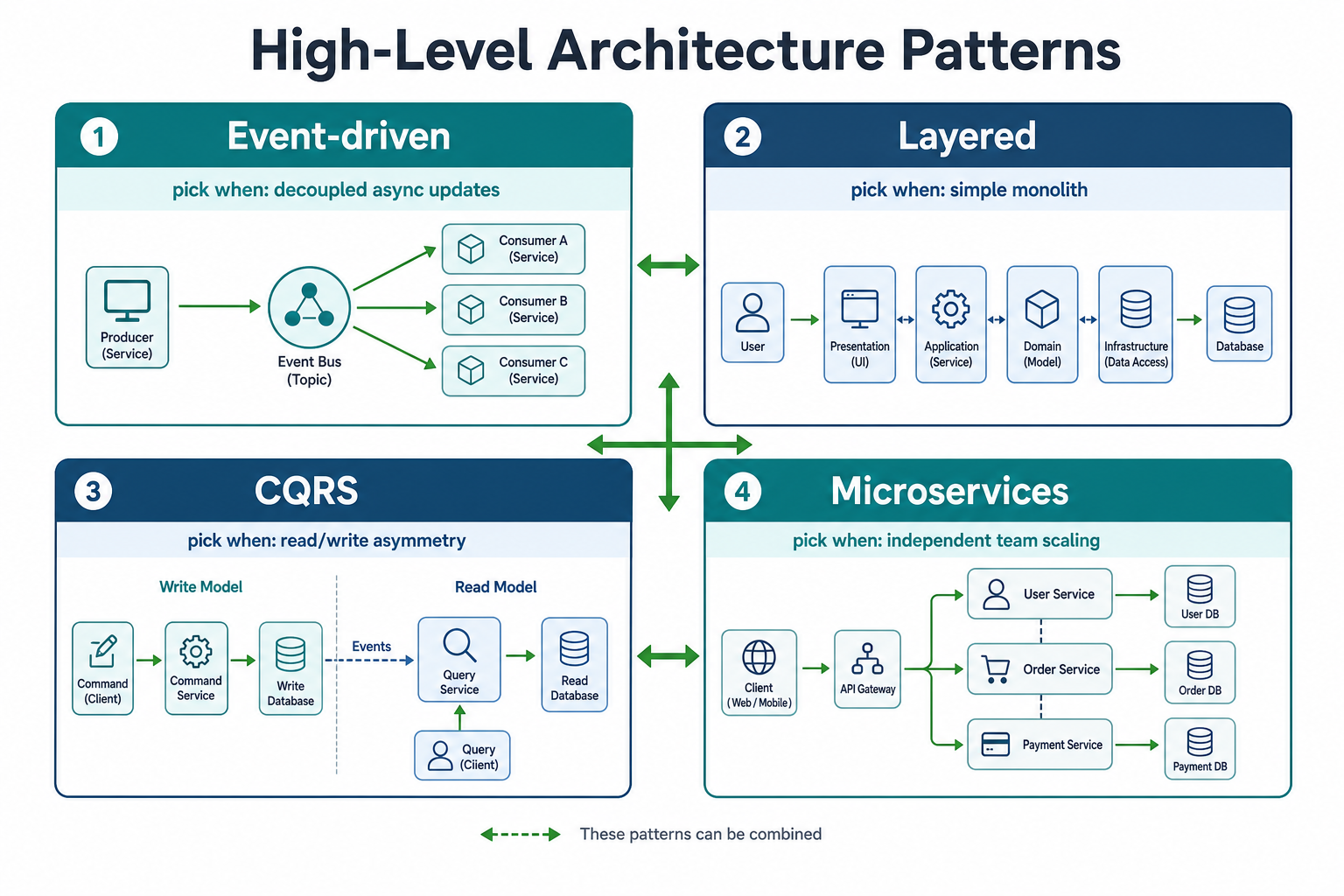
Pick patterns from requirements, not popularity—each box is a "pick when" decision, not a default stack.
Why Architecture Patterns Matter
Architecture patterns are reusable solutions to common problems:
- Speed: Don't reinvent the wheel
- Best practices: Patterns encapsulate lessons learned
- Communication: Common vocabulary for discussing designs
- Scalability: Patterns designed for scale
Pattern 1: Event-Driven Architecture
What It Is
Event-driven architecture uses events to trigger and communicate between services:
- Services publish events
- Other services subscribe to events
- Loose coupling between services
- Asynchronous processing
Architecture
When to Use
- Real-time updates: Prices, notifications, feeds
- Decoupled services: Services don't need to know about each other
- High volume: Millions of events per second
- Event sourcing: Need to replay events
Example: E-commerce Order System
Events:
OrderCreated→ Triggers payment, inventory, notificationPaymentProcessed→ Triggers shipping, notificationOrderShipped→ Triggers notification, analytics
Benefits:
- Services are decoupled (order service doesn't know about shipping)
- Can add new services (analytics) without changing existing ones
- Handles high volume (millions of orders per day)
Trade-offs
- ✅ Loose coupling
- ✅ Scalability
- ✅ Flexibility
- ❌ Eventual consistency
- ❌ Complex debugging
- ❌ Event ordering challenges
Pattern 2: Layered Architecture
What It Is
Layered architecture organizes code into layers:
- Presentation Layer: UI, API
- Business Layer: Business logic
- Data Layer: Database, cache
- Each layer depends on layers below
Architecture
When to Use
- Simple systems: Clear separation of concerns
- Small teams: Easy to understand
- Monoliths: Good for monoliths
- Traditional applications: Web apps, APIs
Example: E-commerce API
Layers:
- Presentation: REST API, request/response handling
- Business: Order processing, payment logic, inventory management
- Data: Database access, caching, file storage
Benefits:
- Clear separation of concerns
- Easy to understand
- Good for small teams
Trade-offs
- ✅ Simple and clear
- ✅ Easy to understand
- ✅ Good for monoliths
- ❌ Can become bloated
- ❌ Hard to scale layers independently
- ❌ Tight coupling between layers
Pattern 3: CQRS (Command Query Responsibility Segregation)
What It Is
CQRS separates reads and writes:
- Command Side: Handles writes (mutations)
- Query Side: Handles reads (queries)
- Different models for reads and writes
- Can use different databases
Architecture
When to Use
- Read/write asymmetry: Many more reads than writes
- Different query patterns: Complex queries for reads, simple writes
- Scale reads independently: Need to scale reads separately
- Event sourcing: Want to replay events
Example: Social Media Feed
Command Side:
- Create post (write to database)
- Like post (update database)
- Simple writes
Query Side:
- Get feed (complex query, join multiple tables)
- Get user posts (filter, sort, paginate)
- Complex reads
Benefits:
- Scale reads independently (add read replicas)
- Optimize reads (denormalized data, materialized views)
- Optimize writes (simple, normalized data)
Trade-offs
- ✅ Scale reads/writes independently
- ✅ Optimize each side separately
- ✅ Handle read/write asymmetry
- ❌ Data synchronization complexity
- ❌ Eventual consistency
- ❌ More infrastructure
Pattern 4: Microservices
What It Is
Microservices break application into small, independent services:
- Each service owns a domain
- Independent deployment
- Independent scaling
- Different technologies per service
Architecture
When to Use
- Large teams: Multiple teams work independently
- Different scaling needs: Services scale differently
- Technology diversity: Different stacks per service
- Fault isolation: Service failure doesn't affect others
Example: E-commerce Platform
Services:
- User Service: Authentication, profiles
- Product Service: Catalog, search
- Order Service: Order management
- Payment Service: Payment processing
- Shipping Service: Shipping, tracking
Benefits:
- Teams work independently
- Scale services based on demand
- Use different technologies
- Fault isolation
Trade-offs
- ✅ Independent scaling
- ✅ Technology freedom
- ✅ Team autonomy
- ✅ Fault isolation
- ❌ Increased complexity
- ❌ Network latency
- ❌ Distributed system challenges
- ❌ Operational overhead
Pattern 5: Real-Time Systems
What It Is
Real-time systems process and respond to events immediately:
- WebSocket connections
- Server-sent events
- Message queues
- Low latency (< 100ms)
Architecture
When to Use
- Chat applications: Real-time messaging
- Collaborative editing: Google Docs, Figma
- Live updates: Stock prices, sports scores
- Gaming: Real-time multiplayer
Example: Chat Application
Components:
- WebSocket Gateway: Handles connections
- Message Queue: Routes messages
- Chat Service: Processes messages
- Presence Service: Tracks online/offline users
Benefits:
- Real-time communication
- Low latency
- Bidirectional communication
Trade-offs
- ✅ Real-time communication
- ✅ Low latency
- ✅ Bidirectional
- ❌ Connection management complexity
- ❌ Scale challenges (millions of connections)
- ❌ State management
Pattern 6: Batch-Processing Systems
What It Is
Batch-processing systems process large volumes of data in batches:
- Scheduled jobs
- ETL pipelines
- Data warehouses
- Analytics processing
Architecture
When to Use
- ETL pipelines: Extract, transform, load
- Analytics: Process large datasets
- Reports: Generate daily/weekly reports
- Data migration: Move large amounts of data
Example: Analytics Pipeline
Components:
- Data Source: Application logs, events
- Message Queue: Kafka (buffers events)
- Workers: Process events in parallel
- Data Warehouse: Store processed data
Benefits:
- Process large volumes
- Parallel processing
- Fault tolerant (retry on failure)
Trade-offs
- ✅ Handle large volumes
- ✅ Parallel processing
- ✅ Fault tolerant
- ❌ Not real-time (batch processing)
- ❌ Latency (process in batches)
- ❌ Complex orchestration
How to Choose a Pattern
Decision Framework
- Understand requirements: What are you building?
- Identify constraints: Scale, latency, team size
- Consider trade-offs: Pros and cons of each pattern
- Start simple: Don't over-engineer
- Evolve: Patterns can evolve as system grows
Example: Choosing a Pattern
Problem: Build a social media feed
Requirements:
- Real-time updates
- High scale (millions of users)
- Complex queries (join, filter, sort)
Pattern Choice:
- Event-driven: For real-time updates (new posts trigger feed updates)
- CQRS: For read/write asymmetry (many reads, fewer writes)
- Microservices: For scale (feed service, post service, user service)
Combination: Use multiple patterns together
- Event-driven for updates
- CQRS for reads/writes
- Microservices for scale
Thinking Aloud Like a Senior Engineer
Let me walk you through how I'd actually choose and combine architecture patterns for a real problem. This is the messy reasoning that happens before you settle on a design.
Problem: "Design a social media platform with feeds, messaging, and real-time notifications."
My first instinct: "I'll use microservices! That's what everyone does for complex systems, right?"
But wait—that's pattern-driven thinking. Let me step back and think about what I actually need.
What are the requirements?
- Social feeds (posts from users you follow)
- Messaging (1-on-1 and group chats)
- Real-time notifications
- Scale: 100M users, billions of posts
Let me think about patterns one by one:
For feeds: "I need to show posts from users you follow, sorted by time. This is read-heavy, complex queries."
My first thought: "I'll use CQRS. Separate read and write models. Pre-compute feeds for fast reads."
But is that necessary? "Actually, I could start with a simple database query. JOIN users and posts, sort by time. It works for MVP."
I'm thinking: "Let me start simple, then add CQRS if I need it. This avoids over-engineering."
For messaging: "I need real-time delivery. Users send messages, recipients get them immediately."
My first thought: "I'll use event-driven architecture. Message sent → event published → recipient receives."
Actually, that makes sense: "Messaging is inherently event-driven. A message is an event. Multiple services can react (notifications, analytics, etc.)."
I'm choosing event-driven for messaging: "Because messaging is event-based, and I need loose coupling between services."
For real-time notifications: "I need to push notifications to users in real-time."
My first thought: "I'll use WebSocket. Real-time, bidirectional communication."
But how do I scale WebSockets? "I can't have millions of connections on a single server. I need a WebSocket gateway pattern."
I'm thinking: "Multiple WebSocket servers, message queue to route notifications, presence service to track which server has which user."
Now, should I use microservices? "Let me think about the services:
- Feed service
- Messaging service
- Notification service
- User service"
My first instinct: "Yes! Separate services, independent scaling, team autonomy."
But wait—what's the team size? "If it's a small team (5 engineers), microservices add too much complexity. If it's a large team (50+ engineers), microservices make sense."
Assuming small team: "I'll start with a monolith, split into services later if needed. This is the trade-off: simpler now, potential refactoring later."
But for messaging and notifications, I need real-time: "These are inherently distributed. I can't do real-time in a monolith easily."
I'm thinking: "Maybe a hybrid approach. Monolith for feeds (can start simple), microservices for messaging and notifications (need real-time)."
This is the trade-off I'm making: Use different patterns for different parts. Monolith for simple parts, microservices for complex parts.
Final architecture:
- Feeds: Monolith (start simple), can evolve to CQRS if needed
- Messaging: Event-driven microservice (inherently event-based)
- Notifications: Real-time microservice with WebSocket gateway
- Users: Part of monolith initially, can split later
This is how I combine patterns: I don't use one pattern everywhere. I choose patterns based on requirements, not popularity.
Notice how I didn't jump to "microservices everywhere." I thought about each part separately, chose patterns based on needs, and combined them appropriately.
How a Senior Engineer Uses Patterns
A senior engineer:
- Knows patterns: Understands common patterns and when to use them
- Combines patterns: Uses multiple patterns together
- Adapts patterns: Modifies patterns to fit context
- Starts simple: Doesn't over-engineer
- Evolves: Patterns evolve as system grows
Best Practices
- Know common patterns: Understand when to use each
- Combine patterns: Use multiple patterns together
- Adapt to context: Modify patterns to fit your needs
- Start simple: Don't over-engineer
- Evolve: Patterns can evolve as system grows
- Document: Explain why you chose a pattern
Common Interview Questions
Beginner
Q: What is event-driven architecture?
A: Event-driven architecture uses events to trigger and communicate between services. Services publish events, and other services subscribe to events. This creates loose coupling and enables asynchronous processing.
Intermediate
Q: When would you use CQRS?
A: I'd use CQRS when:
- Read/write asymmetry (many more reads than writes)
- Different query patterns (complex reads, simple writes)
- Need to scale reads independently
- Want to optimize reads and writes separately
Example: Social media feed (many reads, fewer writes, complex queries).
Senior
Q: How would you combine multiple architecture patterns in a single system?
A: I'd combine patterns based on requirements:
Example: E-commerce Platform
- Microservices: Break into services (user, product, order, payment)
- Event-driven: Services communicate via events (order created → payment, shipping)
- CQRS: Separate reads/writes (complex product queries, simple order writes)
- Real-time: WebSocket for order updates
- Batch processing: Daily analytics, reports
Each pattern solves a specific problem, and they work together to create a complete system.
Summary
Architecture patterns are reusable solutions to recurring structural problems—event-driven for decoupled async work, layered for clear monolith separation, CQRS for read/write asymmetry, microservices for independent team scaling, real-time for low-latency push, and batch for high-volume offline processing. Senior engineers pick patterns from requirements and constraints, combine them where each solves a distinct problem, and start simple before evolving.
Key Takeaways
- Patterns are vocabulary, not defaults — Name the constraint first; then pick event-driven, CQRS, or microservices because it fits, not because it sounds senior.
- Every pattern has a cost — Eventual consistency, operational overhead, and debugging complexity are trade-offs, not bugs to hand-wave away.
- Combine patterns by problem slice — Feeds, messaging, and analytics often need different shapes; one pattern for the whole system is usually wrong.
- Start simple, evolve deliberately — Monolith or layered architecture first; extract microservices or CQRS when metrics or team boundaries demand it.
- Know the "pick when" line — CQRS when reads dominate; event-driven when services must stay decoupled; batch when latency in minutes or hours is acceptable.
- Document why you chose a pattern — In interviews and in ADRs, the reasoning matters more than the label on the diagram.
- Patterns ≠ design patterns — Architecture patterns shape system structure; GoF design patterns shape code—both useful, different altitude.
Apply This Thinking
Practice pattern selection under interview constraints:
- Design Twitter — Feed fan-out, event-driven updates, and read/write asymmetry—classic CQRS and event-driven combination.
- Design Uber — Real-time matching plus async notifications; combine sync and event-driven slices.
- Design Netflix — Encoding pipelines and batch analytics alongside real-time playback paths.
- Architecture Thinking — Decompose into components before labeling them with pattern names.
- Team & Org-Level Design Thinking — Microservices often follow team boundaries—Conway's Law in practice.
Related Topics
- Architecture Thinking: Decomposing Problems into Components — name components and flows before applying pattern labels.
- Evolutionary Design — start with a monolith or layered app; evolve to microservices or CQRS without big-bang rewrites.
- Trade-Off Thinking — every pattern choice has explicit gains and losses under scale and latency constraints.
- Team & Org-Level Design Thinking — microservices make sense when team boundaries and independent deploy align.
- Message Queues — implementation depth after you choose event-driven or async worker patterns in an interview.
FAQs
Q: How are architecture patterns different from design patterns?
A: Architecture patterns describe system-level structure—how services, data stores, and communication paths are organized. Design patterns (Singleton, Factory, Observer) describe code-level structure inside a service. Interviews test architecture patterns far more often than GoF patterns.
Q: Do I need to know every architecture pattern?
A: No. Know event-driven, layered, CQRS, microservices, real-time, and batch processing deeply enough to explain when each fits and what it costs. That covers most interview prompts and production discussions.
Q: Can I combine multiple patterns in one system?
A: Yes—and most real systems do. A platform might use a layered monolith for catalog, event-driven messaging, CQRS for feeds, and batch jobs for analytics. Combine patterns per problem slice, not as a single global choice.
Q: Should I use microservices from day one?
A: Usually no. Start with a modular monolith or layered architecture unless team size, scaling needs, or fault isolation clearly require separate services. Over-engineering microservices is a common senior-mistake anti-pattern.
Q: When would you use CQRS in an interview?
A: When reads vastly outnumber writes, read queries are complex (feeds, dashboards), or you need to scale reads independently. Do not introduce CQRS for a simple CRUD app with balanced read/write load.
Q: How do I choose between event-driven and request-response?
A: Use request-response when the caller needs an immediate answer and the operation is fast. Use event-driven when work can happen asynchronously, multiple consumers react to the same event, or services must stay loosely coupled.
Q: What if no pattern fits my problem exactly?
A: Adapt the closest pattern or blend two. Patterns are starting points, not rigid rules. Name what you changed and why—that is stronger interview signal than forcing a textbook diagram.
Q: How do I learn patterns beyond reading about them?
A: Study real systems (Netflix, Stripe, Uber), map each to 2–3 patterns, then practice 45-minute designs where you state "I pick X because constraint Y." Compare your choices to postmortems and engineering blogs on the same domain.
Keep exploring
Design thinking works best when combined with practice. Explore more topics or apply what you've learned in our system design practice platform.