Design Thinking
Communication & Interview Strategy
Strong designs fail interviews when poorly communicated. Learn to structure answers, justify choices, use diagrams, and manage a 45-minute design session.
You can know the 7-step framework and still fail a system design interview if the interviewer cannot follow your reasoning. Communication is half the score: clarity, structure, trade-offs spoken aloud, and collaboration when the interviewer redirects you. Design thinking only counts when another engineer can replay your decisions.
This guide covers how to speak your design thinking—structuring answers, justifying choices, handling unknowns, using diagrams, and pacing a typical 45-minute session. Read it after What Is Design Thinking and use it alongside the 7-Step Problem-Solving Framework so each step has a voice, not just a checklist.
The timeline below maps minutes to phases so you leave time for deep dive and summary—not a technology monologue in the first five minutes.
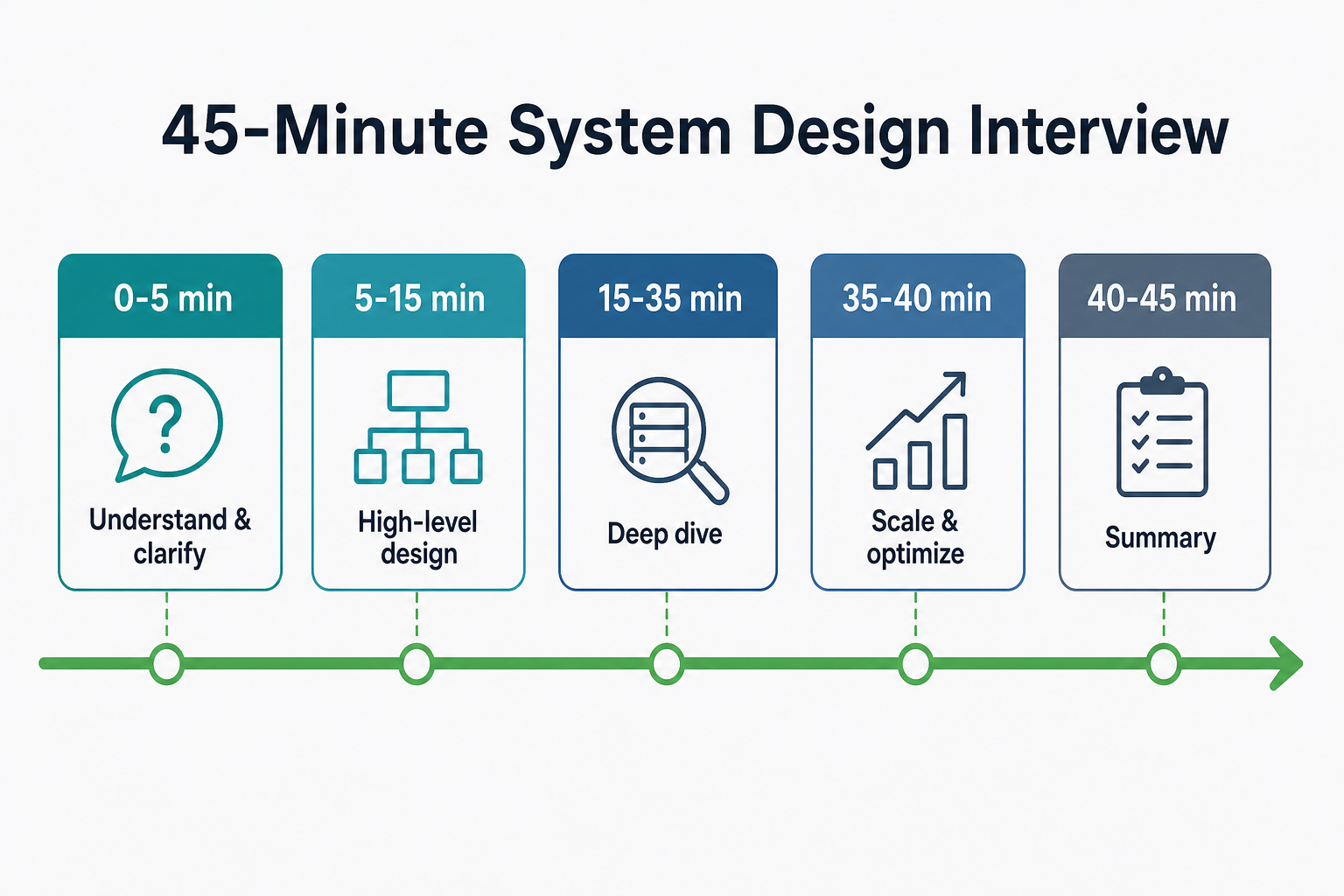
Budget time deliberately: clarification and summary are short; deep dive and trade-offs earn most senior signal.
Why Communication Matters
In system design interviews, communication is as important as technical skills:
- Clarity: Interviewer must understand your design
- Confidence: Shows you know what you're doing
- Collaboration: Shows you can work with others
- Problem-solving: Shows your thinking process
How to Speak Your Design Thinking
Structure Your Thoughts
- Start with the problem: "We're building X to solve Y"
- Clarify requirements: "Let me ask a few questions to understand..."
- Break down the problem: "I'll break this into components..."
- Explain your approach: "I'll use X because of Y"
- Make trade-offs explicit: "We're choosing X over Y because..."
- Summarize: "To summarize, we have..."
Example: Designing a URL Shortener
Good Communication:
"We're building a URL shortener that converts long URLs into short ones. Let me clarify a few things:
- What's the expected scale? 1M URLs/day or 1B?
- Do URLs expire or are they permanent?
- Do we need analytics?
Assuming 100M URLs/day and 10B redirects/day, I'll break this into:
- URL Shortener API (handles creation)
- Redirect Service (handles redirects)
- Database (stores URL mappings)
- Cache (Redis for fast redirects)
I'll use NoSQL (Cassandra) for storage because we need horizontal scaling. We're choosing eventual consistency over strong consistency because redirects can tolerate slight delays.
To summarize: API creates URLs, stores in database, cache for hot URLs, redirect service handles 10B redirects/day with < 10ms latency."
Bad Communication:
"I'll use Redis and Cassandra. Redis for caching, Cassandra for storage. We need to handle scale. Let me draw a diagram."
Problem: No structure, no reasoning, no trade-offs explained.
How to Justify Choices
Framework for Justification
- State the choice: "We're choosing X"
- Explain the reasoning: "Because of Y"
- Acknowledge trade-offs: "We're accepting Z as a cost"
- Provide alternatives: "We considered Y, but chose X because..."
Example: Database Choice
Good Justification:
"We're choosing NoSQL (Cassandra) over SQL for URL storage because:
- We need to store billions of URLs (horizontal scaling)
- We have high write throughput (100M URLs/day)
- We can tolerate eventual consistency (redirects don't need strong consistency)
We're accepting eventual consistency as a trade-off for better scalability. We considered SQL, but it's harder to scale horizontally at this scale."
Bad Justification:
"We'll use Cassandra because it's NoSQL and scales well."
Problem: No reasoning, no trade-offs, no alternatives considered.
How to Handle Unknown Areas
Framework for Handling Unknowns
- Acknowledge the unknown: "I'm not sure about X"
- Make reasonable assumptions: "Assuming Y, I would..."
- Ask for clarification: "Could you clarify X?"
- Show your thinking: "If X, then Y. If not X, then Z"
Example: Unknown Scale
Good Handling:
"I'm not sure about the exact scale. Let me make a reasonable assumption: assuming 100M URLs/day and 10B redirects/day, I would design it this way. If the scale is different, we might need to adjust the architecture. Could you clarify the expected scale?"
Bad Handling:
"I don't know the scale, so I'll just design for high scale."
Problem: No assumptions stated, no clarification asked, no flexibility shown.
When to Ask Clarifying Questions
Good Questions to Ask
- Scale: "What's the expected scale? Users, requests/day, data volume?"
- Requirements: "What features are must-have vs nice-to-have?"
- Constraints: "Are there any technical or business constraints?"
- Use cases: "What are the main use cases? Read-heavy or write-heavy?"
- Latency: "What are the latency requirements?"
Example: Designing a Chat System
Good Questions:
"Before I design, let me clarify:
- What's the expected scale? How many users? Messages per day?
- Do we need group chats or just 1-on-1?
- What's the latency requirement? Real-time or near-real-time?
- Do we need message history? How long?
- Are there any constraints? Team size, budget, timeline?"
Bad Questions:
"What technology should I use?"
Problem: Asking for solution instead of understanding problem.
How to Use Diagrams Effectively
Diagram Best Practices
- Start high-level: Show components and relationships
- Add details gradually: Don't overwhelm with details
- Label everything: Clear labels for components
- Show data flow: How data moves through system
- Explain the diagram: Don't just draw, explain
Example: URL Shortener Diagram
Good Diagram:
Client → Load Balancer → API Service → Database
                          ↓
                       Cache (Redis)
                          ↓
                    Redirect Service
Explanation:
"Here's the high-level architecture:
- Client sends request to load balancer
- Load balancer routes to API service (for creation) or redirect service (for redirects)
- API service stores URL mapping in database
- Redirect service checks cache first, then database
- Cache stores hot URLs for fast redirects"
Bad Diagram:
[Complex diagram with 20 components, no labels, no explanation]
Problem: Too complex, no labels, no explanation.
Interview Strategy: The Complete Flow
Step 1: Understand the Problem (5 minutes)
- Repeat the problem: "So we're building X to solve Y"
- Ask clarifying questions: Scale, requirements, constraints
- State assumptions: "Assuming X, I'll design it this way"
Step 2: High-Level Design (10 minutes)
- Break into components: "I'll break this into A, B, C"
- Draw high-level diagram: Show components and relationships
- Explain data flow: "Data flows like this..."
- Identify key components: "Key components are X, Y, Z"
Step 3: Deep Dive (20 minutes)
- Choose areas to deep dive: Based on interviewer's interest
- Detail each component: Purpose, technology, scale
- Discuss trade-offs: Why you chose X over Y
- Handle edge cases: What if X fails? How do we handle Y?
Step 4: Scale and Optimize (10 minutes)
- Estimate scale: Storage, throughput, bandwidth
- Identify bottlenecks: Where will system break?
- Optimize: How do we optimize bottlenecks?
- Discuss evolution: How does system evolve?
Step 5: Summary (5 minutes)
- Summarize design: "To summarize, we have..."
- Highlight key decisions: "Key decisions were X, Y, Z"
- Discuss trade-offs: "We chose X over Y because..."
- Next steps: "If I had more time, I would..."
Common Communication Mistakes
Mistake 1: Jumping to Solutions
Bad: "I'll use Redis and Cassandra." Good: "Let me understand the requirements first, then choose technologies."
Mistake 2: Not Explaining Reasoning
Bad: "We'll use microservices." Good: "We'll use microservices because we need independent scaling and team autonomy."
Mistake 3: Ignoring Trade-offs
Bad: "We'll use NoSQL because it's better." Good: "We'll use NoSQL for horizontal scaling, accepting eventual consistency as a trade-off."
Mistake 4: Not Asking Questions
Bad: "I'll design it this way." Good: "Before I design, let me clarify the scale and requirements."
Mistake 5: Overwhelming with Details
Bad: [20-minute monologue with all details] Good: [Structured approach, high-level first, details when asked]
Thinking Aloud Like a Senior Engineer
Let me walk you through how I'd actually communicate my design thinking in an interview. This is the real-time reasoning that happens when you're explaining your thought process.
Interviewer: "Design a notification system."
My first instinct: "I'll use Redis and Kafka. Redis for caching, Kafka for the queue. Done!"
But wait—that's jumping to solutions. The interviewer wants to see my thinking process, not just my answer.
Let me structure my response:
Step 1: Understand the Problem
What I'm saying: "So we're building a notification system that sends notifications to users. Let me clarify a few things before I design:
- What's the expected scale? 1K notifications/day or 1M?
- What types of notifications? Email, SMS, push?
- What's the latency requirement? Do notifications need to be sent immediately or can they be delayed?
- Do we need to track delivery status?"
Why I'm doing this: "I'm showing that I don't jump to solutions. I understand the problem first."
Step 2: State Assumptions
What I'm saying: "Assuming 1M notifications/day, email/SMS/push notifications, 5-second latency requirement, and need delivery tracking, I'll design it this way."
Why I'm doing this: "I'm making my assumptions explicit. If the interviewer corrects me, I can adjust."
Step 3: Break Down the Problem
What I'm saying: "I'll break this into components:
- Notification API (receives notification requests)
- Message queue (stores pending notifications)
- Workers (process notifications)
- Notification services (email, SMS, push)
- Database (tracks delivery status)"
Why I'm doing this: "I'm showing my architecture thinking. Breaking down into components, not jumping to code."
Step 4: Explain My Approach
What I'm saying: "I'll use asynchronous processing because:
- 1M notifications/day means we can't process synchronously
- If one service (email) is slow, it would block others
- We need to handle spikes (e.g., breaking news = 1M notifications in 1 minute)
So the flow will be: API receives request → Enqueue to message queue → Return immediately → Workers process in background."
Why I'm doing this: "I'm explaining my reasoning, not just stating what I'll do."
Step 5: Make Trade-offs Explicit
What I'm saying: "For the message queue, I'm choosing RabbitMQ over Kafka because:
- Our scale (1M/day = ~12/second) doesn't need Kafka's advanced features
- RabbitMQ is simpler to operate
- We don't need event replay or multiple consumer groups
This is the trade-off: simpler operations over Kafka's advanced features. If we needed event replay or higher scale, I'd choose Kafka."
Why I'm doing this: "I'm showing that I understand trade-offs and can justify my choices."
Step 6: Handle Edge Cases
What I'm saying: "What if the email service is down? I'll retry with exponential backoff. What if the queue is full? I'll reject new requests and return an error. What if a worker crashes? Notifications remain in the queue, another worker picks them up."
Why I'm doing this: "I'm showing that I think about failure scenarios, not just the happy path."
Step 7: Summarize
What I'm saying: "To summarize: We have an API that accepts notification requests, enqueues them to RabbitMQ, workers process them asynchronously, send via appropriate services, and update delivery status in the database. Key decisions: async processing for scalability, RabbitMQ for simplicity, retry with exponential backoff for reliability."
Why I'm doing this: "I'm showing that I can synthesize my design into key points."
This is how I communicate: I structure my thoughts, explain my reasoning, make trade-offs explicit, and handle edge cases. I don't just state solutions—I show my thinking process.
Notice how I didn't just say "I'll use Redis and Kafka." I walked through my reasoning, asked clarifying questions, made assumptions explicit, and justified my choices. That's what interviewers want to see.
How a Senior Engineer Communicates
A senior engineer:
- Structures thoughts: Clear beginning, middle, end
- Explains reasoning: Why, not just what
- Makes trade-offs explicit: Pros, cons, decisions
- Asks good questions: Understands problem before solving
- Uses diagrams effectively: Visualizes thinking
- Handles unknowns gracefully: Assumptions, clarifications
- Summarizes clearly: Key points, decisions, next steps
Best Practices
- Structure your thoughts: Problem → Requirements → Design → Trade-offs → Summary
- Explain reasoning: Why, not just what
- Make trade-offs explicit: Pros, cons, decisions
- Ask good questions: Understand problem before solving
- Use diagrams effectively: Visualize thinking, explain diagrams
- Handle unknowns gracefully: Assumptions, clarifications
- Practice: Practice explaining designs out loud
- Get feedback: Record yourself, get feedback from peers
Common Interview Questions
Beginner
Q: How do you structure your thoughts in a system design interview?
A: I follow a structured approach:
- Understand the problem (clarify requirements, state assumptions)
- High-level design (break into components, draw diagram)
- Deep dive (detail components, discuss trade-offs)
- Scale and optimize (estimate scale, identify bottlenecks)
- Summary (summarize design, highlight key decisions)
Intermediate
Q: How do you justify your technology choices?
A: I justify choices by:
- Stating the choice: "We're choosing X"
- Explaining reasoning: "Because of Y"
- Acknowledging trade-offs: "We're accepting Z as a cost"
- Providing alternatives: "We considered Y, but chose X because..."
Example: "We're choosing NoSQL (Cassandra) over SQL because we need horizontal scaling for billions of URLs. We're accepting eventual consistency as a trade-off for better scalability."
Senior
Q: How do you handle areas you're not familiar with in an interview?
A: I handle unknowns by:
- Acknowledging the unknown: "I'm not sure about X"
- Making reasonable assumptions: "Assuming Y, I would..."
- Asking for clarification: "Could you clarify X?"
- Showing my thinking: "If X, then Y. If not X, then Z"
I don't pretend to know everything. I show my thinking process, make reasonable assumptions, and ask for clarification when needed. This demonstrates honesty and problem-solving skills.
Summary
Communication in system design interviews means structuring your answer (problem → requirements → design → trade-offs → summary), explaining why not just what, making trade-offs audible, asking clarifying questions before solutions, using simple diagrams with narration, and handling unknowns with stated assumptions. Practice out loud until the 45-minute flow feels natural—interviewers hire engineers they can follow in a war room, not only on a whiteboard.
Key Takeaways
- Structure beats speed — Problem, clarify, components, trade-offs, summary; interviewers track the arc more than buzzwords.
- Justify with constraints — "We chose X because scale Y requires Z" beats "We chose Cassandra because it scales."
- High-level first, depth on demand — Start with five components and data flow; let the interviewer steer the deep dive.
- Diagrams need narration — Label boxes, trace one request, explain what you are not drawing yet.
- Unknowns are OK — Acknowledge gaps, assume reasonably, ask for correction; pretending erodes trust faster than ignorance.
- Time-box phases — Roughly five / ten / twenty / ten / five minutes keeps room for trade-offs and failure handling.
- Corrections are collaboration — Listen, adjust, explain why the new path is better; defensiveness is negative signal.
Apply This Thinking
Practice speaking designs aloud on InterviewCrafted:
- Design a Notification System — Classic async/queue narrative; record yourself through clarify → summary in 45 minutes.
- Design a URL Shortener — Short scope to drill structured opening and closing summaries.
- Design Pastebin — Practice handling "I don't know exact scale" with explicit assumptions.
- Real-World Design Templates — Templates give you section headings to speak through in order.
- Ambiguity Handling & Problem Framing — Scripts for the first five minutes of clarifying questions.
Related Topics
- What Is Design Thinking — mental model you are communicating, not just diagramming.
- Structured Problem-Solving Framework: The 7-Step Approach — content for each phase of the interview timeline.
- Real-World Design Templates — structured notes to talk through while you draw.
- Trade-Off Thinking — language for Step 6: gain, lose, and recommendation under constraints.
- Interview Senior Mistakes & Anti-Patterns — communication failures that look senior but score junior.
FAQs
Q: How do I practice communication for interviews?
A:
- Practice explaining designs out loud
- Record yourself and review
- Get feedback from peers or mentors
- Practice with mock interviews
- Study how others explain designs (videos, articles)
Q: What if I don't know something in an interview?
A:
- Acknowledge the unknown
- Make reasonable assumptions
- Ask for clarification
- Show your thinking process
- Don't pretend to know everything
Q: How much detail should I provide?
A:
- Start high-level, add details when asked
- Don't overwhelm with details upfront
- Let interviewer guide the depth
- Be ready to deep dive into any area
Q: Should I draw diagrams?
A:
- Yes, diagrams help visualize thinking
- Start simple, add details gradually
- Label everything clearly
- Explain the diagram, don't just draw
Q: How do I handle interruptions or corrections?
A:
- Listen carefully
- Acknowledge the correction
- Adjust your design accordingly
- Show you can incorporate feedback
- Don't be defensive
Q: What if I make a mistake?
A:
- Acknowledge the mistake
- Correct it
- Explain why the correction is better
- Show you can learn from mistakes
- Don't dwell on it, move forward
Q: How is interview communication different from design thinking?
A: Design thinking is how you reason—clarify, decompose, trade off, plan for failure. Communication is how you deliver that reasoning so the interviewer can follow and correct you. Strong thinking with poor structure still scores lower than clear delivery of a simpler design.
Q: How do I show confidence without being arrogant?
A:
- Be confident in your knowledge
- Acknowledge when you don't know something
- Ask questions to understand better
- Show you can learn and adapt
- Be collaborative, not defensive
Keep exploring
Design thinking works best when combined with practice. Explore more topics or apply what you've learned in our system design practice platform.