Design Thinking
Real-World Design Templates
Reusable design templates beat blank-page syndrome—requirements, API, data model, latency, and reliability checklists for interviews and design reviews.
Staring at a blank whiteboard when the interviewer says "design a system" is normal—but it is also fixable. Design templates are reusable thinking models: structured sections for requirements, APIs, data, latency, and reliability that ensure you cover the right ground without memorizing a single "correct" architecture.
This article gives six templates you can adapt in interviews and real design reviews. They pair naturally with the 7-Step Problem-Solving Framework (process) and Communication & Interview Strategy (how to present what you fill in). Templates are starting points, not rigid scripts—seniors customize sections when the problem does not fit.
The workflow below shows how templates chain from requirements through a complete interview answer.
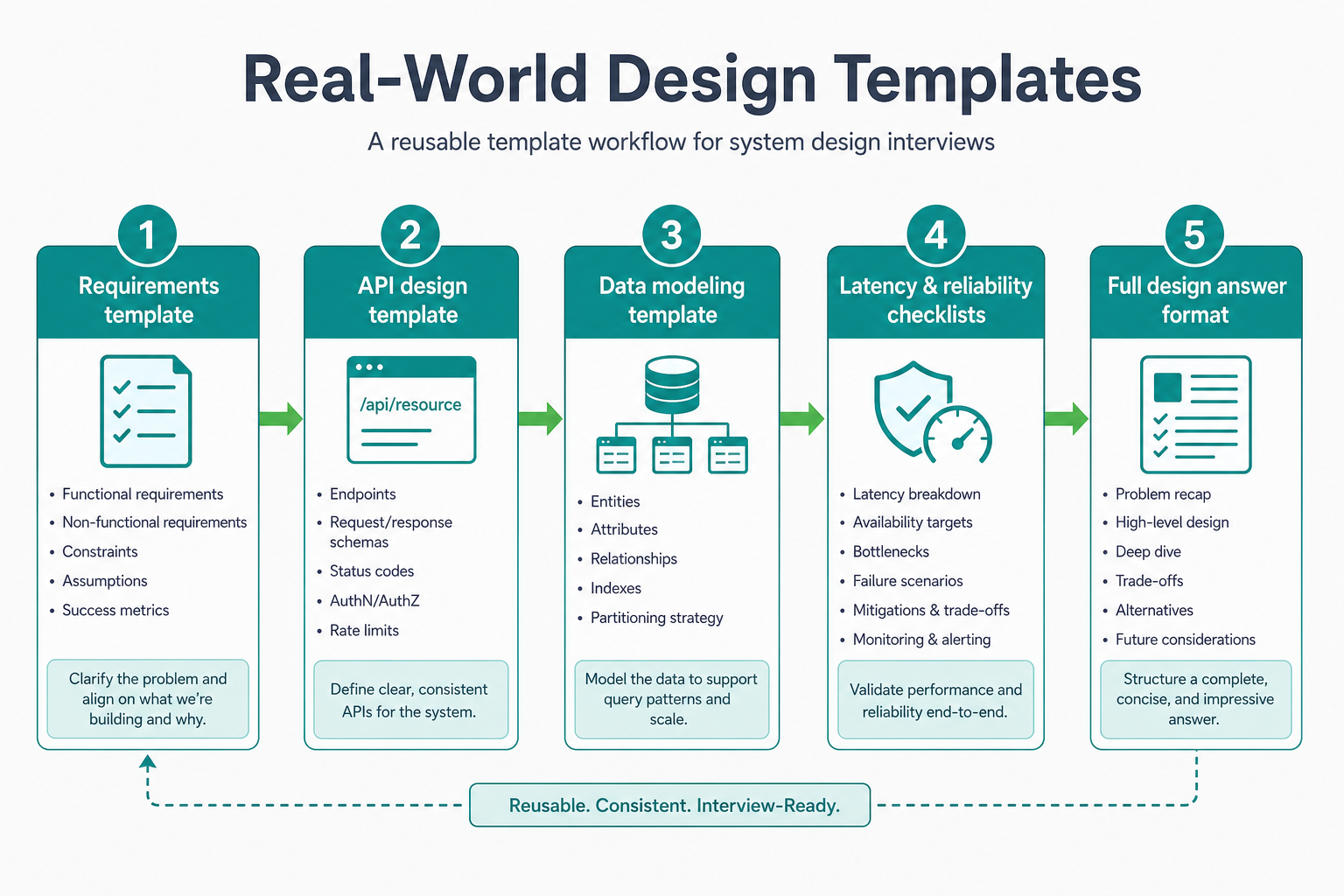
Use templates to cover every area systematically—then adapt or skip sections the problem does not need.
Why Templates Matter
When you're asked to design a system, templates provide:
- Structure: Know what to cover
- Speed: Don't waste time figuring out what to think about
- Completeness: Ensure you don't miss important areas
- Confidence: Have a framework to fall back on
Requirement Analysis Template
Template Structure
1. FUNCTIONAL REQUIREMENTS
   - Core features: [List]
   - Optional features: [List]
   - Out of scope: [List]

2. NON-FUNCTIONAL REQUIREMENTS
   - Scale: [Users, requests/day, data volume]
   - Performance: [Latency, throughput]
   - Availability: [Uptime %]
   - Consistency: [Strong/Eventual]
   - Durability: [Data loss tolerance]

3. CONSTRAINTS
   - Technical: [Technologies, infrastructure]
   - Business: [Budget, timeline]
   - Team: [Size, expertise]

4. ASSUMPTIONS
   - [List assumptions and validate]
Example: URL Shortener
Functional Requirements:
- Core: Create short URL, redirect to long URL
- Optional: Custom aliases, analytics, expiration
- Out of scope: User authentication, URL editing
Non-Functional Requirements:
- Scale: 100M URLs/day, 10B redirects/day
- Performance: Redirect < 10ms, Creation < 100ms
- Availability: 99.9% uptime
- Consistency: Eventual consistency acceptable
- Durability: No data loss
Constraints:
- Technical: Must use existing infrastructure
- Business: Launch in 3 months
- Team: 5 engineers
Assumptions:
- URLs don't expire (permanent)
- No user authentication needed
- Analytics optional for MVP
API Design Template
Template Structure
1. ENDPOINTS
   - [Method] [Path]: [Description]
   - Request: [Parameters, body]
   - Response: [Status codes, body]
   - Errors: [Error codes, messages]

2. AUTHENTICATION
   - [Method: API key, OAuth, JWT]
   - [Where: Header, query, body]

3. RATE LIMITING
   - [Limits per user/IP]
   - [Throttling strategy]

4. VERSIONING
   - [Strategy: URL, header]
   - [Backward compatibility]

5. DATA MODELS
   - [Request/Response schemas]
Example: URL Shortener API
Endpoints:
-
POST /api/v1/shorten: Create short URL- Request:
{ "longUrl": "https://example.com" } - Response:
{ "shortUrl": "https://short.ly/abc123" } - Errors: 400 (invalid URL), 429 (rate limit)
- Request:
-
GET /api/v1/:shortUrl: Redirect to long URL- Response: 302 redirect
- Errors: 404 (not found)
Authentication:
- API key in header:
X-API-Key: <key> - Optional for redirects (public)
Rate Limiting:
- 100 requests/minute per API key
- 1000 redirects/minute per IP
Versioning:
- URL-based:
/api/v1/,/api/v2/ - Backward compatible for 6 months
Data Models:
{
  "longUrl": "string (required, max 2048 chars)",
  "shortUrl": "string (generated, 7 chars)",
  "createdAt": "timestamp",
  "expiresAt": "timestamp (optional)"
}
Data Modeling Template
Template Structure
1. ENTITIES
   - [Entity name]: [Description]
     - Attributes: [List]
     - Relationships: [List]

2. STORAGE STRATEGY
   - [SQL/NoSQL choice and reasoning]
   - [Sharding strategy]
   - [Replication strategy]

3. INDEXING
   - [Primary keys]
   - [Secondary indexes]
   - [Composite indexes]

4. DATA ACCESS PATTERNS
   - [Read patterns: queries, frequency]
   - [Write patterns: inserts, updates, frequency]
Example: Social Media Feed
Entities:
- User: id, username, email, createdAt
- Relationships: follows many Users, has many Posts
- Post: id, userId, content, createdAt
- Relationships: belongs to User, has many Likes
- Feed: userId, postId, createdAt
- Relationships: belongs to User, belongs to Post
Storage Strategy:
- SQL (PostgreSQL): Users, Posts (structured data, complex queries)
- NoSQL (Cassandra): Feeds (high scale, simple queries)
- Sharding: By userId (hash-based)
- Replication: 3 replicas per shard
Indexing:
- Users: Primary key (id), Index (username, email)
- Posts: Primary key (id), Index (userId, createdAt)
- Feeds: Primary key (userId, createdAt), Index (postId)
Data Access Patterns:
- Read: Get feed by userId (high frequency, needs index on userId)
- Write: Insert post (medium frequency, needs index on userId, createdAt)
- Write: Insert feed entry (high frequency, needs index on userId, createdAt)
Latency Estimation Template
Template Structure
1. REQUEST FLOW
   - [Component] → [Component]: [Latency]
   - Total: [Sum]

2. BOTTLENECKS
   - [Component]: [Current latency, target latency]

3. OPTIMIZATION STRATEGIES
   - [Strategy]: [Expected improvement]

4. TARGET LATENCY
   - [p50, p95, p99]
Example: URL Redirect
Request Flow:
- Client → Load Balancer: 1ms
- Load Balancer → Redirect Service: 2ms
- Redirect Service → Cache (hit): 1ms
- Redirect Service → Database (miss): 50ms
- Redirect Service → Client: 2ms
- Total (cache hit): 6ms
- Total (cache miss): 55ms
Bottlenecks:
- Database query: 50ms (target: < 10ms with cache)
Optimization Strategies:
- Cache hot URLs: Reduce database queries by 80%
- Use CDN: Reduce network latency by 50%
- Database read replicas: Reduce database latency by 30%
Target Latency:
- p50: 5ms (cache hit)
- p95: 10ms (cache hit)
- p99: 50ms (cache miss, acceptable)
Reliability Checklist
Template Structure
1. SINGLE POINTS OF FAILURE
   - [Component]: [Risk, mitigation]

2. FAILURE SCENARIOS
   - [Scenario]: [Impact, handling]

3. MONITORING
   - [Metrics to track]
   - [Alerts to set up]

4. RECOVERY STRATEGIES
   - [Strategy]: [When to use]
Example: Notification System
Single Points of Failure:
- Database: Risk (all data), Mitigation (replication, backups)
- Queue: Risk (all messages), Mitigation (replication, persistence)
- Workers: Risk (processing stops), Mitigation (multiple workers, auto-restart)
Failure Scenarios:
- Database down: Impact (can't store notifications), Handling (queue messages, process when DB recovers)
- Queue full: Impact (can't accept new requests), Handling (reject requests, return error)
- Worker crash: Impact (messages not processed), Handling (another worker picks up)
Monitoring:
- Queue depth (alert if > 10K messages)
- Worker health (alert if workers down)
- Database connections (alert if > 80% capacity)
- Error rate (alert if > 1%)
Recovery Strategies:
- Database failure: Switch to read replica, restore from backup
- Queue failure: Use backup queue, replay messages
- Worker failure: Auto-restart, scale up workers
System Design Answer Format
Template Structure
1. REQUIREMENTS CLARIFICATION
   - [Questions asked, assumptions made]

2. HIGH-LEVEL ARCHITECTURE
   - [Diagram with components]
   - [Data flow description]

3. DETAILED DESIGN
   - [Component 1]: [Purpose, technology, scale]
   - [Component 2]: [Purpose, technology, scale]
   - ...

4. SCALE ESTIMATIONS
   - [Storage: size, growth]
   - [Throughput: requests/second]
   - [Bandwidth: data transfer]

5. TRADE-OFFS
   - [Decision]: [Pros, cons, reasoning]

6. FAILURE HANDLING
   - [Scenario]: [How system handles it]

7. FUTURE IMPROVEMENTS
   - [What to optimize next]
Example: URL Shortener
Requirements Clarification:
- Scale: 100M URLs/day, 10B redirects/day
- Latency: Redirect < 10ms, Creation < 100ms
- Availability: 99.9% uptime
- URLs don't expire
High-Level Architecture:
Client → Load Balancer → API/Redirect Service →
Cache (Redis) → Database (Cassandra) →
Message Queue → Analytics Service
Detailed Design:
- API Service: Handles URL creation (Node.js, 100 req/s per instance)
- Redirect Service: Handles redirects (Node.js, 10K req/s per instance)
- Cache: Redis for hot URLs (80% hit rate, 7-day TTL)
- Database: Cassandra for URL storage (sharded by hash, 3 replicas)
- Message Queue: Kafka for click events (10K events/s)
- Analytics Service: Processes click events (Python, async)
Scale Estimations:
- Storage: 100M URLs/day × 365 days = 36.5B URLs/year × 100 bytes = 3.65 TB/year
- Throughput: 10B redirects/day = 115K redirects/second
- Bandwidth: 115K req/s × 1KB = 115 MB/s
Trade-offs:
- NoSQL (Cassandra) over SQL: Chose for horizontal scaling, accepting eventual consistency
- Cache-aside over write-through: Chose for simplicity, accepting cache miss penalty
- Async analytics over sync: Chose for scalability, accepting delay
Failure Handling:
- Database failure: Redirect service falls back to cache (degraded mode)
- Cache failure: Redirect service falls back to database (slower but functional)
- Analytics failure: Events queued, processed when service recovers
Future Improvements:
- Add CDN for edge caching
- Implement URL expiration
- Add custom aliases
- Optimize database sharding strategy
Thinking Aloud Like a Senior Engineer
Let me walk you through how I'd actually use templates when designing a system. This is the real-time reasoning that happens when you're filling out a template.
Problem: "Design a URL shortener. Use the requirement analysis template."
My first instinct: "I'll just fill in the template quickly. Scale: high. Performance: fast. Done!"
But wait—that's not helpful. Let me actually think through each section systematically.
Step 1: Functional Requirements
My first thought: "Core features: create short URL, redirect. That's it, right?"
But let me think deeper: "What about custom aliases? Analytics? Expiration? These might be optional, but I should list them."
I'm filling in:
- Core: Create short URL, redirect to long URL
- Optional: Custom aliases, analytics, expiration
- Out of scope: User authentication, URL editing (for MVP)
Step 2: Non-Functional Requirements
My first instinct: "Scale: high. Performance: fast. Availability: high."
But that's vague: "I need numbers. Let me think about actual requirements."
I'm quantifying:
- Scale: 100M URLs/day, 10B redirects/day
- Performance: Redirect < 10ms (p99), Creation < 100ms (p99)
- Availability: 99.9% uptime
- Consistency: Eventual consistency acceptable (redirects don't need strong consistency)
- Durability: No data loss (URLs must persist)
Step 3: Constraints
My first thought: "No constraints, I can use anything!"
But that's not realistic: "Let me think about actual constraints."
I'm listing:
- Technical: Must use existing infrastructure (AWS)
- Business: Launch in 3 months
- Team: 5 engineers
- Budget: Limited (startup)
Step 4: Assumptions
My first instinct: "No assumptions, I know everything!"
But that's wrong: "I'm making assumptions. I should list them explicitly."
I'm listing:
- URLs don't expire (permanent)
- No user authentication needed (public service)
- Analytics optional for MVP
- 80% of redirects are for URLs created in last 7 days (cache strategy)
Now, let me use the API design template:
My first thought: "I'll just list endpoints. POST /shorten, GET /:shortUrl. Done!"
But the template asks for more: "Authentication, rate limiting, versioning, data models."
I'm thinking through each:
- Endpoints: POST /api/v1/shorten, GET /:shortUrl
- Authentication: API key for creation, public for redirects
- Rate limiting: 100 requests/minute per API key, 1000 redirects/minute per IP
- Versioning: URL-based (/api/v1/), backward compatible for 6 months
- Data models: Need to define request/response schemas
This is how I use templates: I don't just fill them in quickly. I think through each section, quantify everything, and make assumptions explicit.
What if a template doesn't fit? "Let's say I'm designing a real-time system. The latency estimation template might not cover WebSocket connection management."
I'm adapting: "I'll add a section for connection management, modify the latency section for real-time flows, and customize to my needs."
This is the key: Templates are starting points, not rigid rules. I customize them to my problem.
Notice how I didn't just fill in the template blindly. I thought through each section, quantified requirements, listed constraints, and made assumptions explicit. That's how templates become useful.
How a Senior Engineer Uses Templates
A senior engineer:
- Customizes templates: Adapts to specific problem
- Fills in systematically: Doesn't skip sections
- Quantifies everything: Uses numbers, not vague statements
- Validates assumptions: States and validates assumptions
- Iterates: Refines template based on feedback
Best Practices
- Use templates as starting point: Don't follow blindly, adapt to problem
- Fill in systematically: Cover all sections
- Quantify everything: Use numbers, not vague statements
- Validate assumptions: State and validate assumptions
- Iterate: Refine template based on feedback
- Practice: Use templates in practice problems
Common Interview Questions
Beginner
Q: What are design templates and why are they useful?
A: Design templates are reusable thinking models that provide structure, speed, completeness, and confidence when designing systems. They help you avoid blank-page syndrome and ensure you cover all important areas.
Intermediate
Q: How do you use the requirement analysis template?
A: I fill in systematically:
- Functional requirements (core, optional, out of scope)
- Non-functional requirements (scale, performance, availability)
- Constraints (technical, business, team)
- Assumptions (list and validate)
I quantify everything (use numbers, not vague statements) and validate assumptions with the interviewer.
Senior
Q: You're designing a system. Walk me through your process using templates.
A: I use templates systematically:
- Requirement Analysis: Clarify functional/non-functional requirements, constraints, assumptions
- API Design: Define endpoints, authentication, rate limiting, data models
- Data Modeling: Identify entities, storage strategy, indexing, access patterns
- Latency Estimation: Map request flow, identify bottlenecks, optimize
- Reliability Checklist: Identify single points of failure, failure scenarios, monitoring, recovery
- System Design Answer: Present high-level architecture, detailed design, scale estimations, trade-offs, failure handling, future improvements
I customize templates to the specific problem and quantify everything.
Summary
Design templates turn blank-page panic into structured reasoning: requirement analysis for scope and numbers, API and data templates for interfaces and storage, latency and reliability checklists for NFRs and failure modes, and a full answer format for presenting the design end-to-end. Use them as starting points—customize sections, quantify everything, state assumptions aloud, and iterate when the interviewer corrects you.
Key Takeaways
- Templates beat memorization — Structure what to think about; they do not dictate which database you pick.
- Requirement analysis first — Functional, non-functional, constraints, and assumptions in one pass prevents skipped scale questions.
- Quantify every section — Replace "high scale" and "low latency" with users, RPS, and p99 targets before Step 5.
- Adapt, do not obey — Real-time systems may need extra connection-management sections; skip API template sections when there is no public API.
- Reliability checklist is senior signal — Single points of failure, failure scenarios, monitoring, and recovery belong in the first sketch.
- Chain templates to the 7-step framework — Each template maps to a step; together they are a complete interview playbook.
- Practice fills templates faster — After 5–10 timed runs, sections become automatic and you spend time on trade-offs instead of "what do I write next?"
Apply This Thinking
Fill templates on real practice prompts:
- Design a URL Shortener — Run requirement analysis + API + latency templates end-to-end.
- Design Pastebin — Smaller scope; practice reliability checklist without over-templating.
- Design a Notification System — Queue, workers, and delivery status map cleanly to data + reliability templates.
- The 7-Step Problem-Solving Framework — Process layer that tells you when to use each template in the interview.
- API Design — Topic depth when your API template surfaces auth, versioning, and rate-limit questions.
Related Topics
- Structured Problem-Solving Framework: The 7-Step Approach — step order that templates plug into.
- Communication & Interview Strategy — present each filled template section aloud without monologuing.
- Ambiguity Handling & Problem Framing — clarify before you fill the requirement analysis template.
- Architecture Thinking — after templates, decompose into components and boundaries at HLD depth.
- Non-Functional Requirements Deep Dive — deepen the NFR sections of your requirement template.
FAQs
Q: Should I memorize templates?
A: Not exactly. Understand the structure and concepts, then adapt to specific problems. Memorization helps with speed, but understanding helps with flexibility.
Q: Can I use templates in real work?
A: Yes. Templates are useful in real work for:
- Design reviews
- Architecture discussions
- Documentation
- Onboarding new team members
Q: What if a template doesn't fit my problem?
A: Adapt it. Templates are starting points, not rigid rules. Customize to your specific problem.
Q: How do I practice with templates?
A:
- Use templates in practice problems
- Review real-world systems and fill in templates
- Get feedback from peers or mentors
- Iterate and refine based on feedback
Q: Are templates the same as frameworks?
A: Similar but different. Templates provide structure (what to think about), while frameworks provide process (how to think). Use both together.
Q: How do I know if I'm using templates correctly?
A: You're using templates correctly if:
- You cover all important areas
- You don't miss critical components
- You can explain your design clearly
- You make trade-offs explicit
Q: How are design templates different from the 7-step framework?
A: The framework is process—the order you work through a problem (clarify → constrain → sketch → trade off → summarize). Templates are structure—fill-in sections for requirements, APIs, data, latency, and reliability. Use the framework to decide when to open each template.
Q: Can I create my own templates?
A: Yes. Start with existing templates, then customize based on your experience and needs. Your own templates will be more useful than generic ones.
Keep exploring
Design thinking works best when combined with practice. Explore more topics or apply what you've learned in our system design practice platform.