Networking Topic
HTTP/1.1 vs HTTP/2 vs HTTP/3
Compare HTTP versions: HTTP/1.1 (persistent connections), HTTP/2 (multiplexing, header compression), and HTTP/3 (QUIC, UDP-based).
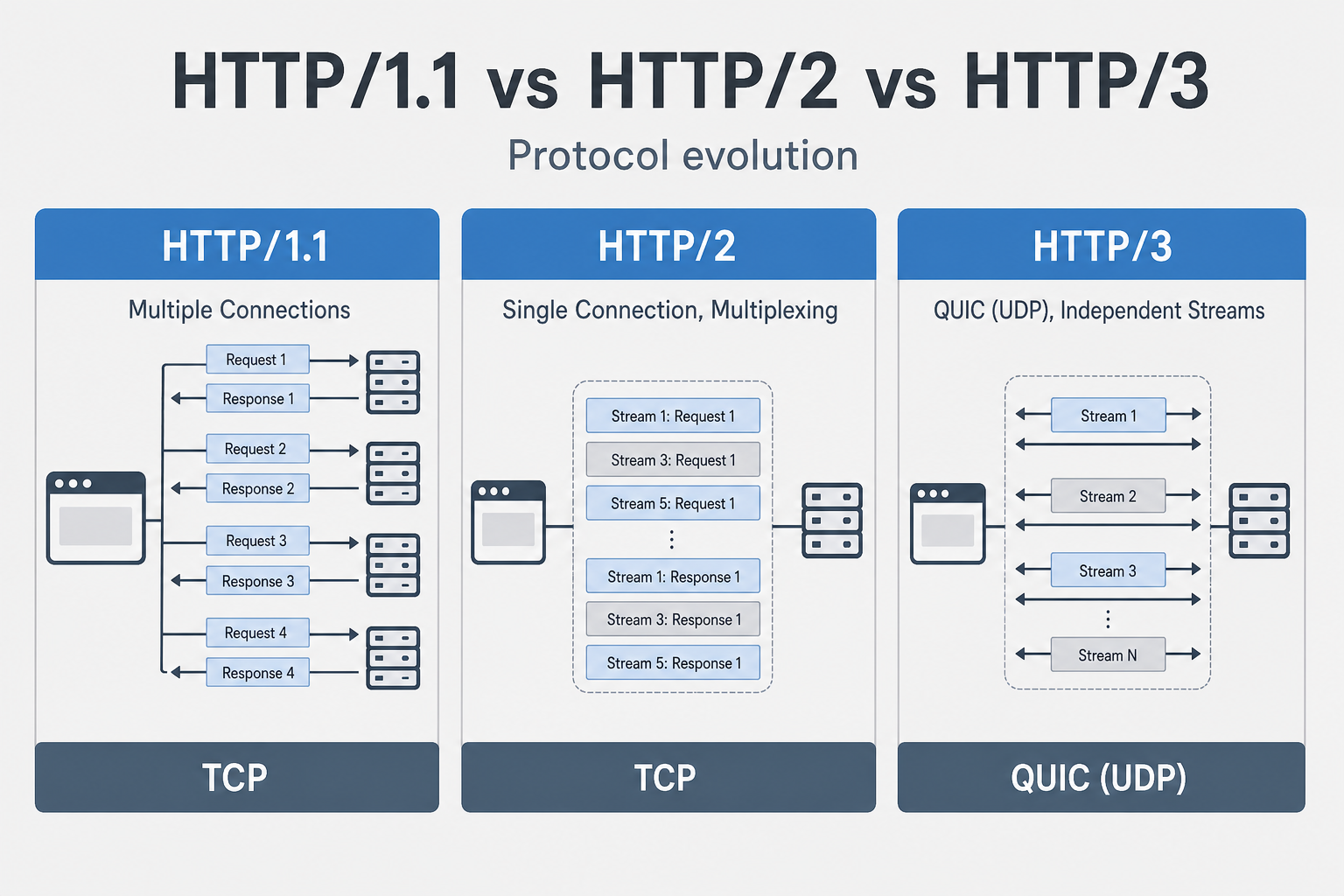
HTTP/1.1 vs HTTP/2 vs HTTP/3
Why This Matters
Think of HTTP versions like different types of highways. HTTP/1.1 is like a single-lane road where each car (request) needs its own lane. HTTP/2 is like a multi-lane highway where multiple cars can share lanes, but if one car breaks down, it can still block traffic. HTTP/3 is like a smart highway where each lane is independent—if one car has problems, others keep moving.
This matters because the HTTP version you use affects how your application performs under load. HTTP/1.1 requires multiple connections for parallelism, which wastes resources. HTTP/2 fixes this with multiplexing, but still suffers from TCP head-of-line blocking. HTTP/3 eliminates that blocking entirely by using QUIC over UDP.
In interviews, when someone asks "How would you optimize a web application for performance?", they're testing whether you understand these protocol differences. Do you know why HTTP/2 is faster than HTTP/1.1? Do you understand when HTTP/3 makes sense? Most engineers don't. They just enable HTTP/2 and assume it's always better.
If client vs server roles are still fuzzy, start with Client-Server Architecture — HTTP versions only describe how messages move once you know who sends them.
What Engineers Usually Get Wrong
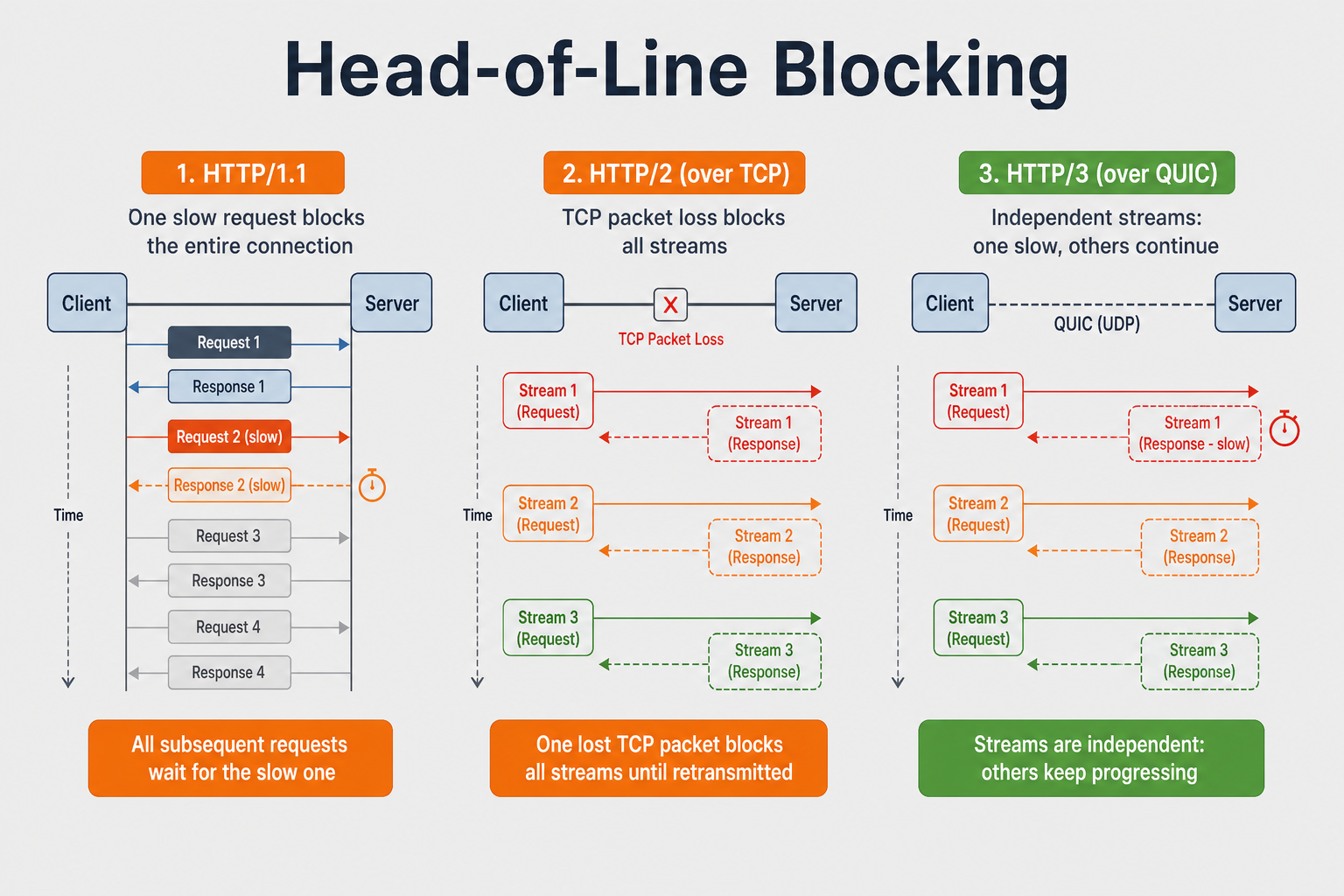
Most engineers think "HTTP/2 is always better than HTTP/1.1." But HTTP/2 still uses TCP, which means it still has head-of-line blocking at the TCP level. If one packet is lost, TCP waits for retransmission, blocking all streams on that connection. HTTP/3 fixes this by using QUIC over UDP, where each stream is independent.
Engineers also think "HTTP/3 is always faster." But HTTP/3 requires QUIC support, and UDP might be blocked by firewalls. Also, HTTP/3 is newer and has less widespread support. The performance gains depend on network conditions—on stable networks, HTTP/2 might be sufficient.
How This Breaks Systems in the Real World
A web application was serving a dashboard with 50 resources (CSS, JS, images). It was using HTTP/1.1, so the browser opened 6 connections and loaded resources sequentially. Page load time was 5 seconds. The team upgraded to HTTP/2, expecting instant improvement. But they didn't see much improvement. Investigation showed that HTTP/2 was working, but the server was still sending resources one at a time instead of using server push. Also, they were still using HTTP/1.1 optimizations like domain sharding, which actually hurt HTTP/2 performance.
The fix? Remove domain sharding, enable server push for critical resources, and optimize for HTTP/2's multiplexing. But the real lesson is: upgrading protocols isn't enough—you need to optimize for the protocol you're using.
Another story: A mobile app was using HTTP/2 for API calls. Users on unstable networks (switching between WiFi and cellular) experienced frequent connection drops. Each drop required a new TCP handshake (3 round trips) plus TLS handshake (2 round trips) = 5 round trips before the app could make requests again. The fix? Use HTTP/3, which has connection migration—if the IP changes, the connection survives. This reduced connection setup time from 5 round trips to 0-1 round trips.
HTTP/1.1
Released: 1997 Transport: TCP Key Features: Persistent connections, pipelining (limited)
Characteristics
- One request per connection (without pipelining)
- Text-based protocol: Human-readable headers
- No header compression: Headers sent in full
- Head-of-line blocking: One slow request blocks others
- Multiple connections: Browsers open 6-8 connections per domain
Limitations
Connection 1: Request 1 → Response 1
Connection 2: Request 2 → Response 2
Connection 3: Request 3 → Response 3
...
Connection 6: Request 6 → Response 6

Problem: Need multiple TCP connections for parallelism
Head-of-line blocking:
Request 1 (slow) → Blocks Request 2, 3, 4...
HTTP/2
Released: 2015 Transport: TCP Key Features: Multiplexing, header compression, server push
Key Improvements
- Multiplexing: Multiple requests over single connection
- Header Compression (HPACK): Compress headers
- Binary Protocol: More efficient than text
- Server Push: Server can push resources proactively
- Stream Prioritization: Prioritize important resources
Multiplexing
HTTP/2 interleaves many requests and responses on one TCP connection instead of opening six parallel connections like HTTP/1.1.
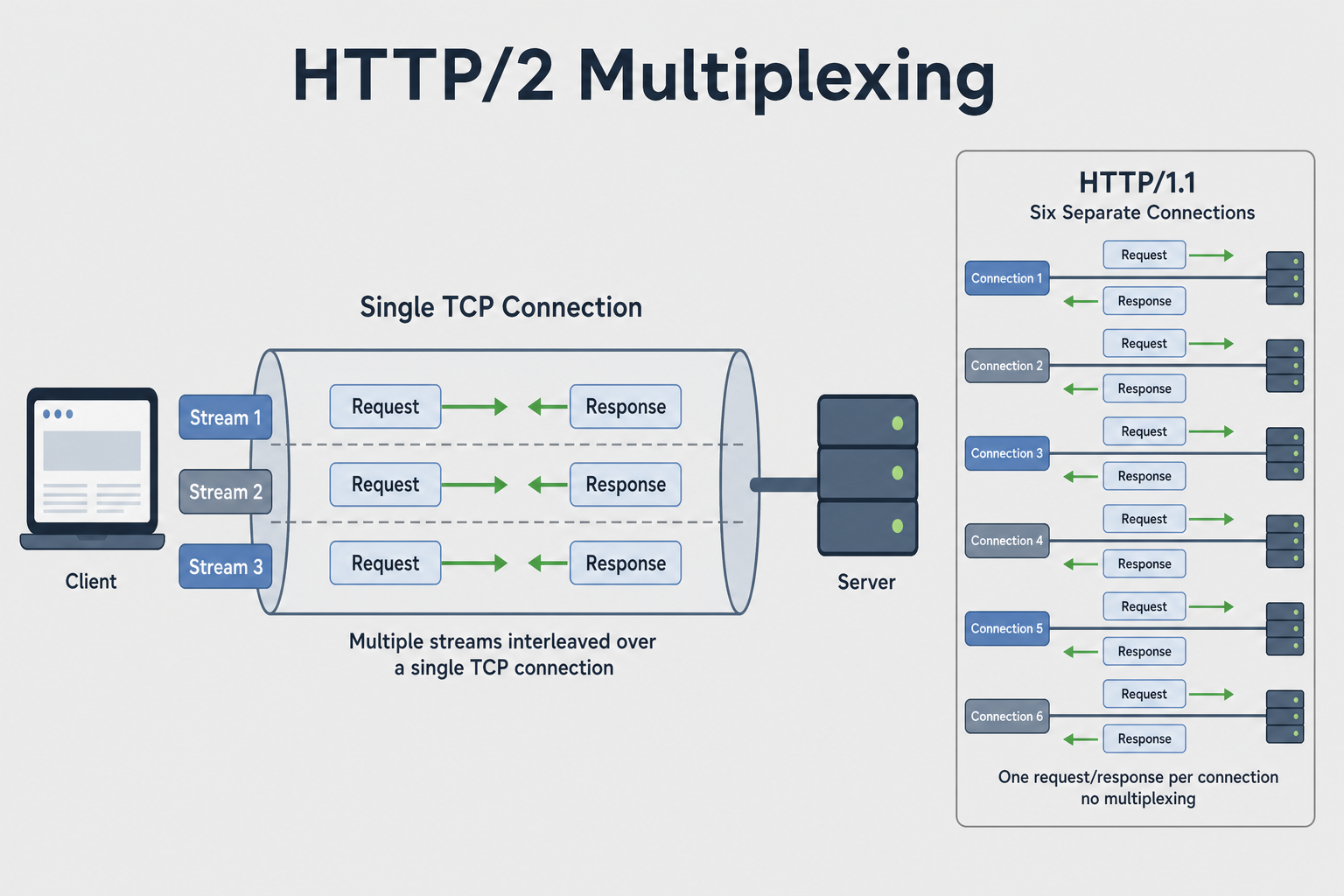
Single TCP Connection:
  Stream 1: Request 1 → Response 1
  Stream 2: Request 2 → Response 2
  Stream 3: Request 3 → Response 3
  Stream 4: Request 4 → Response 4

All streams multiplexed over one connection
Benefits:
- Fewer TCP connections
- Better resource utilization
- Reduced latency
Header Compression (HPACK)
HTTP/1.1:
  GET /api/users HTTP/1.1
  Host: example.com
  User-Agent: Mozilla/5.0...
  Accept: application/json
  Cookie: session=abc123...
  (Headers sent in full every time)

HTTP/2:
  (Headers compressed using HPACK)
  (Static table + dynamic table)
  (Much smaller header size)
Limitations
- Still uses TCP: Head-of-line blocking at TCP level
- TCP handshake: Still requires 3-way handshake
- TCP congestion control: Can cause delays
HTTP/3
Released: 2022 Transport: QUIC (UDP-based) Key Features: QUIC protocol, connection migration, improved multiplexing
Key Improvements
- QUIC Protocol: UDP-based, eliminates TCP head-of-line blocking
- Built-in encryption: TLS 1.3 integrated
- Connection migration: Survives IP changes
- Faster handshake: 0-RTT or 1-RTT (vs 2-RTT for TCP+TLS)
- Independent streams: Stream blocking doesn't affect others
QUIC Protocol
HTTP/3 over QUIC (UDP):
  - Multiple streams over single QUIC connection
  - Each stream independent (no head-of-line blocking)
  - Built-in encryption (TLS 1.3)
  - Connection migration (survives IP changes)
Benefits:
- No TCP head-of-line blocking: Streams are independent
- Faster connection: 0-RTT or 1-RTT handshake
- Better mobile: Handles network changes better
Head-of-line blocking is the main reason HTTP/3 exists — the diagram below shows where each version still stalls when one request or packet slows down:
Comparison
The three versions differ in transport, parallelism, and where blocking can still happen:
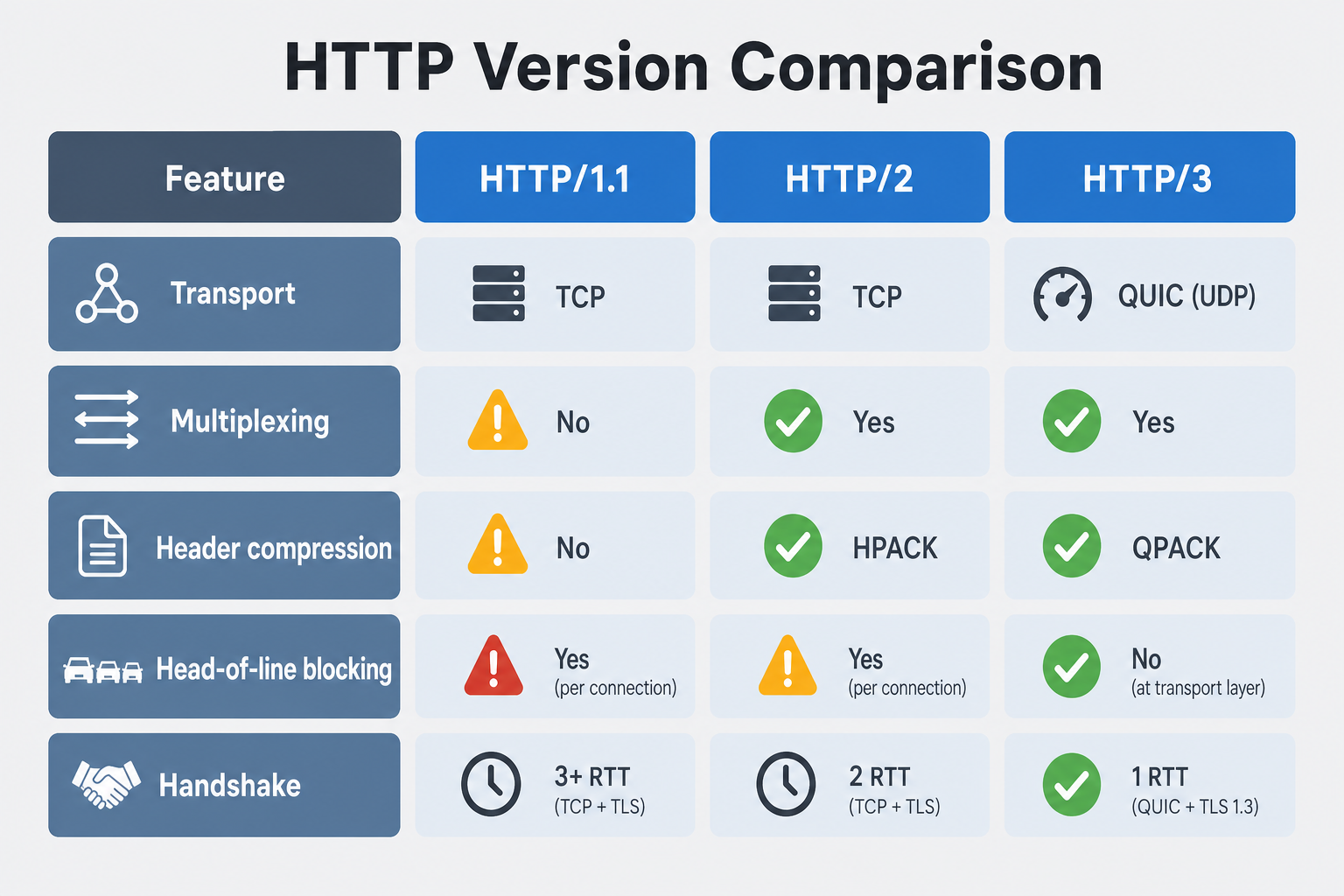
| Feature | HTTP/1.1 | HTTP/2 | HTTP/3 |
|---|---|---|---|
| Transport | TCP | TCP | QUIC (UDP) |
| Multiplexing | No (needs multiple connections) | Yes (single connection) | Yes (single connection) |
| Header Compression | No | Yes (HPACK) | Yes (QPACK) |
| Head-of-line Blocking | Yes (application level) | Yes (TCP level) | No (streams independent) |
| Server Push | No | Yes | No (replaced by Early Hints) |
| Encryption | Optional (HTTPS) | Optional (HTTPS) | Required (built-in) |
| Connection Migration | No | No | Yes |
| Handshake | TCP (3-RTT) + TLS (2-RTT) = 5-RTT | TCP (3-RTT) + TLS (2-RTT) = 5-RTT | QUIC (0-RTT or 1-RTT) |
Examples
HTTP/1.1 Request
GET /api/users HTTP/1.1
Host: example.com
User-Agent: Mozilla/5.0 (Windows NT 10.0; Win64; x64)
Accept: application/json
Accept-Language: en-US,en;q=0.9
Cookie: session=abc123; theme=dark
Connection: keep-alive
Characteristics:
- Text-based, human-readable
- Headers sent in full
- One request per connection (without pipelining)
HTTP/2 Request (Binary)
HTTP/2 uses binary frames:

HEADERS Frame:
  Stream ID: 1
  Flags: END_HEADERS
  Headers: (compressed with HPACK)
    :method: GET
    :path: /api/users
    :scheme: https
    :authority: example.com
    user-agent: Mozilla/5.0...
    accept: application/json
Characteristics:
- Binary protocol (more efficient)
- Headers compressed (HPACK)
- Multiple streams over single connection
HTTP/3 Request (QUIC)
HTTP/3 over QUIC:

QUIC Packet:
  Connection ID: 0x1234
  Stream ID: 1
  Data: (HTTP/3 request)
    :method: GET
    :path: /api/users
    :scheme: https
    :authority: example.com

Encrypted with TLS 1.3 (built-in)
Characteristics:
- UDP-based (QUIC)
- Built-in encryption
- Independent streams
Performance Comparison
1
Migration Strategy
HTTP/1.1 → HTTP/2
Benefits:
- Multiplexing (single connection)
- Header compression
- Server push (optional)
Considerations:
- Requires HTTPS (most browsers)
- Server must support HTTP/2
- Still has TCP head-of-line blocking
HTTP/2 → HTTP/3
Benefits:
- No TCP head-of-line blocking
- Faster handshake (0-RTT or 1-RTT)
- Better mobile performance
- Connection migration
Considerations:
- Requires QUIC support
- UDP may be blocked by some firewalls
- Newer protocol (less widespread support)
Common Pitfalls
- Not using HTTPS: HTTP/2 requires HTTPS in most browsers. Fix: Always use HTTPS
- Ignoring HTTP/2 server push: Not utilizing server push. Fix: Use server push for critical resources
- Not optimizing for HTTP/2: Still using HTTP/1.1 optimizations (domain sharding). Fix: Remove unnecessary optimizations
- Firewall blocking UDP: HTTP/3 uses UDP, may be blocked. Fix: Ensure UDP port 443 is open
- Not monitoring performance: Not measuring actual improvements. Fix: Monitor metrics, A/B test
- Assuming HTTP/3 is always faster: Depends on network conditions. Fix: Test in your environment
Interview Questions
Beginner
Q: What are the main differences between HTTP/1.1, HTTP/2, and HTTP/3?
A:
HTTP/1.1 (1997):
- Transport: TCP
- Multiplexing: No (needs multiple connections)
- Header compression: No
- Limitations: Head-of-line blocking, text-based protocol
HTTP/2 (2015):
- Transport: TCP
- Multiplexing: Yes (single connection, multiple streams)
- Header compression: Yes (HPACK)
- Improvements: Binary protocol, server push, stream prioritization
- Limitation: Still has TCP head-of-line blocking
HTTP/3 (2022):
- Transport: QUIC (UDP-based)
- Multiplexing: Yes (single connection, independent streams)
- Header compression: Yes (QPACK)
- Improvements: No TCP blocking, built-in encryption, connection migration
- Benefits: Faster handshake, better mobile performance
Key Differences:
- HTTP/1.1: Multiple connections, text-based
- HTTP/2: Single connection, multiplexing, binary
- HTTP/3: QUIC, UDP-based, no TCP blocking
Intermediate
Q: Explain how HTTP/2 multiplexing works and why it's better than HTTP/1.1.
A:
HTTP/1.1 Problem:
Connection 1: Request 1 → (wait) → Response 1
Connection 2: Request 2 → (wait) → Response 2
Connection 3: Request 3 → (wait) → Response 3
...
Connection 6: Request 6 → (wait) → Response 6

Issues:
- Need 6 TCP connections
- Each connection has overhead
- Head-of-line blocking (slow request blocks connection)
HTTP/2 Solution:
Single TCP Connection:
  Stream 1: Request 1 → Response 1
  Stream 2: Request 2 → Response 2
  Stream 3: Request 3 → Response 3
  Stream 4: Request 4 → Response 4
  Stream 5: Request 5 → Response 5
  Stream 6: Request 6 → Response 6

All streams multiplexed over one connection
How it works:
- Single TCP connection: All requests use one connection
- Streams: Each request/response is a stream with unique ID
- Frames: Data sent in binary frames (HEADERS, DATA, etc.)
- Interleaving: Frames from different streams interleaved
- Reassembly: Receiver reassembles frames by stream ID
Benefits:
- Fewer connections: One connection vs multiple
- Better resource utilization: Single connection more efficient
- Reduced latency: No connection establishment overhead
- Header compression: HPACK reduces header size
Example:
HTTP/1.1: 6 connections × 3-way handshake = 18 packets
HTTP/2:   1 connection × 3-way handshake = 3 packets
Senior
Q: Design a web application that supports HTTP/1.1, HTTP/2, and HTTP/3. How do you handle protocol negotiation, fallback, and optimize for each version?
A:
1
Features:
- Protocol negotiation: ALPN for automatic selection
- Fallback strategy: HTTP/3 → HTTP/2 → HTTP/1.1
- Optimization per version: Different strategies for each
- Server push: HTTP/2 server push for critical resources
- Monitoring: Track performance per protocol
- Graceful degradation: Fallback to older versions
Failure Stories You'll Recognize
The HTTP/2 Upgrade That Didn't Help: A team upgraded from HTTP/1.1 to HTTP/2 expecting instant performance improvements. They didn't see much improvement. Investigation showed they were still using HTTP/1.1 optimizations like domain sharding (splitting resources across multiple domains). Domain sharding actually hurts HTTP/2 because it prevents multiplexing across domains. The fix? Remove domain sharding and optimize for HTTP/2's single-connection multiplexing.
The Mobile Connection Drops: A mobile app was using HTTP/2. Users switching between WiFi and cellular experienced frequent connection drops. Each drop required a full TCP + TLS handshake (5 round trips). This made the app feel slow and unresponsive. The fix? Use HTTP/3, which has connection migration—the connection survives IP changes, reducing setup time to 0-1 round trips.
The UDP Firewall Block: A team tried to enable HTTP/3, but users behind corporate firewalls couldn't connect. The firewalls were blocking UDP traffic. HTTP/3 uses UDP, so it was blocked. The fix? Fallback to HTTP/2 for users behind restrictive firewalls, and work with network administrators to allow UDP on port 443.
What Interviewers Are Really Testing
They want to hear you talk about protocol trade-offs, not just "use HTTP/2." Junior engineers say "HTTP/2 is faster." Senior engineers say "HTTP/2 fixes HTTP/1.1's multiplexing problem, but still has TCP blocking. HTTP/3 fixes that with QUIC, but requires UDP support. Choose based on your use case."
When they ask "How would you optimize a web application?", they're testing:
- Do you understand the differences between HTTP versions?
- Do you know when to use each version?
- Can you optimize for the protocol you're using?
Key Takeaways
HTTP/1.1: Multiple connections, text-based, no multiplexing, head-of-line blocking
HTTP/2: Single connection, multiplexing, header compression, binary protocol, still has TCP blocking
HTTP/3: QUIC (UDP), independent streams, no TCP blocking, built-in encryption, connection migration
Multiplexing: HTTP/2 allows multiple requests over single connection
Header compression: HPACK (HTTP/2), QPACK (HTTP/3) reduce header size
Protocol negotiation: ALPN for automatic protocol selection
Migration strategy: Support multiple versions, fallback gracefully
Best practices: Use HTTPS, optimize for each version, monitor performance
Related Topics
Client-Server Architecture
Foundational request/response model before comparing how HTTP versions carry messages
TCP vs UDP
HTTP/1.1 and HTTP/2 use TCP, while HTTP/3 uses UDP via QUIC, understanding the transport layer explains protocol differences
QUIC Protocol
HTTP/3 is built on QUIC, understanding QUIC explains HTTP/3's advantages over HTTP/2
Three-Way Handshake (TCP)
HTTP/1.1 and HTTP/2 require TCP handshakes, understanding handshake overhead explains HTTP/2 connection reuse benefits
TLS/SSL Handshake
HTTPS requires TLS handshakes, understanding TLS helps explain HTTP/2 and HTTP/3 security features
What's next?
Keep exploring
Protocols make more sense in sequence. Pick the next topic in the hub when a concept still feels fuzzy.