Networking Topic
Load Balancers (L4 vs L7)
Compare Layer 4 (transport) and Layer 7 (application) load balancers, their use cases, and when to use each type.
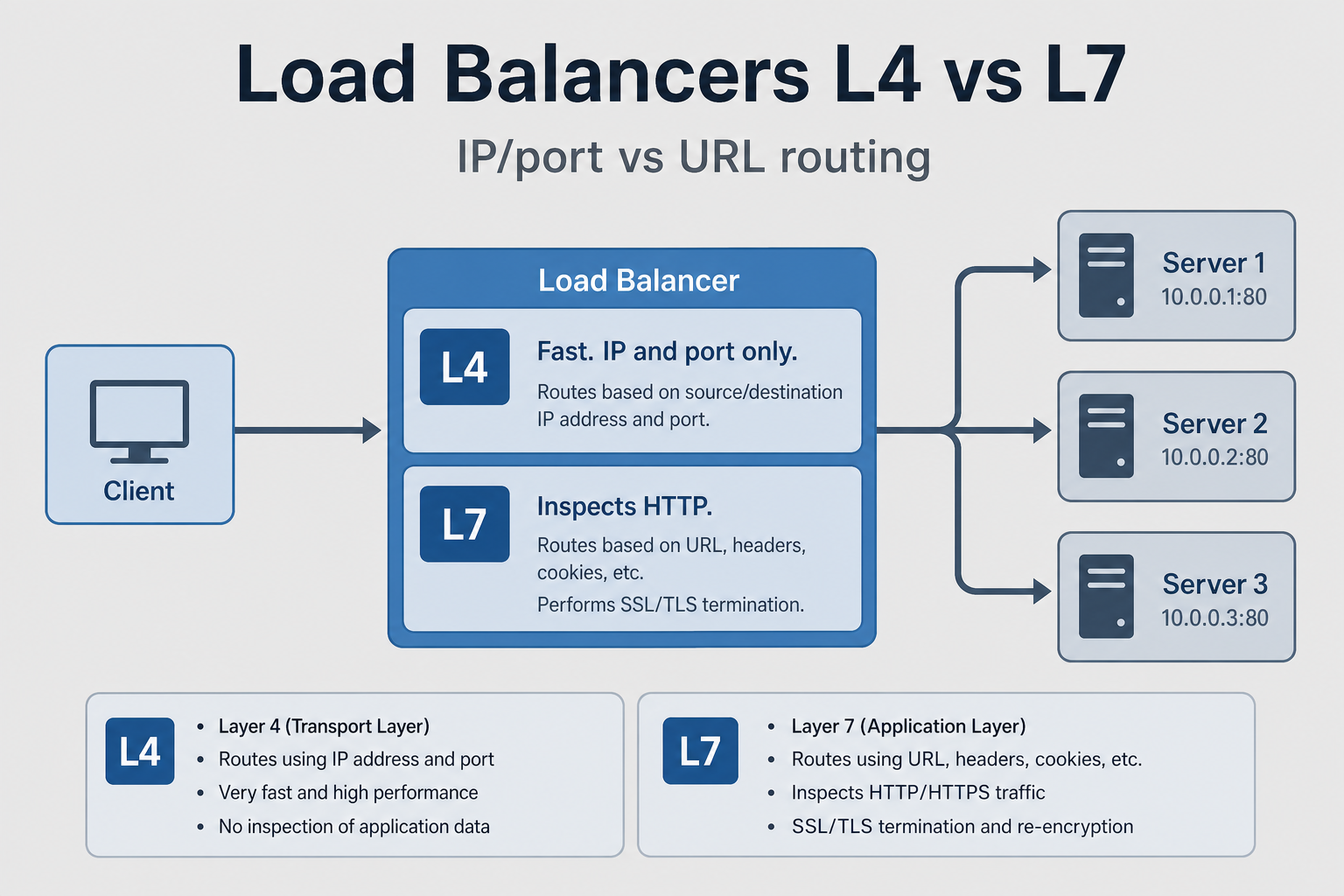
Load Balancers (L4 vs L7)
Why This Matters
Think of load balancers like a receptionist at a busy office. L4 load balancers are like a receptionist who only looks at which department you're going to (IP and port) and routes you there. L7 load balancers are like a receptionist who reads your request form (HTTP headers, content) and routes you based on what you actually need.
This matters because the choice between L4 and L7 affects performance, features, and complexity. L4 load balancers are faster (they don't inspect application data) but less flexible. L7 load balancers are slower (they inspect HTTP) but more flexible (can route based on URL, headers, cookies). Understanding this helps you choose the right load balancer for your use case.
In interviews, when someone asks "How would you design a scalable system?", they're testing whether you understand load balancing. Do you know when to use L4 vs L7? Do you understand the trade-offs? Most engineers don't. They just use L7 and wonder why it's slow.
Load balancers scale the server side when many clients hit one hostname — pair this with Client-Server Architecture for the full picture from phone to backend.
What Engineers Usually Get Wrong
Most engineers think "L7 is always better because it's more flexible." But L7 load balancers have overhead—they must parse HTTP, inspect headers, and make routing decisions. For high-throughput systems, this overhead can be significant. L4 load balancers are faster because they only look at IP and port.
Engineers also don't understand that L4 load balancers can't do content-based routing. If you need to route based on URL path, headers, or cookies, you need L7. But if you just need to distribute traffic across servers, L4 is simpler and faster.
How This Breaks Systems in the Real World
A service was using an L7 load balancer for all traffic. The load balancer was inspecting every HTTP request, parsing headers, and making routing decisions. Under normal load, this worked. But during high traffic, the load balancer became a bottleneck. It couldn't process requests fast enough. Response times spiked. The service became unusable.
The fix? Use L4 load balancer for simple traffic distribution, and L7 only when you need content-based routing. This reduced load balancer overhead and improved performance. But the real lesson is: L7 has overhead. Use it only when you need its features.
Another story: A service was using an L4 load balancer, but needed to route based on URL path (e.g., /api/users to one server, /api/orders to another). L4 can't do this—it only looks at IP and port. The service had to use L7 instead. But they didn't optimize the L7 configuration, and it became slow. The fix? Optimize L7 configuration (connection pooling, caching, etc.) to reduce overhead.
Layer 4 (L4) Load Balancer
Operates at: Transport Layer (TCP/UDP) Makes decisions based on: IP addresses and ports Does NOT inspect: Application data (HTTP headers, content)
How L4 Load Balancing Works
Client Request: TCP connection to 203.0.113.1:80
                ↓
L4 Load Balancer: Sees only IP and port
  - Source IP: 192.168.1.100
  - Source Port: 5000
  - Dest IP: 203.0.113.1
  - Dest Port: 80
                ↓
L4 Load Balancer: Routes based on algorithm
  - Round robin, least connections, etc.
                ↓
Backend Server: Receives connection
  - Server 1, 2, or 3
Characteristics:
- Fast: Minimal processing overhead
- Simple: Only looks at IP and port
- Transparent: Backend servers see original client IP
- Protocol agnostic: Works with any TCP/UDP protocol
Layer 7 (L7) Load Balancer
Operates at: Application Layer (HTTP/HTTPS) Makes decisions based on: HTTP headers, URLs, cookies, content Inspects: Full HTTP request
How L7 Load Balancing Works
L7 can send /api/users to one service and /api/orders to another because it reads the HTTP request, not just the TCP socket:
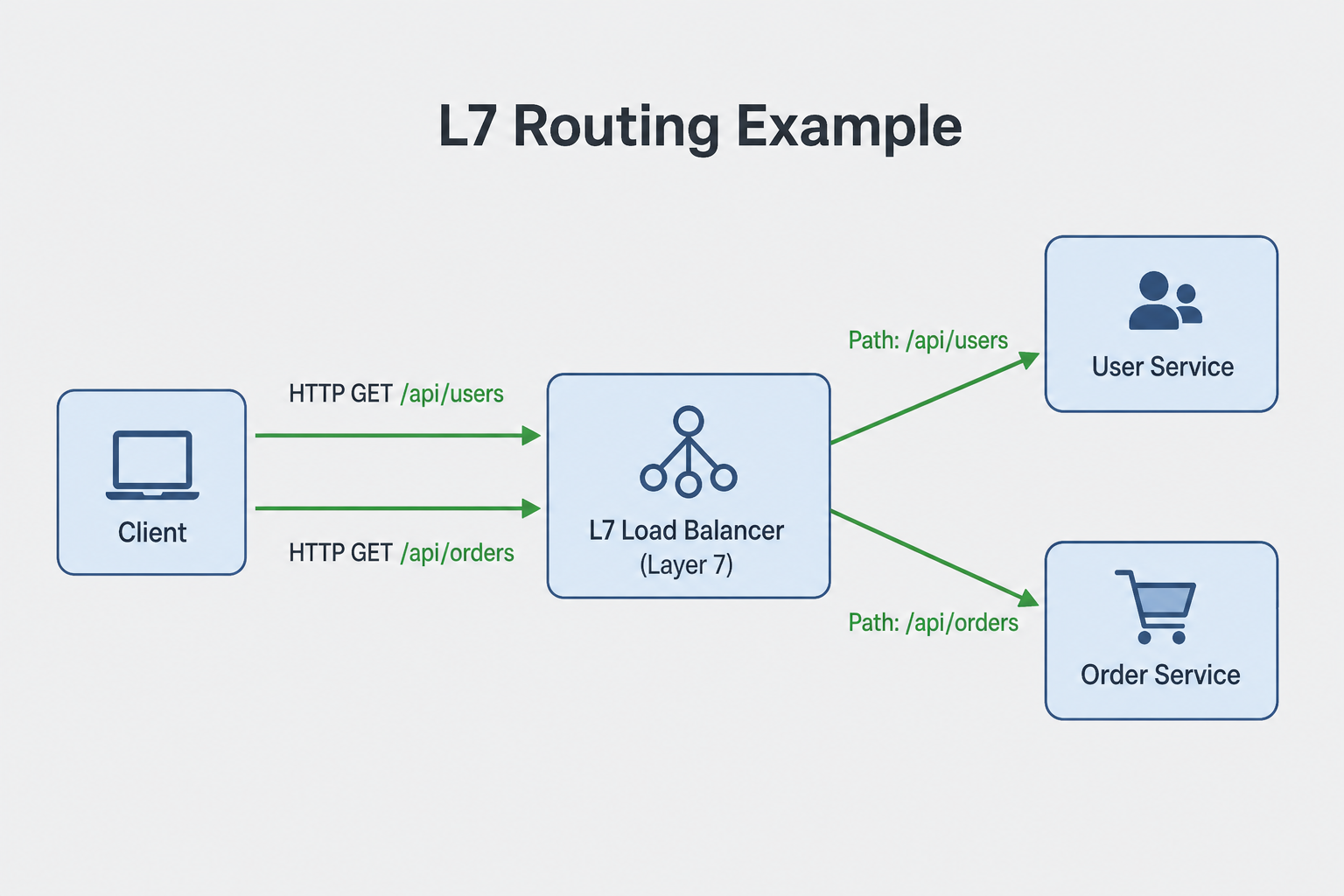
Client Request: HTTP GET /api/users
                ↓
L7 Load Balancer: Inspects HTTP request
  - URL: /api/users
  - Host header: api.example.com
  - Cookie: session_id=abc123
  - Method: GET
                ↓
L7 Load Balancer: Routes based on content
  - Route /api/users → user-service
  - Route /api/orders → order-service
  - Route based on session → sticky session
                ↓
Backend Server: Receives HTTP request
Characteristics:
- Intelligent routing: Can route based on URL, headers, content
- SSL termination: Can terminate SSL/TLS
- Content-based routing: Route different URLs to different services
- More overhead: Inspects application data
Comparison
L4 routes on IP and port only; L7 inspects HTTP and unlocks path-based routing and TLS termination:
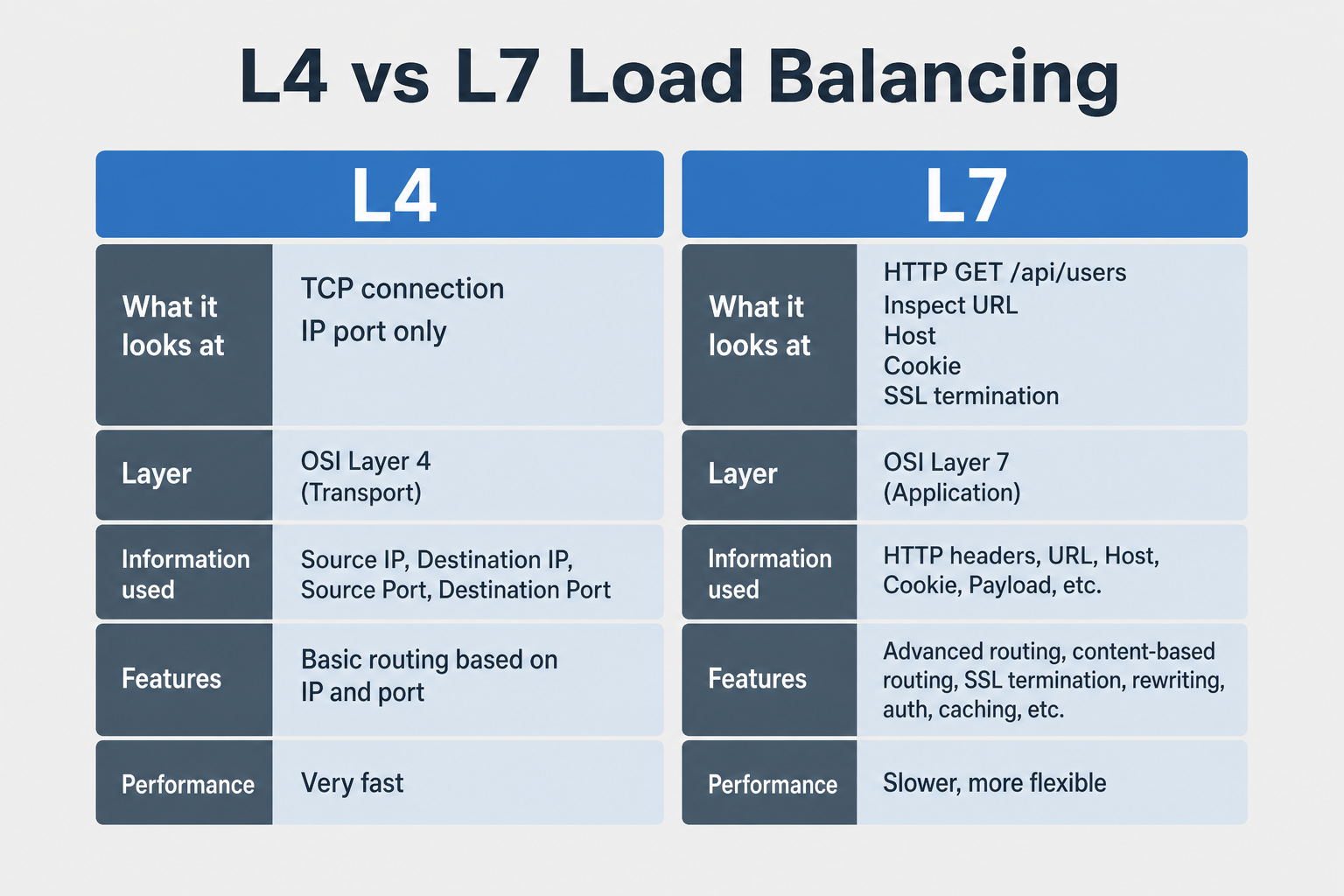
| Feature | Layer 4 (L4) | Layer 7 (L7) |
|---|---|---|
| Layer | Transport (TCP/UDP) | Application (HTTP/HTTPS) |
| Decision based on | IP address, port | URL, headers, cookies, content |
| Performance | Very fast (low overhead) | Slower (more processing) |
| Protocol support | Any TCP/UDP | HTTP/HTTPS (primarily) |
| SSL termination | No | Yes |
| Content inspection | No | Yes |
| Sticky sessions | Limited (IP-based) | Full (cookie-based) |
| Health checks | TCP/UDP connection | HTTP status codes |
| Use case | High throughput, simple routing | Content-based routing, SSL termination |
Examples
L4 Load Balancer Configuration
# Nginx L4 Load Balancing (stream module)
stream {
    upstream backend {
        least_conn;  # Algorithm
        server 192.168.1.10:8080;
        server 192.168.1.11:8080;
        server 192.168.1.12:8080;
    }

    server {
        listen 80;
        proxy_pass backend;
        proxy_timeout 1s;
        proxy_responses 1;
    }
}
Characteristics:
- Routes based on IP and port only
- Fast, low latency
- Works with any TCP/UDP protocol
L7 Load Balancer Configuration
# Nginx L7 Load Balancing (http module)
http {
    upstream user_service {
        least_conn;
        server 192.168.1.10:8080;
        server 192.168.1.11:8080;
    }

    upstream order_service {
        ip_hash;  # Sticky sessions
        server 192.168.1.20:8080;
        server 192.168.1.21:8080;
    }

    server {
        listen 80;

        # Route based on URL path
        location /api/users {
            proxy_pass http://user_service;
            proxy_set_header Host $host;
            proxy_set_header X-Real-IP $remote_addr;
        }

        location /api/orders {
            proxy_pass http://order_service;
            proxy_set_header Host $host;
            proxy_set_header X-Real-IP $remote_addr;
        }
    }
}
Characteristics:
- Routes based on URL path
- Can set custom headers
- Supports sticky sessions
L4 vs L7 Performance
1
Use Cases
Use L4 Load Balancer When:
- High throughput needed: Minimal processing overhead
- Protocol agnostic: Need to balance non-HTTP traffic (database, custom protocols)
- Simple routing: Route based on IP/port only
- Low latency critical: Fast forwarding without inspection
Examples:
- Database load balancing
- Custom TCP/UDP protocols
- High-performance web servers (simple routing)
Use L7 Load Balancer When:
- Content-based routing: Route based on URL, headers
- SSL termination: Terminate SSL at load balancer
- Sticky sessions: Route same user to same server
- Request/response modification: Add headers, modify content
- API gateway functionality: Rate limiting, authentication
Examples:
- Microservices routing (different URLs to different services)
- Web applications (session affinity)
- API gateways
- CDN edge servers
Common Pitfalls
- Using L7 for high throughput: L7 has more overhead. Fix: Use L4 for high throughput, L7 for content routing
- Not understanding layer differences: Confusing L4 and L7 capabilities. Fix: Understand L4 = IP/port, L7 = HTTP content
- SSL termination placement: Terminating SSL at L7 adds overhead. Fix: Consider SSL termination at L7 vs backend
- Sticky sessions at L4: L4 can only do IP-based stickiness. Fix: Use L7 for cookie-based sticky sessions
- Health check mismatch: L4 checks TCP connection, L7 checks HTTP. Fix: Use appropriate health checks
- Performance expectations: Expecting L7 to be as fast as L4. Fix: L7 will always have more overhead
Interview Questions
Beginner
Q: What is the difference between Layer 4 and Layer 7 load balancers?
A:
Layer 4 (L4) Load Balancer:
- Operates at: Transport layer (TCP/UDP)
- Makes decisions based on: IP addresses and ports
- Does NOT inspect: Application data (HTTP headers, content)
- Performance: Very fast (minimal processing)
- Use case: High throughput, simple routing
Layer 7 (L7) Load Balancer:
- Operates at: Application layer (HTTP/HTTPS)
- Makes decisions based on: URL, headers, cookies, content
- Inspects: Full HTTP request
- Performance: Slower (more processing overhead)
- Use case: Content-based routing, SSL termination
Example:
L4: Routes based on IP:port only
  Client (192.168.1.100:5000) → Load Balancer → Server 1 or 2

L7: Routes based on HTTP content
  GET /api/users → user-service
  GET /api/orders → order-service
When to use:
- L4: High throughput, protocol agnostic, simple routing
- L7: Content-based routing, SSL termination, sticky sessions
Intermediate
Q: When would you choose L4 vs L7 load balancing? Explain with examples.
A:
Choose L4 When:
-
High Throughput Required
# Database load balancing # Need maximum performance, minimal overhead stream { upstream database { server db1:5432; server db2:5432; } } -
Non-HTTP Protocols
# Custom TCP protocol # L4 works with any TCP/UDP protocol stream { upstream custom_service { server service1:9000; server service2:9000; } } -
Simple Routing
# Just need to distribute load
# No content-based routing needed
upstream web_servers {
    server web1:80;
    server web2:80;
}
Choose L7 When:
-
Content-Based Routing
# Route different URLs to different services location /api/users { proxy_pass http://user_service; } location /api/orders { proxy_pass http://order_service; } -
SSL Termination
# Terminate SSL at load balancer server { listen 443 ssl; ssl_certificate /path/to/cert.pem; proxy_pass http://backend; } -
Sticky Sessions
# Route same user to same server upstream backend { ip_hash; # Or cookie-based server server1:80; server server2:80; } -
Request Modification
# Add headers, modify requests
proxy_set_header X-Real-IP $remote_addr;
proxy_set_header X-Forwarded-For $proxy_add_x_forwarded_for;
Hybrid Approach:
- Use L4 for high-throughput services
- Use L7 for application-level routing
- Combine both in architecture
Senior
Q: Design a load balancing architecture for a high-traffic web application that handles 1 million requests per second. How do you combine L4 and L7 load balancers, handle SSL termination, and ensure high availability?
A:
1
Architecture:
Internet
  ↓
L4 Load Balancers (High Throughput)
  ↓
L7 Load Balancers (Content Routing, SSL Termination)
  ↓
Backend Services (Application Servers)
Features:
- Two-tier architecture: L4 for throughput, L7 for routing
- SSL termination: At L7 to reduce backend load
- Content-based routing: L7 routes to appropriate services
- High availability: Multiple L4 and L7 load balancers
- Health monitoring: Monitor all layers
- Scalability: Scale each layer independently
Failure Stories You'll Recognize
The L7 Bottleneck: A service was using an L7 load balancer for all traffic. The load balancer was inspecting every HTTP request, parsing headers, and making routing decisions. Under normal load, this worked. But during high traffic, the load balancer became a bottleneck. It couldn't process requests fast enough. Response times spiked. The service became unusable. The fix? Use L4 load balancer for simple traffic distribution, and L7 only when you need content-based routing. This reduced load balancer overhead and improved performance.
The L4 Limitation: A service was using an L4 load balancer, but needed to route based on URL path (e.g., /api/users to one server, /api/orders to another). L4 can't do this—it only looks at IP and port. The service had to use L7 instead. But they didn't optimize the L7 configuration, and it became slow. The fix? Optimize L7 configuration (connection pooling, caching, etc.) to reduce overhead.
The SSL Termination Problem: A service was terminating SSL at the application servers. Each server had to handle SSL handshakes, which is CPU-intensive. During high traffic, servers became CPU-bound. The fix? Terminate SSL at the L7 load balancer. The load balancer handles SSL, and servers receive plain HTTP. This offloads CPU-intensive SSL work from application servers.
What Interviewers Are Really Testing
They want to hear you talk about L4 vs L7 as a performance vs features trade-off. Junior engineers say "use L7 for more features." Senior engineers say "L4 is faster but less flexible. L7 is slower but more flexible. Use L4 for high throughput, L7 when you need content-based routing. Terminate SSL at L7 to offload work from application servers."
When they ask "How would you design a scalable system?", they're testing:
- Do you understand the trade-offs between L4 and L7?
- Do you know when to use each type?
- Can you design systems that balance performance and features?
Key Takeaways
L4 Load Balancer: Operates at transport layer (TCP/UDP), routes based on IP/port, fast, protocol agnostic
L7 Load Balancer: Operates at application layer (HTTP/HTTPS), routes based on content, slower, more features
Use L4 for: High throughput, non-HTTP protocols, simple routing
Use L7 for: Content-based routing, SSL termination, sticky sessions, request modification
Performance: L4 is faster (less overhead), L7 is slower (more processing)
Hybrid approach: Use L4 → L7 → Backend for high-traffic applications
Best practices: Use L4 for throughput, L7 for routing, terminate SSL at L7, monitor health
Related Topics
Client-Server Architecture
One client request fans out to many servers — load balancers scale the server side
OSI Model (7 Layers)
Load balancers operate at different OSI layers, understanding the model helps choose L4 vs L7
HTTP/1 vs HTTP/2 vs HTTP/3
L7 load balancers work with HTTP protocols, understanding HTTP versions helps configure load balancing
TCP vs UDP
L4 load balancers work with TCP/UDP, understanding transport protocols explains L4 load balancing
CDN Routing
CDNs use load balancing techniques, understanding load balancers explains CDN functionality
What's next?
Keep exploring
Protocols make more sense in sequence. Pick the next topic in the hub when a concept still feels fuzzy.