Networking Topic
Proxy vs Reverse Proxy
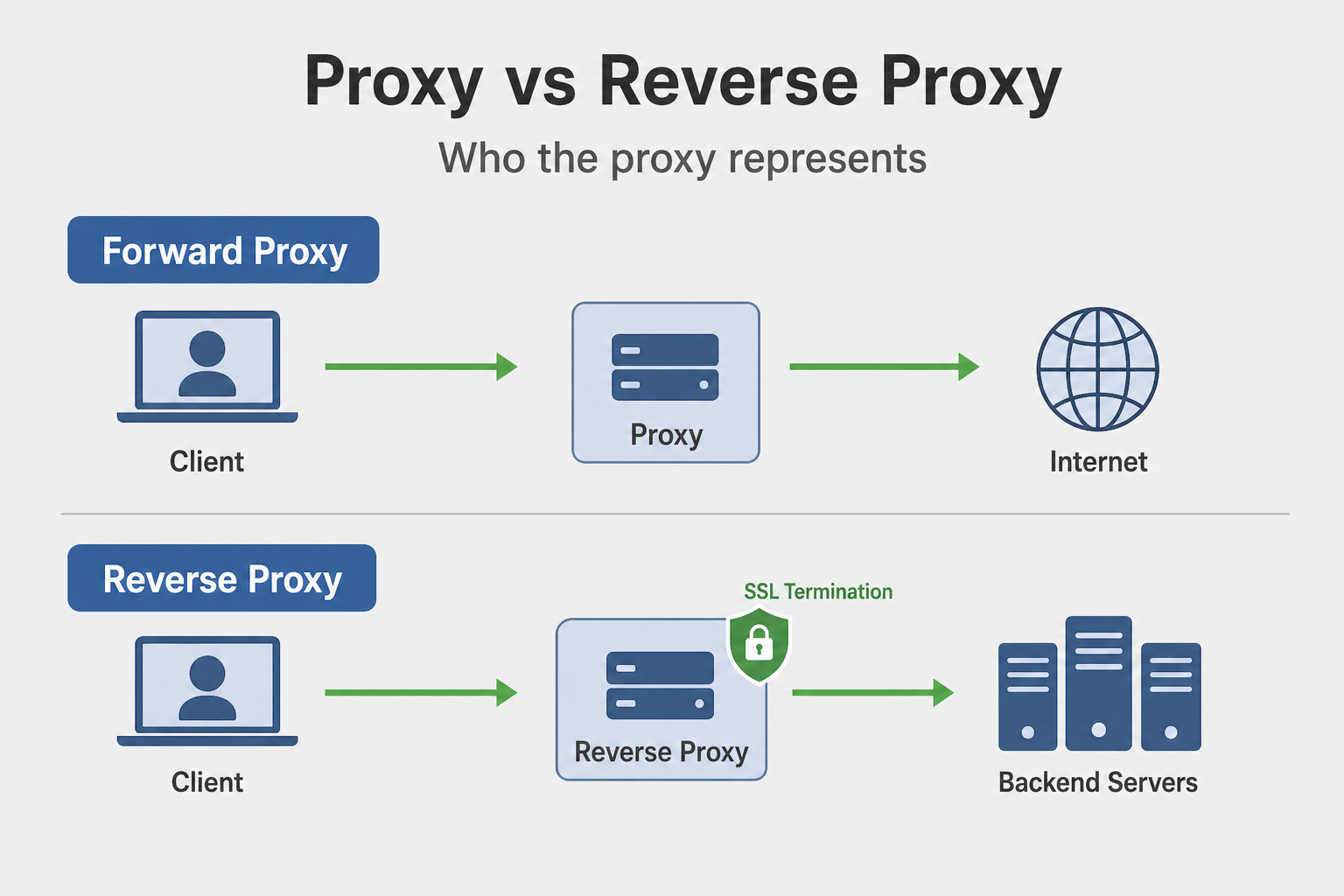
Understand the difference between forward proxies (client-side) and reverse proxies (server-side), their use cases, and when to use each.
Proxy vs Reverse Proxy
Why This Matters
Think of proxies like intermediaries. A forward proxy is like a mail forwarding service—you send mail to the service, and it forwards it to the recipient (hiding your address). A reverse proxy is like a receptionist at a company—clients talk to the receptionist, who routes them to the right department (hiding internal structure). Understanding the difference helps you design secure and scalable systems.
This matters because proxies serve different purposes. Forward proxies protect clients (hide client IPs, filter content, cache). Reverse proxies protect servers (load balancing, SSL termination, caching, hiding server structure). Understanding this helps you choose the right proxy for your use case.
In interviews, when someone asks "How would you design a scalable system?", they're testing whether you understand reverse proxies. Do you know how to use them for load balancing? Do you understand SSL termination? Most engineers don't. They just use one server and wonder why it doesn't scale.
Reverse proxies sit in front of your servers on the client-server path — see Client-Server Architecture if the basic request flow is not clear yet.
What Engineers Usually Get Wrong
Most engineers think "proxy and reverse proxy are the same thing." But they're different. Forward proxies sit in front of clients (client → proxy → internet). Reverse proxies sit in front of servers (client → reverse proxy → servers). They serve different purposes and are configured differently. Understanding this helps you use proxies correctly.
Engineers also don't understand that reverse proxies can do more than just forwarding. They can do load balancing (distribute requests across servers), SSL termination (handle HTTPS), caching (cache responses), and rate limiting (limit requests). Understanding this helps you use reverse proxies effectively.
How This Breaks Systems in the Real World
A service was using a single server. When traffic increased, the server became overloaded. Response times spiked. The service became unavailable. The fix? Use a reverse proxy with load balancing. Deploy multiple servers behind the reverse proxy. The reverse proxy distributes requests across servers. This improves scalability and availability.
Another story: A service was handling SSL/TLS at each server. Each server had to do SSL termination, which is CPU-intensive. Servers became overloaded. The fix? Use a reverse proxy for SSL termination. The reverse proxy handles SSL/TLS, and servers handle plain HTTP. This reduces server load and simplifies certificate management.
Forward Proxy (Client-Side Proxy)
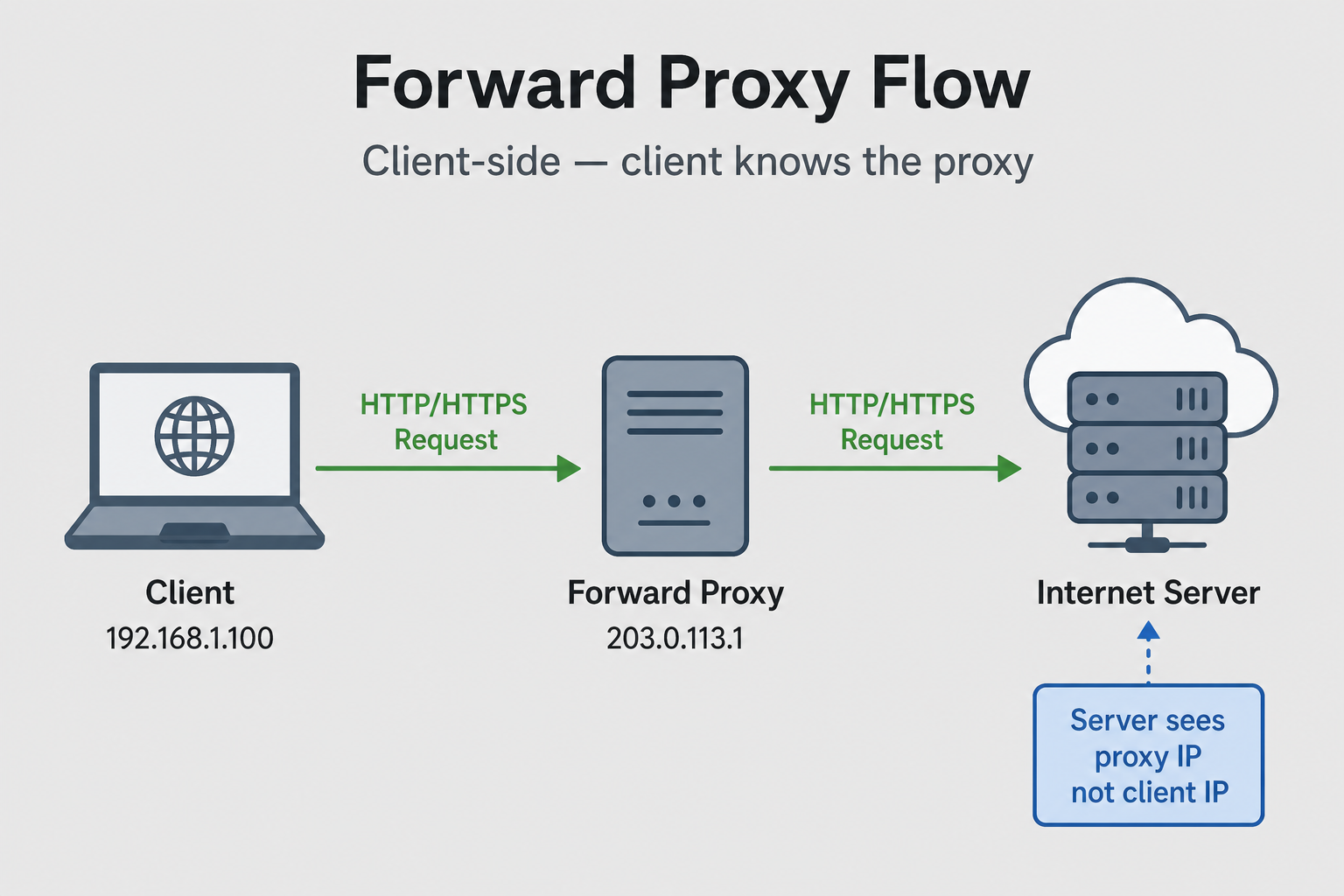
Definition: A forward proxy sits between clients and the internet, representing clients to servers.
Direction: Client → Proxy → Internet
Client          Forward Proxy        Internet
  |                    |                  |
  |---Request--------->|                  |
  |                    |---Request------->|
  |                    |<--Response-------|
  |<--Response---------|                  |
Characteristics:
- Client knows proxy: Client is configured to use proxy
- Server doesn't know client: Server sees proxy's IP, not client's
- Hides client identity: Client IP is hidden from servers
- Client-side: Located near clients or in client network
Reverse Proxy (Server-Side Proxy)
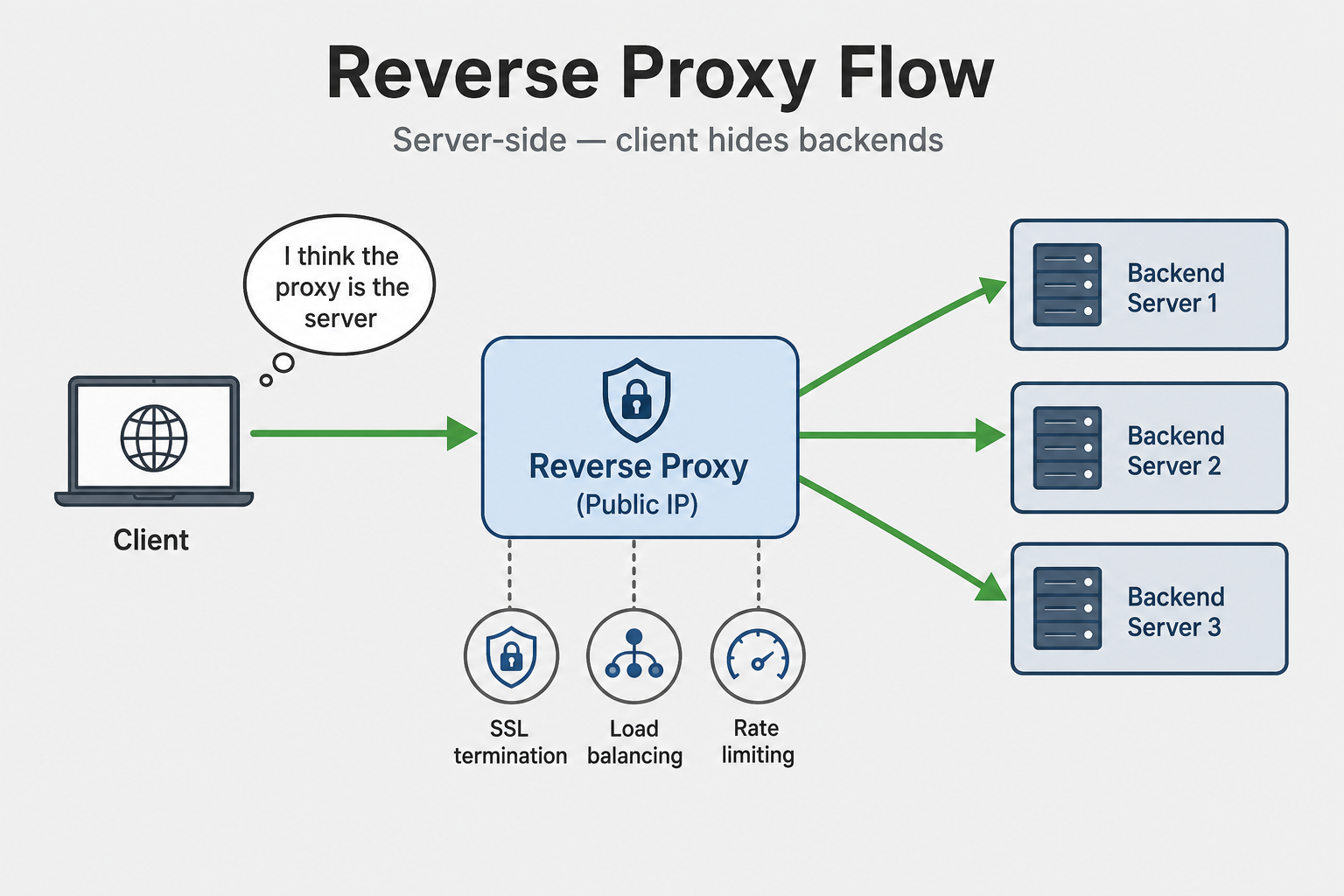
Definition: A reverse proxy sits between the internet and servers, representing servers to clients.
Direction: Internet → Reverse Proxy → Servers
Internet        Reverse Proxy        Backend Servers
  |                    |                  |
  |---Request--------->|                  |
  |                    |---Request------->|
  |                    |<--Response-------|
  |<--Response---------|                  |
Characteristics:
- Client doesn't know backend: Client thinks it's talking to reverse proxy
- Server knows proxy: Backend servers see proxy's IP
- Hides server identity: Backend server IPs are hidden from clients
- Server-side: Located in front of servers
Key Differences
| Aspect | Forward Proxy | Reverse Proxy |
|---|---|---|
| Location | Client-side | Server-side |
| Represents | Clients | Servers |
| Client awareness | Client knows proxy | Client doesn't know backend |
| Server awareness | Server doesn't know client | Server knows proxy |
| Hides | Client IP from servers | Server IPs from clients |
| Use case | Privacy, filtering, caching | Load balancing, SSL termination, security |
Forward Proxy Use Cases
1. Privacy and Anonymity
Hide client IP addresses from servers.
Client (192.168.1.100) → Proxy (203.0.113.1) → Server
Server sees: 203.0.113.1 (proxy's IP)
Server doesn't see: 192.168.1.100 (client's IP)
2. Content Filtering
Block access to certain websites.
Client → Proxy → Internet
Proxy checks: Is website allowed?
If blocked: Return error
If allowed: Forward request
3. Caching
Cache frequently accessed content.
Client → Proxy → Internet
Proxy checks: Is content cached?
If cached: Return from cache
If not: Fetch from internet, cache, return
4. Bypass Restrictions
Access content restricted by location.
Client (Country A) → Proxy (Country B) → Server
Server sees: Proxy in Country B
Client can access: Content available in Country B
Reverse Proxy Use Cases
1. Load Balancing
Distribute requests across multiple backend servers.
Client → Reverse Proxy → Backend Servers
                      ├─ Server 1
                      ├─ Server 2
                      └─ Server 3
2. SSL Termination
Terminate SSL/TLS at reverse proxy.
Client (HTTPS) → Reverse Proxy (decrypts) → Backend (HTTP)
3. Caching
Cache responses from backend servers.
Client → Reverse Proxy → Backend
         (cached response)
4. Security
Hide backend server IPs, provide DDoS protection.
Client → Reverse Proxy (public IP) → Backend (private IP)
5. Request Routing
Route requests to different backend services.
Client → Reverse Proxy → /api/users → user-service
                      → /api/orders → order-service
Examples
Forward Proxy (Squid)
# Squid forward proxy configuration
http_port 3128

# Access control
acl local_net src 192.168.1.0/24
http_access allow local_net
http_access deny all

# Caching
cache_dir ufs /var/spool/squid 100 16 256
cache_mem 256 MB

# Logging
access_log /var/log/squid/access.log
Client configuration:
# Set proxy in browser or environment
export http_proxy=http://proxy.example.com:3128
export https_proxy=http://proxy.example.com:3128
Reverse Proxy (Nginx)
# Nginx reverse proxy configuration
upstream backend {
    server 192.168.1.10:8080;
    server 192.168.1.11:8080;
    server 192.168.1.12:8080;
}

server {
    listen 80;
    server_name example.com;

    location / {
        proxy_pass http://backend;
        proxy_set_header Host $host;
        proxy_set_header X-Real-IP $remote_addr;
        proxy_set_header X-Forwarded-For $proxy_add_x_forwarded_for;
    }

    # SSL termination
    listen 443 ssl;
    ssl_certificate /path/to/cert.pem;
    ssl_certificate_key /path/to/key.pem;
}
Forward Proxy Implementation
1
Reverse Proxy Implementation
1
Common Pitfalls
- Confusing forward and reverse: Not understanding which represents what. Fix: Forward = client-side, Reverse = server-side
- Not handling X-Forwarded-For: Backend doesn't know real client IP. Fix: Set X-Forwarded-For header
- SSL termination issues: Backend expects HTTPS but receives HTTP. Fix: Configure backend for HTTP when using SSL termination
- Session affinity: Requests not routed to same backend. Fix: Use sticky sessions (cookie-based or IP-based)
- Health checks: Not monitoring backend health. Fix: Implement health checks, remove unhealthy backends
- Caching issues: Stale content served. Fix: Set appropriate cache headers, implement cache invalidation
Interview Questions
Beginner
Q: What is the difference between a forward proxy and a reverse proxy?
A:
Forward Proxy (Client-Side):
- Location: Between clients and internet
- Represents: Clients to servers
- Client awareness: Client knows proxy (configured to use it)
- Server awareness: Server doesn't know real client (sees proxy's IP)
- Hides: Client IP from servers
- Use case: Privacy, content filtering, caching, bypass restrictions
Reverse Proxy (Server-Side):
- Location: Between internet and servers
- Represents: Servers to clients
- Client awareness: Client doesn't know backend servers
- Server awareness: Backend servers see proxy's IP
- Hides: Backend server IPs from clients
- Use case: Load balancing, SSL termination, security, caching
Example:
Forward Proxy:
  Client → Proxy → Internet
  (Client knows proxy, server doesn't know client)

Reverse Proxy:
  Internet → Proxy → Backend Servers
  (Client doesn't know backend, backend knows proxy)
Intermediate
Q: When would you use a forward proxy vs a reverse proxy? Explain with examples.
A:
Use Forward Proxy When:
-
Privacy/Anonymity
# Hide client IP from servers Client (192.168.1.100) → Proxy → Server Server sees: Proxy's IP, not client's IP -
Content Filtering
# Corporate network: Block social media Client → Proxy → Internet Proxy checks: Is website allowed? If blocked: Deny access -
Caching
# Cache frequently accessed content Client → Proxy → Internet If cached: Return from cache (fast) If not: Fetch, cache, return -
Bypass Geo-restrictions
# Access content from different country
Client (US) → Proxy (UK) → Server
Server sees: UK IP, serves UK content
Use Reverse Proxy When:
-
Load Balancing
# Distribute requests across servers Client → Reverse Proxy → Backend Servers ├─ Server 1 ├─ Server 2 └─ Server 3 -
SSL Termination
# Terminate SSL at proxy Client (HTTPS) → Reverse Proxy (decrypts) → Backend (HTTP) -
Security
# Hide backend IPs, DDoS protection Client → Reverse Proxy (public) → Backend (private) -
Request Routing
# Route to different services
/api/users → user-service
/api/orders → order-service
Key Difference:
- Forward Proxy: Client-side, hides client from servers
- Reverse Proxy: Server-side, hides servers from clients
Senior
Q: Design a proxy architecture for a large organization that needs both forward proxies for employee internet access and reverse proxies for internal services. How do you handle scaling, security, and monitoring?
A:
1
Architecture:
Internet Access (Forward Proxy):
  Employees → Forward Proxies → Internet
            (Filtering, Caching, Privacy)

Internal Services (Reverse Proxy):
  Internet → Reverse Proxies → Internal Services
           (Load Balancing, SSL, Security)
Features:
- Forward proxies: Employee internet access with filtering and caching
- Reverse proxies: Internal service exposure with load balancing
- Security: DDoS protection, WAF, rate limiting
- Monitoring: Track metrics, health, performance
- Scaling: Multiple proxies per region/tier
- High availability: Redundancy, failover
Key Takeaways
Forward Proxy: Client-side, represents clients, hides client IP from servers
Reverse Proxy: Server-side, represents servers, hides server IPs from clients
Forward proxy use cases: Privacy, content filtering, caching, bypass restrictions
Reverse proxy use cases: Load balancing, SSL termination, security, request routing
Key difference: Forward = client knows proxy, Reverse = client doesn't know backend
Implementation: Use appropriate headers (X-Forwarded-For), handle SSL termination, implement health checks
Best practices: Monitor performance, implement security layers, use caching appropriately, ensure high availability
Related Topics
Client-Server Architecture
Client always talks to a server endpoint; reverse proxies sit on the server side of that path
Load Balancers (L4 vs L7)
Reverse proxies often function as load balancers, understanding load balancers explains reverse proxy functionality
HTTP/1 vs HTTP/2 vs HTTP/3
Proxies work with HTTP protocols, understanding HTTP versions helps configure proxy behavior
TLS/SSL Handshake
Reverse proxies can terminate TLS, understanding TLS helps configure SSL termination
CDN Routing
CDNs use reverse proxy techniques, understanding proxies explains CDN functionality
What's next?
Keep exploring
Protocols make more sense in sequence. Pick the next topic in the hub when a concept still feels fuzzy.