Mock Interviewer
Ask Coach
Tap a question to start, or type your own below.
Auth System Design
Visual Problem Diagram
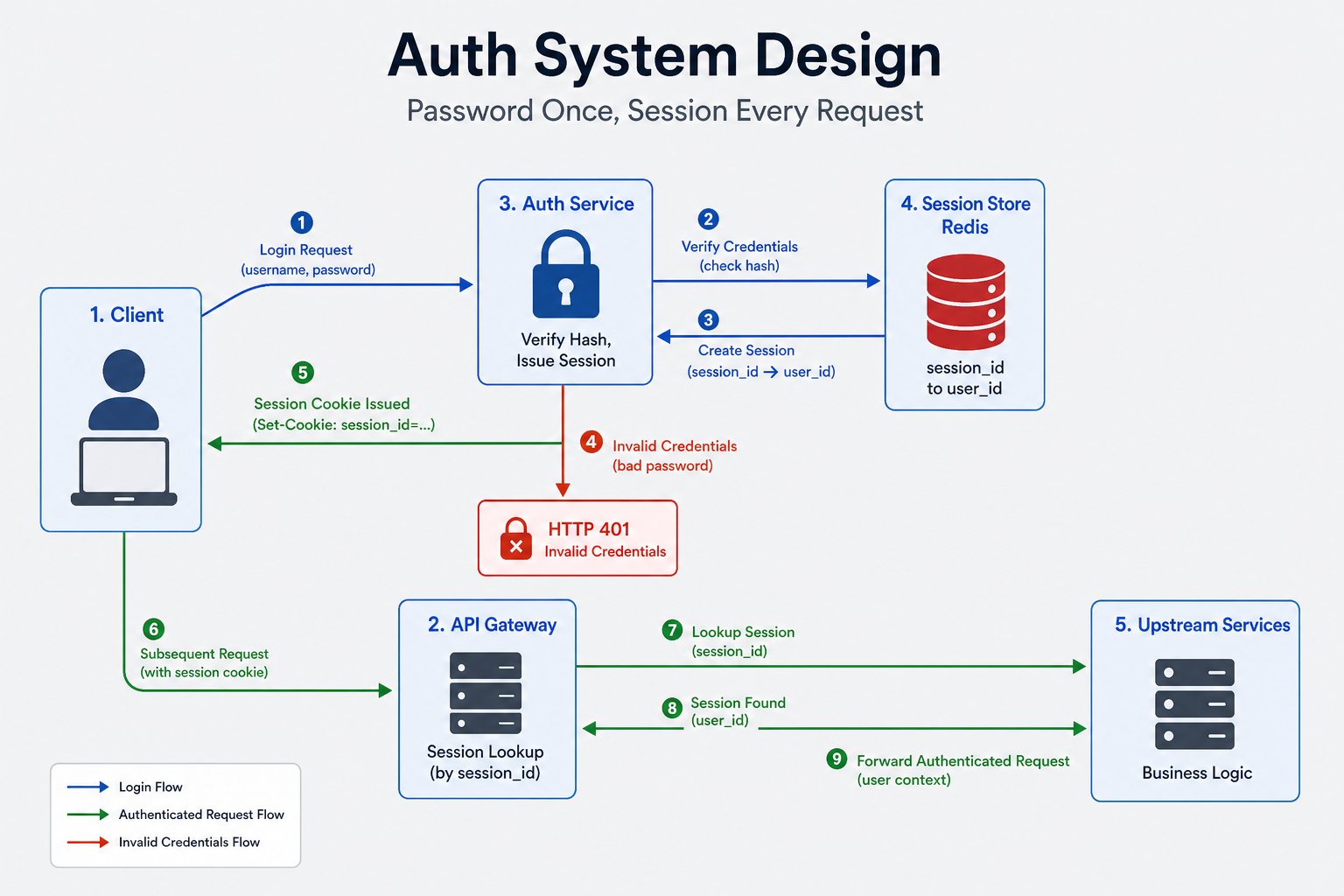
Scenario
Picture opening an app on a new phone and typing your email and password. A second or two later you are inside your account, and the app keeps you signed in so you do not have to type the password again on every tap. Behind that screen, strangers are sending thousands of email and password pairs that leaked from other websites, hoping some of them also work here. Every one of those guesses makes the server run a deliberately slow password check, so if the server is not careful the strangers use up all of that capacity and your real login times out. The part of the system that proves who you are, remembers that you proved it, and can take that proof back later is called an authentication system, and a good answer explains how it stays both safe and fast.
Clarify this problem here, or open Pathway Coach if you want a prep plan first.
Think about the last time you installed an app, made an account, and then opened the app again a week later without typing anything. The app already knew who you were. If you had lost that phone, you could have used another device to tell the service to forget the lost one. If you had forgotten your password, a link in an email would have let you choose a new one. Behind all of that sits an authentication system, which is the part of a product that proves who someone is, remembers that they proved it, and can take that proof back later.
In the interview you need to explain five things. First, how the password is stored so that a leaked database is not a list of real passwords. Second, how login checks the password once and every later request checks something cheaper instead. Third, how signing out on a stolen phone actually ends that login. Fourth, how a password reset link works exactly once and then stops working. Fifth, how strangers trying leaked passwords are kept from using up the slow password check that real people need. Signing in through another company’s account (for example “Sign in with Google”) can stay thin, because your product still has to keep its own login afterwards.
Constraints
A person can register, log in, and log out. The system can check that they are still signed in. It can extend a long-lived login. It can reset a password. It can ask for a one-time code. It can end one login or every login. It records security events without storing the password.
A real person's login finishes within a few hundred milliseconds most of the time. The password is stored as a slow one-way scramble, not as the password itself. Checking an existing login stays up. If the login store is down, the product has a stated behavior. Guessing attacks do not push real logins into a timeout.
Millions of users and many live logins. Login attempts spike when an attack starts. Checks of an existing login are far more common than password checks, and those checks are the heavy read.
Stages ahead
Not ready to design yet?
Try the free Coach trial — ask how to prep, what to practice first, or how InterviewCrafted works. Sign in when you want to start this problem.
Log in to start practicing
Preview the problem below. Sign in to start your timed session, save progress, and use the AI coach.
Want full access now? View Pro pricing