Real Engineering Stories
The Cache Stampede That Took Down Our API
An accidental cache flush caused a stampede that exhausted the DB connection pool and took down the API for 45 minutes.
This is a story about how a simple mistake—running a cache flush command in production instead of staging—caused a cascading failure that took down our API for 45 minutes. It's also a story about what we learned and how we changed our system design to prevent it from happening again.
Related reading on this site: For cache pattern trade-offs and stampede protection in tutorial form, see Caching Strategies. For the full distributed-cache interview walkthrough (sharding, eviction, hot keys), use the Distributed Cache system design guide. When the database stays up but dependencies keep failing, read The Circuit Breaker That Didn't Break. For a different load-amplification pattern, see The N+1 Query Problem That Slowed Down Our API.
Context
We were running a social media API that served user profiles, posts, and feeds. The system handled about 10M requests per day, with most traffic during peak hours (evenings). User profiles were cached in Redis with a 1-hour TTL to reduce database load.
Original Architecture:
The system looked healthy on paper: three stateless API instances, Redis in front of PostgreSQL, cache-aside on user profiles. The weak link was invisible until every key vanished at once—there was no stampede guard, no pool headroom alert, and no safe way to run a flush in production.
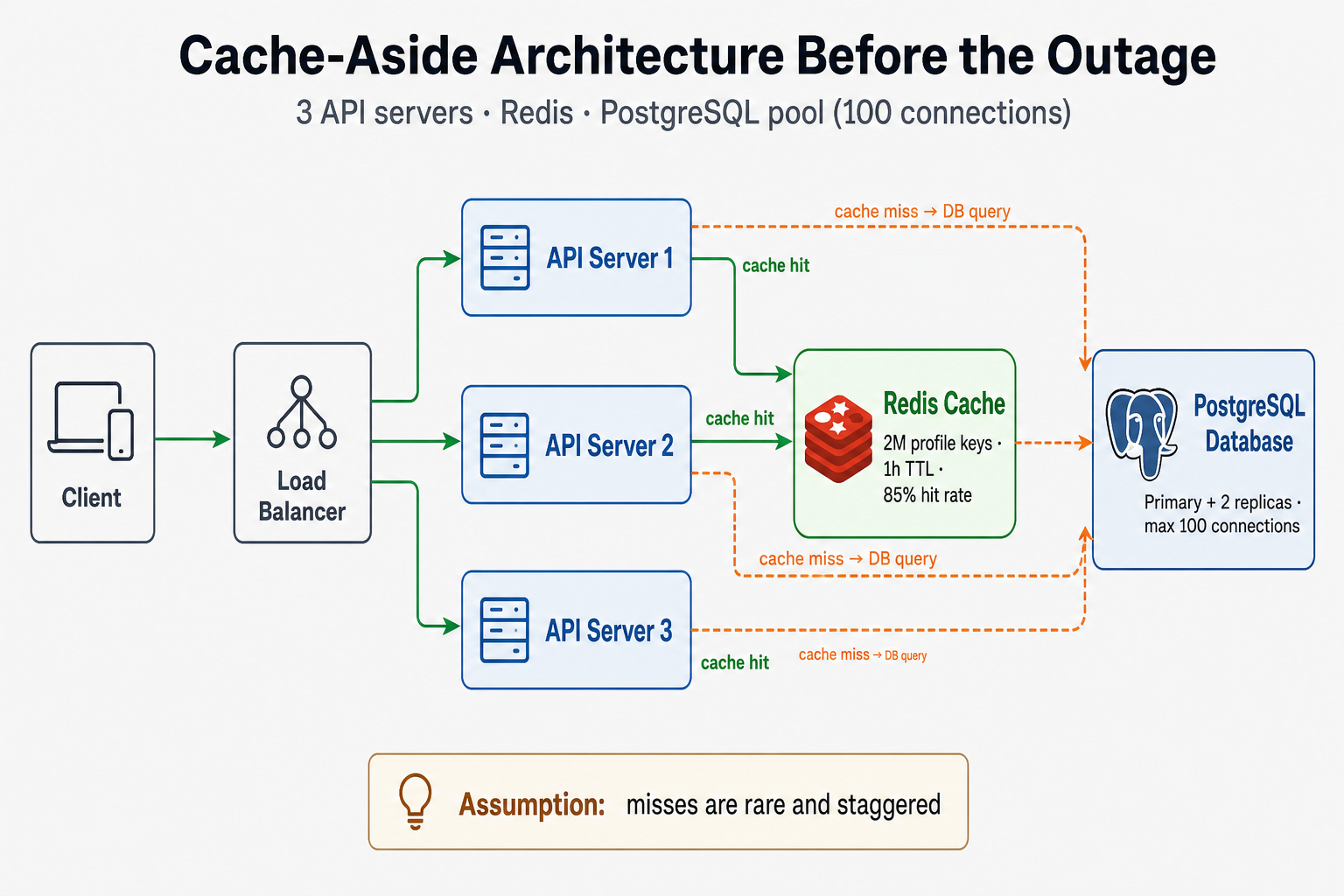
Cache-aside on hot profiles worked at 85% hit rate—until a single FLUSHALL turned every read into a database round-trip.
Technology Choices:
- API Layer: Node.js with Express (3 instances behind load balancer)
- Cache: Redis (single instance, 8GB memory)
- Database: PostgreSQL (primary + 2 read replicas)
- Caching Strategy: Cache-aside pattern with 1-hour TTL
Assumptions Made:
- Cache hit rate would be > 80%
- Database could handle cache misses during normal traffic
- TTL expiration would be staggered (not all keys expire at once)
The Incident
Symptoms
What We Saw:
- Error Rate: Spiked from 0.1% to 15% in 4 minutes
- Response Time: p50 went from 50ms to 5 seconds, p99 exceeded 30 seconds
- Database Connections: Hit 100/100 (pool exhausted)
- Cache Hit Rate: Dropped from 85% to 0% (all keys expired)
- User Impact: ~500K requests failed or timed out during the incident
How We Detected It:
- Alert fired when error rate exceeded 5% threshold
- Dashboard showed database connection pool at 100%
- On-call engineer noticed spike in database query latency
Monitoring Gaps:
- No alert for cache hit rate drops
- No alert for database connection pool usage
- No alert for cache flush operations
Root Cause Analysis
Primary Cause: Cache stampede after accidental cache flush.
How cache-aside turned a flush into an outage:
On a normal read, the API checks Redis first. A hit returns in single-digit milliseconds. On a miss, one request opens a DB connection, loads the profile, writes Redis, and returns. That is fine when misses are rare and staggered.
After FLUSHALL, every profile read became a miss at the same time. With ~10K requests in the first minute and no per-key lock, each miss tried to fetch independently. Three API servers × dozens of worker threads quickly pinned the 100-connection pool. Waiting requests timed out; clients and middleware retried, so load increased while the cache was still empty.
FLUSHALL → 0% hit rate → N parallel misses per key → pool saturated → timeouts → retries → worse
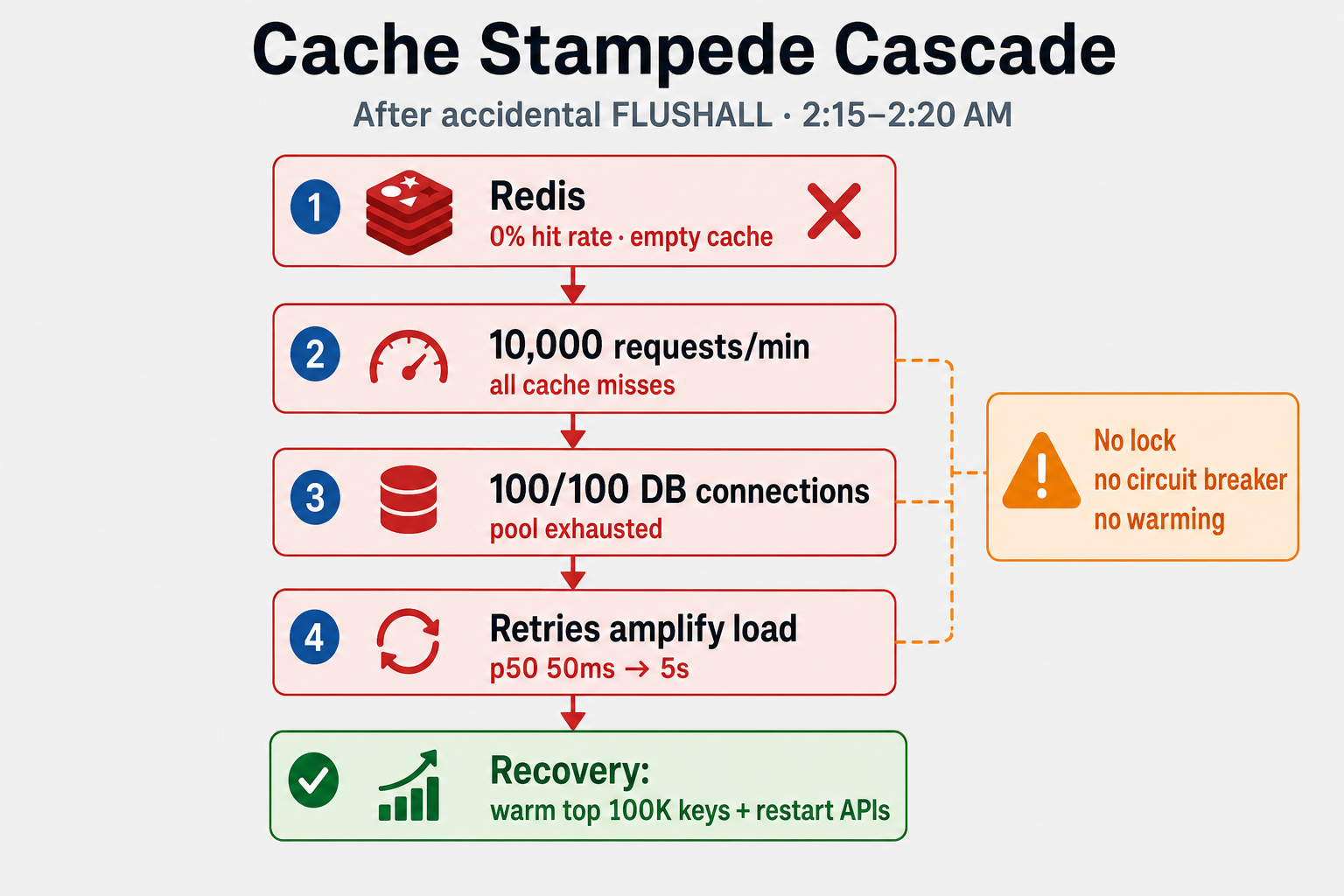
The cascade was faster than human response time—error rate hit 15% four minutes after the flush.
What Happened:
- Cache flush invalidated all 2M cached user profiles
- Next 10,000 requests (within 1 minute) all resulted in cache misses
- Each cache miss triggered a database query—with no lock, many requests fetched the same popular keys in parallel
- Database connection pool (100 connections) was exhausted
- New requests waited for available connections, causing timeouts
- Timeouts caused retries, amplifying the load
Why It Was So Bad:
- No cache warming: After flush, cache was empty
- No connection pool monitoring: We didn't know we were hitting limits
- No rate limiting: All requests tried to hit database simultaneously
- No circuit breaker: System kept trying even when database was overwhelmed
Contributing Factors:
- Single Redis instance (no redundancy)
- Small database connection pool (100 connections for 3 API servers)
- No cache stampede protection (no locking or probabilistic early expiration)
- Manual cache flush command (should have been restricted or automated)
Fix & Mitigation
Immediate Fixes (During Incident):
- Restarted API servers: Cleared connection pool, gave database breathing room
- Manually warmed cache: Ran script to pre-populate top 100K user profiles
- Increased database connection pool: From 100 to 200 (temporary)
Long-Term Improvements:
| Strategy | What it does | Best when |
|---|---|---|
| Probabilistic early expiration (PEX) | Each key gets a random early TTL jitter so mass expiry does not align | Large key sets with similar TTL; cheap to add |
| Distributed lock on miss | Only one fetcher per key; others wait or serve stale | Hot keys; stampede after flush or expiry |
| Cache warming | Pre-load top-N keys before traffic or after deploy | Known hot set (top profiles, feature flags) |
| Request coalescing / singleflight | In-process dedupe of in-flight misses per key | Single-region app before adding Redis locks |
| Circuit breaker on DB path | Fail fast when pool or latency exceeds SLO | Protect origin when cache is cold—pairs with circuit breaker patterns |
-
Cache Stampede Protection:
- Implemented probabilistic early expiration (cache keys expire 10% early randomly)
- Added distributed locking for cache misses (only one request per key fetches from DB)
- Added cache warming on startup
-
Database Connection Pool:
- Increased pool size to 300 connections
- Added connection pool monitoring and alerts
- Implemented connection pool per API server (not shared)
-
Monitoring & Alerting:
- Added cache hit rate alert (alert if < 70%)
- Added database connection pool usage alert (alert if > 80%)
- Added cache flush operation audit log
-
Process Improvements:
- Restricted cache flush commands (require approval)
- Added staging/production environment checks
- Created runbook for cache-related incidents
Architecture After Fix
Key Changes:
- Redis replica for redundancy
- Distributed locking for cache stampede protection
- Larger database connection pool (300 connections)
- Enhanced monitoring and alerting
Key Lessons
-
Cache stampedes are real: When cache expires, all requests hit the database simultaneously. Use probabilistic early expiration or locking.
-
Monitor connection pools: Database connection pools are a common bottleneck. Monitor usage and set alerts.
-
Cache warming matters: After cache flushes or deployments, warm the cache with hot data.
-
Restrict dangerous operations: Cache flush commands should require approval or be automated with safeguards.
-
Circuit breakers help: When database is overwhelmed, circuit breakers prevent cascading failures.
Interview Takeaways
Common Questions:
- "How do you prevent cache stampedes?"
- "What happens when cache expires?"
- "How do you handle database connection pool exhaustion?"
What Interviewers Are Looking For:
- Understanding of cache-aside pattern and its failure modes
- Knowledge of cache stampede mitigation strategies
- Awareness of database connection pool limits
- Experience with production incident response
What a Senior Engineer Would Do Differently
From the Start:
- Implement cache stampede protection: Probabilistic early expiration or distributed locking
- Monitor connection pools: Set up alerts before hitting limits
- Use cache warming: Pre-populate cache after deployments
- Add circuit breakers: Prevent cascading failures when database is overwhelmed
- Restrict dangerous operations: Cache flush should require approval
The Real Lesson: Caching is powerful, but cache invalidation is hard. Design for cache failures, not just cache hits.
How I'd answer in interviews
"We used cache-aside with Redis in front of PostgreSQL. An accidental production flush emptied two million keys at once, so every profile read became a miss. Without per-key locking or warming, thousands of parallel fetches exhausted a hundred-connection pool; timeouts triggered retries and made it worse. I'd prevent it with probabilistic TTL jitter, a distributed lock or singleflight on miss, cache warming for hot keys, pool and hit-rate alerts, and circuit breakers on the database path. I'd also make flush a audited, approval-gated operation—not a copy-paste CLI in prod."
Related reading on this site
- Caching Strategies — cache-aside vs read-through, invalidation, and stampede protection in fundamentals form.
- Distributed Cache system design guide — sharding, eviction, hot keys, and replication for interview depth.
- Circuit Breakers — fail-fast when the origin is overloaded after a cache cold start.
- The Circuit Breaker That Didn't Break — when missing breakers let failures cascade across services.
- The N+1 Query Problem That Slowed Down Our API — another way innocent reads multiply database load.
FAQs
Q: How do you prevent cache stampedes?
A: Use probabilistic early expiration (cache keys expire 10% early randomly) or distributed locking (only one request per key fetches from database). Cache warming after deployments also helps.
Q: What's the best way to handle database connection pool exhaustion?
A: Monitor connection pool usage and set alerts before hitting limits. Increase pool size if needed, but also optimize queries and add caching to reduce database load.
Q: Should you always use caching?
A: Caching is powerful, but cache invalidation is hard. Use caching for read-heavy workloads, but design for cache failures. Not everything needs to be cached.
Q: How do you detect cache stampedes before they cause problems?
A: Monitor cache hit rate (alert if < 70%), database connection pool usage (alert if > 80%), and response times. Sudden drops in cache hit rate combined with increased database load indicate a potential stampede.
Q: What's the difference between cache stampede and thundering herd?
A: Cache stampede happens when cache expires and all requests hit the database. Thundering herd is when many requests try to refresh the same cache key simultaneously. Both can be prevented with locking or probabilistic early expiration.
Q: How do you warm a cache after a flush?
A: Pre-populate cache with hot data (most frequently accessed keys) before traffic hits. This can be done via a script that queries the database for top N items and stores them in cache.
Q: Is it better to use a single large connection pool or multiple smaller ones?
A: It depends on your architecture. For microservices, connection pools per service are better for isolation. For monoliths, a shared pool might be simpler. Monitor usage and adjust based on actual load.
Q: Should we remove the ability to flush cache in production?
A: Don't rely on discipline alone. Prefer namespaced keys and targeted invalidation over FLUSHALL, require approval or break-glass for destructive commands, log every flush to an audit trail, and run environment guards so staging CLI cannot target prod endpoints.
Keep exploring
Real engineering stories work best when combined with practice. Explore more stories or apply what you've learned in our system design practice platform.