Real Engineering Stories
The Hot Partition That Overwhelmed Our Database
90% of sharded messaging traffic pinned one partition—query timeouts and 10% errors until we re-sharded celebrity users.
This is a story about how we scaled our database by sharding—and accidentally made things worse. A handful of celebrity users sent almost all message traffic to one shard. Hashing by user_id looked fair on paper; in production, one partition ran at 95% CPU while the others idled. It's also a story about why partition keys must match access patterns, not just your data model.
Related reading on this site: For sharding strategies and interview depth, see Database Sharding. For uneven routing at the edge (a cousin problem), read The Misconfigured Load Balancer That Created a Single Point of Failure. For observability that catches skew early, use Monitoring & Observability. For load-spreading patterns at the API layer, see Load Balancing.
Context
We ran a messaging service storing billions of messages. A single PostgreSQL instance couldn't keep up—p99 read latency crossed 800ms at peak. We sharded by user_id with hash modulo 3, expecting each shard to carry ~33% of traffic.
Original Architecture:
Three shards, application-level router, hash-based partition key. The design assumed user IDs and traffic would be uniformly distributed. It wasn't.
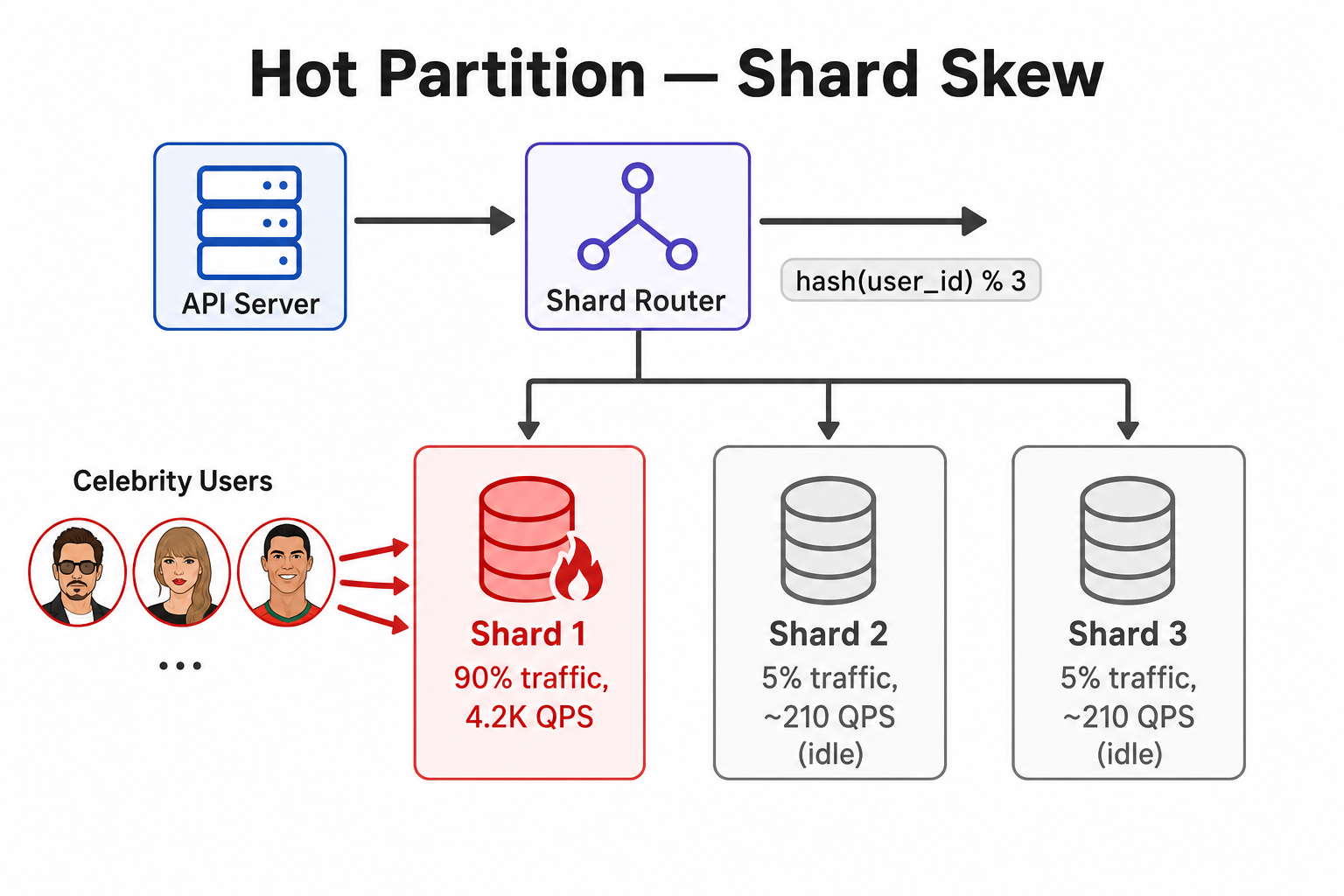
Celebrity inboxes broke the hash assumption—Shard 1 took ~90% of QPS while Shards 2 and 3 idled.
Technology Choices:
- Database: PostgreSQL (3 shards, 32 vCPU each)
- Sharding Strategy: Hash-based on
user_id - Router: Application-level shard router
- Partition Key:
hash(user_id) % 3
Assumptions Made:
- User IDs would be evenly distributed across hash buckets
- Hash function would equalize traffic, not just row count
- Each shard would handle ~33% of read/write load
- Re-sharding would be rare if we chose the key correctly
The Incident
Symptoms
What We Saw:
- Shard Distribution: Shard 1 handling 90% of QPS; Shards 2–3 at ~5% each
- Database CPU: Shard 1 at 95%; others at 10%
- Query Latency: Shard 1 p99 > 8 seconds; others < 100ms
- Error Rate: Increased from 0.1% to 10% (timeouts on Shard 1)
- Connection Pool: Shard 1 at 98/100 connections; others at 20/100
- User Impact: ~500K message requests failed or timed out over 6 hours
How We Detected It:
- Alert fired when single-shard QPS exceeded 50% of total (added Week 3—too late)
- Database monitoring showed Shard 1 CPU at 95%
- Query logs showed 100% of slow queries on Shard 1
Monitoring Gaps:
- No per-shard QPS dashboard at launch
- No top-N user traffic report by shard
- No alert on shard CPU imbalance (only aggregate DB metrics)
- No pre-shard traffic analysis on production access patterns
Root Cause Analysis
Primary Cause: Hot partition driven by celebrity users—not a broken hash function.
How user_id sharding hid the skew:
Hashing spreads users evenly across shards. It does not spread traffic evenly when a few users have millions of followers. Every inbox read for a celebrity fan hits the celebrity's shard. Ten celebrity accounts landed in hash bucket 0 (Shard 1) and generated ~80% of message reads. Shards 2 and 3 held millions of quiet users.
hash(user_id) % 3 → even user count → uneven QPS → one shard at 95% CPU → timeouts
What Happened:
- We sharded by
hash(user_id) % 3 - Ten celebrity users (combined 40M followers) hashed to Shard 1
- Fan inbox fetches concentrated on that shard—~45K QPS vs. ~2.5K per other shard
- Shard 1 connection pool and CPU saturated
- API timeouts propagated as 10% error rate
- Adding CPU to Shard 1 helped briefly; traffic skew remained
Why It Was So Bad:
- Partition key matched data model, not access pattern
- No shard-level monitoring for first four weeks
- No escape hatch for hot keys (dedicated shard, sub-sharding)
- Gradual drift normalized ops to "Shard 1 is a bit hot"
Contributing Factors:
- Assumed hash = fair load (true for keys, false for skewed traffic)
- No production traffic analysis before picking the partition key
- Read path always keyed by message owner
user_id - Re-sharding tooling didn't exist until after the incident
Fix & Mitigation
Immediate Fix:
- Identified hot users: Top 10 accounts = 80% of Shard 1 QPS
- Dedicated hot shard: Migrated celebrities to Shard 4 (isolated hardware)
- Read replica on hot shard for fan-out reads
- Temporary rate limiting on celebrity inbox endpoints—see rate limiting
Long-Term Improvements:
| Strategy | What it does | Best when |
|---|---|---|
| Dedicated hot shard | Isolate known power users | Small set of predictable celebrities |
| Composite partition key | Spread one user's data across buckets | Single user exceeds shard capacity |
| Read replicas per shard | Offload read QPS from primary | Read-heavy, skewed keys |
| Consistent hashing + virtual nodes | Smoother redistribution on scale-out | Growing shard count over time |
| Cache hot inboxes | Move fan reads off DB | Celebrity timelines—pairs with caching strategies |
-
Better Partition Strategy:
- Composite key
(user_id, bucket_id)for users above 1M followers - Time-based archival for messages older than 90 days
- Router table for manual hot-key overrides
- Composite key
-
Shard Monitoring:
- Per-shard QPS, CPU, pool usage, p99 latency
- Alert if any shard > 40% of total QPS for 15 minutes
- Weekly top-100 users by traffic per shard
-
Re-sharding Capability:
- Online migration tool for moving user ranges
- Runbook for hot-key isolation
- Staging cluster with production traffic shadow
-
Read-Path Optimization:
- Redis cache for celebrity inboxes (60s TTL)
- Circuit breakers when shard latency exceeds SLO
Architecture After Fix
Key Changes:
- Dedicated shard (and cache) for celebrity traffic
- Composite keys and router overrides for future hot keys
- Per-shard monitoring with imbalance alerts
- Online re-sharding tooling and runbooks
- Read replicas on the hot shard
Key Lessons
-
Hash spreads keys, not load: Even user distribution ≠ even QPS when traffic is power-law distributed.
-
Partition on access patterns: Choose keys that match how data is read and written, not just how it's stored.
-
Monitor per shard from day one: Aggregate DB health can look fine while one shard burns.
-
Plan for hot keys before launch: Celebrities, viral posts, and leaderboard tops are predictable skew classes.
-
Re-sharding must be operable: If you can't move a hot key in hours, you don't really have sharding—you have hope.
-
Cache the unavoidable hot spots: Sometimes isolation plus cache beats perfect hashing.
-
Gradual skew is still an incident: "Shard 1 is a bit hot" for four weeks is a missed escalation.
Interview Takeaways
Common Questions:
- "How do you shard a database?"
- "What is a hot partition?"
- "How do you choose a partition key?"
What Interviewers Are Looking For:
- Difference between even data distribution and even traffic distribution
- Hot-key detection and mitigation (dedicated shard, sub-keys, cache)
- Per-shard monitoring and imbalance alerts
- Trade-offs: hash vs. range vs. composite keys
- Operational cost of re-sharding
What a Senior Engineer Would Do Differently
From the Start:
- Analyze production traffic before picking a partition key—top users, QPS per key
- Monitor per-shard QPS and latency from day one with imbalance alerts
- Design hot-key escape hatches: router overrides, dedicated shard, cache layer
- Use composite keys when single-key cardinality can't bound per-shard load
- Load-test with skewed distributions, not uniform synthetic data
- Build online re-sharding before you need it—not during an outage
The Real Lesson: Sharding solves capacity until one partition becomes the whole system. Design for skew, not for the average user.
How I'd answer in interviews
"We sharded a messaging database by hash(user_id) % 3. User counts were even, but traffic wasn't—ten celebrity accounts on one shard drove 90% of reads there while other shards idled. p99 on that shard hit eight seconds and errors went to 10%. I'd choose partition keys from access patterns, monitor QPS per shard, cache or isolate hot keys, use composite keys for power users, and build online re-sharding before launch. Hashing is necessary but not sufficient—you need skew detection and an escape path for keys that outgrow a single shard."
Related reading on this site
- Load Balancing — spreading traffic at the edge; analogous imbalance detection.
- Caching Strategies — offload hot reads (celebrity inboxes) from the database.
- Monitoring & Observability — per-shard golden signals and skew alerts.
- The Misconfigured Load Balancer That Created a Single Point of Failure — when 90% of traffic hits one backend for a different reason.
- The Cache Stampede That Took Down Our API — another hot-key amplification pattern on the read path.
FAQs
Q: What is a hot partition?
A: A shard that receives disproportionately more traffic than others—often from power-law data (celebrities, viral content, leaderboard leaders), not from a broken hash function.
Q: How do you choose a partition key?
A: Start from access patterns: what queries hit the DB hardest? Validate with production traffic histograms. Use composite keys or sub-sharding when one key can exceed shard capacity.
Q: How do you detect hot partitions?
A: Monitor QPS, CPU, connection pool, and p99 per shard. Alert if one shard exceeds ~40% of total QPS. Track top-N keys per shard weekly.
Q: How do you fix a hot partition?
A: Short term: dedicated shard, read replicas, cache hot data, rate limit. Long term: better partition key, composite bucketing, online re-sharding tooling.
Q: Should you always shard by user_id?
A: Only if per-user traffic is bounded. Social, messaging, and feed systems often need hot-key plans—user_id alone is rarely enough.
Q: What's the difference between sharding and partitioning?
A: Sharding splits data across databases; partitioning splits within one database. Both can suffer hot spots if the split key doesn't match traffic skew.
Q: How is a hot partition different from a hot key in cache?
A: Same skew, different layer. A hot cache key overloads one Redis slot; a hot partition overloads one database shard. Mitigations overlap: isolate, replicate, cache, or split the key.
Keep exploring
Real engineering stories work best when combined with practice. Explore more stories or apply what you've learned in our system design practice platform.