Real Engineering Stories
The Misconfigured Load Balancer That Created a Single Point of Failure
An ALB health-check typo marked every backend unhealthy, pinned traffic to one server, and caused a 20-minute outage when it crashed.
This is a story about how a one-character typo in a load balancer health check turned three redundant API servers into a single point of failure. Within thirteen minutes, 100% of production traffic hit one Node instance, it ran out of memory, and the whole service went dark. Infrastructure configuration deserves the same review rigor as application code.
Related reading on this site: For algorithms, health checks, and L4 vs L7 trade-offs, see Load Balancing. For detecting uneven routing and golden signals, use Monitoring & Observability. For a database-layer skew problem (different mechanism, same "one backend takes all" symptom), read The Hot Partition That Overwhelmed Our Database. For protecting overloaded origins, see Circuit Breakers.
Context
We ran a REST API for authentication, profiles, and data queries—about 5M requests per day (~58 req/sec average, ~200 req/sec peak) across three Node.js instances behind an AWS Application Load Balancer.
Original Architecture:
Three stateless API servers, ALB with HTTP health checks, PostgreSQL with read replicas. Redundancy existed on paper; we didn't monitor whether traffic actually spread.
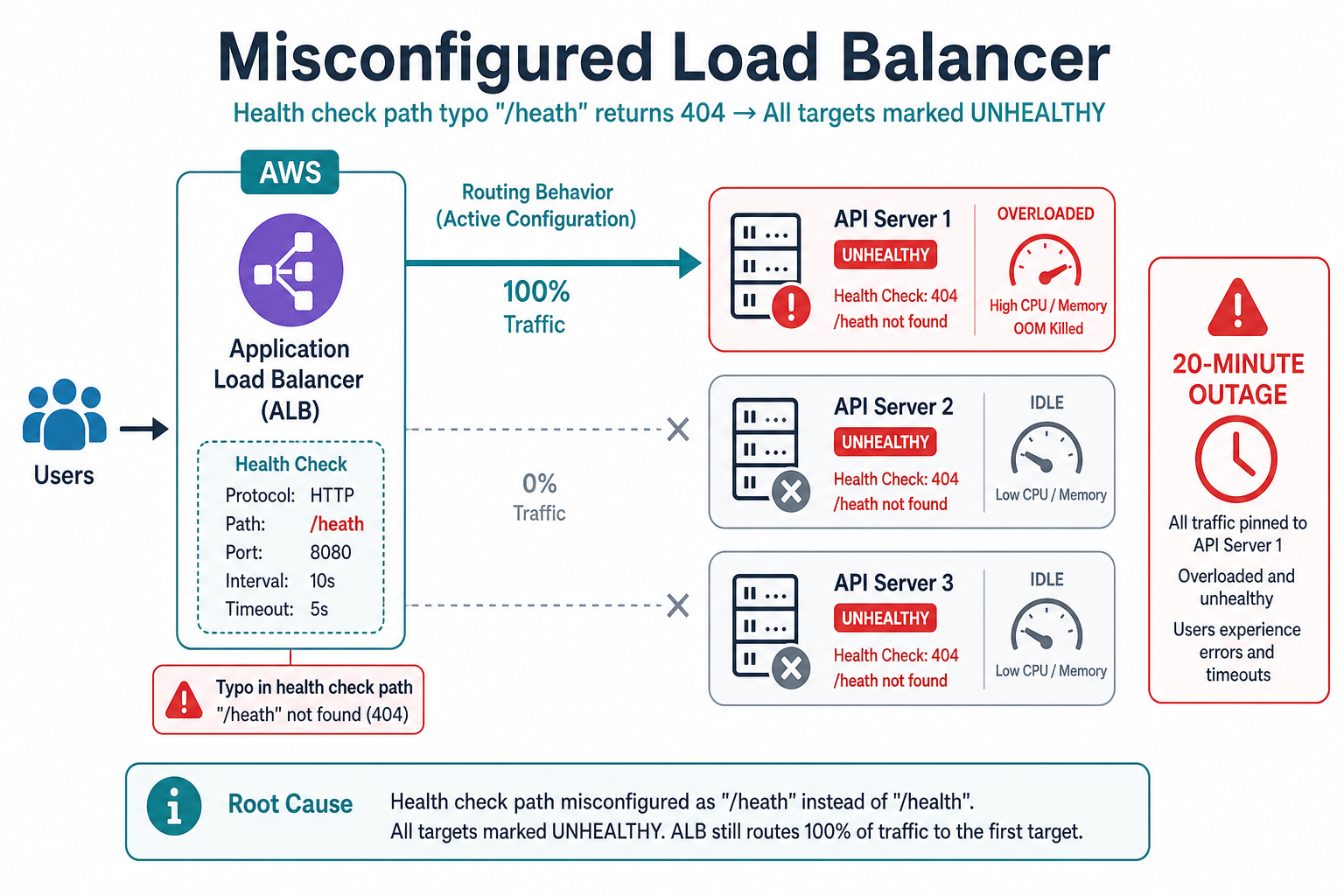
A /heath typo returned 404 on every probe—ALB drained healthy targets and pinned traffic to one server until it crashed.
Technology Choices:
- Load Balancer: AWS Application Load Balancer (ALB)
- Backend: Node.js API servers (3 instances, 2 vCPU / 4GB each)
- Database: PostgreSQL with read replicas
- Health Check: HTTP GET
/health→ 200 OK
Assumptions Made:
- Load balancer would distribute traffic evenly across healthy targets
- Health checks would accurately reflect server readiness
- Three backends meant no single point of failure
- Infra changes were low risk because "it's just config"
The Incident
/health to /api/health (typo—endpoint does not exist)/healthSymptoms
What We Saw:
- Error Rate: Jumped from 0.1% to 100% in ~3 minutes
- Response Time: All requests timing out or 503
- Server Load: API Server 1 at 100% CPU; Servers 2–3 at 0% incoming ALB traffic
- Health Check Status: All targets unhealthy in ALB target group
- ALB Active Connections: 100% on one target IP before crash
- User Impact: Complete outage ~25 minutes; ~200K failed requests
How We Detected It:
- PagerDuty when error rate exceeded 10%
- ALB console showed all targets unhealthy
- CloudWatch:
HealthyHostCountdropped to 0
Monitoring Gaps:
- No alert on
HealthyHostCount< total targets - No alert on per-target request count imbalance (>60% on one host)
- No automated validation of health check path after config change
- No synthetic canary post-deploy for infra changes
Root Cause Analysis
Primary Cause: Misconfigured health check path (/api/health instead of /health).
How a typo removed redundancy:
The ALB probes each target on an interval. Every probe got 404 because our app only exposed /health. After enough failures, all targets were unhealthy. With no healthy backends, new connections behaved erratically—effectively concentrating traffic on API Server 1, the only instance with existing keep-alive connections. That host took the full ~200 req/sec peak alone (~6× its tested steady load), memory climbed, Node OOM'd, and the service had zero healthy targets.
Wrong health path → all targets unhealthy → traffic pins to one host → OOM → zero healthy targets → total outage
What Happened:
- Health check path changed manually in AWS console
- All probes returned 404; targets marked unhealthy within ~60 seconds
- New sessions concentrated on API Server 1
- CPU pegged, event-loop lag spiked, memory exhausted in ~4 minutes
- Process crash →
HealthyHostCount = 0→ full outage - Rollback of health path restored targets in ~5 minutes after diagnosis
Why It Was So Bad:
- No pre-deploy health check test against real endpoints
- No traffic distribution monitoring—skew invisible until crash
- Manual console change without IaC diff or staging validation
- Misunderstood unhealthy-target behavior—assumed traffic would stop, not pin
Contributing Factors:
- No staging ALB mirroring production target groups
- Health endpoint not covered by deployment smoke tests
- On-call runbook didn't list "all targets unhealthy" as first check
- Single ALB (acceptable) but no per-target metrics dashboard
Fix & Mitigation
Immediate Fixes (During Incident):
- Corrected health check path to
/health - Restarted API Server 1 after OOM
- Forced connection drain on ALB before re-enabling traffic
Long-Term Improvements:
| Strategy | What it does | Best when |
|---|---|---|
| Infrastructure as Code | Terraform/CloudFormation with PR review | Any LB or target group change |
| Post-change synthetic checks | Canary hits /health from outside VPC | After every infra deploy |
| Per-target traffic alerts | Page if one host > 60% ALB requests | Multi-instance services |
| HealthyHostCount alerts | Page when healthy < desired | Always—for LB-backed APIs |
| Staging mirror | Identical ALB rules in staging | Catch typos before prod |
-
Health Check Validation:
- Terraform-managed ALB with CI test:
curl /healthreturns 200 - Deployment smoke test includes LB target health
- Documented health vs. readiness endpoints
- Terraform-managed ALB with CI test:
-
Traffic Distribution Monitoring:
- CloudWatch alert: max per-target share > 60% for 5 minutes
- Dashboard:
HealthyHostCount,RequestCountPerTarget, p99 latency - See monitoring patterns for golden signals
-
Infrastructure as Code:
- All ALB/target group changes via Terraform PR
- Mandatory staging apply + synthetic probe before prod
- Config drift detection weekly
-
Process Improvements:
- Infra changes require same review as app code
- Runbook: "all targets unhealthy" → verify health path first
- Blameless postmortem; added console-change freeze for LB
Architecture After Fix
Key Changes:
- Terraform-managed ALB with reviewed health check config
- Alerts on
HealthyHostCountand per-target request skew - Synthetic canaries after infra deploys
- Staging environment mirrors production LB rules
- Runbook for unhealthy-target incidents
Key Lessons
-
Infrastructure is code: A one-line health path typo caused a full outage—review and test config like application logic.
-
Healthy targets are the product: If health checks lie, redundancy is imaginary.
-
Monitor distribution, not just uptime: One server at 100% CPU while others idle is a red flag—even before crash.
-
Alert on
HealthyHostCount: When it drops below desired count, page immediately. -
Staging must include the LB: Testing apps without testing the load balancer misses the failure mode.
-
Unhealthy ≠ evenly stopped: Understand your LB behavior when all targets fail probes.
Interview Takeaways
Common Questions:
- "How do you configure load balancer health checks?"
- "What happens when all backends fail health checks?"
- "How do you detect uneven traffic distribution?"
What Interviewers Are Looking For:
- Health vs. readiness probes
- ALB/target group concepts and failure modes
- Per-target metrics and synthetic monitoring
- IaC and change-management for infra
- Why N backends ≠ N× capacity if routing is wrong
What a Senior Engineer Would Do Differently
From the Start:
- Manage LB config in Terraform with CI validation of health endpoints
- Alert on healthy host count and per-target request share
- Run synthetic canaries after every infra change
- Mirror production LB in staging and test failover scenarios
- Document LB behavior when all targets are unhealthy
- Treat infra PRs like app PRs: reviewer, staging proof, rollback plan
The Real Lesson: Redundancy only exists if health checks are correct and traffic is actually balanced. Monitor both.
How I'd answer in interviews
"We had three API servers behind an AWS ALB. Someone changed the health check from /health to /api/health in the console—all probes got 404, every target went unhealthy, and traffic effectively pinned to one server until it OOM'd. With zero healthy targets the API was fully down for about twenty minutes. I'd manage ALB config in Terraform, alert on HealthyHostCount and per-target request skew, run synthetic canaries after infra changes, and keep a staging ALB that mirrors production. The interview point is: load balancers are part of your availability story—wrong health checks silently remove redundancy."
Related reading on this site
- Load Balancing — algorithms, health checks, sticky sessions, and L4 vs L7.
- Monitoring & Observability — golden signals, synthetics, and alert design for infra.
- Circuit Breakers — fail fast when backends are overloaded (complementary to LB health).
- The Hot Partition That Overwhelmed Our Database — 90% load on one backend at the database layer.
- The Cache Stampede That Took Down Our API — cascading failure after a single misconfiguration.
FAQs
Q: How do you configure load balancer health checks?
A: Use a lightweight endpoint (e.g., /health) that returns 200 when the process and critical dependencies are OK. Set interval, timeout, and healthy/unhealthy thresholds. Test the exact path in staging before prod—and manage in IaC.
Q: What happens when all backends fail health checks?
A: The LB marks all targets unhealthy. Behavior varies: some LBs reject new connections (503), others may route erratically to draining targets. Assume full outage risk—alert on HealthyHostCount = 0.
Q: How do you ensure even traffic distribution?
A: Monitor RequestCountPerTarget (or equivalent). Alert if one target exceeds ~60% of traffic. Pick the right algorithm (round-robin vs. least connections) and avoid unnecessary stickiness.
Q: What's the difference between health checks and readiness probes?
A: Liveness/health: is the process alive? Readiness: is it ready for traffic (migrations done, warm cache)? Both matter—readiness prevents sending traffic to starting pods.
Q: Should you use multiple load balancers?
A: For HA across AZs, yes—active/active or active/passive pairs. For smaller services, one ALB with multiple targets is fine if health and distribution are monitored.
Q: How do you test infrastructure changes?
A: Staging mirror, Terraform plan/apply in CI, synthetic probes post-deploy, and chaos tests (kill one target, verify rebalance).
Q: How is this different from a hot partition?
A: Hot partition is skewed data routing to one database shard. This incident was skewed traffic routing to one app server because health checks failed. Both look like "one backend at 100%," but fixes differ: partition keys vs. health check config.
Keep exploring
Real engineering stories work best when combined with practice. Explore more stories or apply what you've learned in our system design practice platform.