System Design Topic
Rate Limiting Fundamentals: Why and Where It Applies
Why teams use rate limits, real-world examples, how one request is checked at the gateway, the per-server mistake, and rate limiting vs throttling—in plain English.
Where we left off
Rate limiting gives each client a budget of requests per time window so one abusive or buggy source cannot use up all your servers' power. This chapter places that idea on the request path and shows where you have already seen limits in real products.
Why teams bother with rate limiting
If you don't limit how much each client can send, one bad script, one broken app that keeps retrying, or one partner that calls your API too often can use up almost all of your servers' power. Everyone else then gets slow responses or errors. That feels unfair to customers and expensive to the company, because you pay for servers and databases that are busy serving junk traffic.
Rate limiting is used in many places you have already seen as a user, even if you did not know the name. Login pages often limit failed password attempts so attackers cannot guess millions of passwords. Email products limit how many messages one account can send per hour so spam stays under control. Public APIs publish rules like “1,000 calls per hour per API key” so one integration cannot starve everyone else.
The goal is not only to stop attackers. It is also to share limited server power fairly and to keep the core system alive during spikes. A good limit is strict enough to protect backends but generous enough that normal users rarely hit it. Limits that are too loose waste money; limits that are too tight create support tickets from paying customers.
Where rate limiting applies (with examples)
In interviews—and in real design work—the valuable part is where you would use a limit and what should happen, not a lecture on how a counter is stored. Start with the situation, then the rule, then what the user or client experiences.
| Situation | What you limit | Why it matters | What “limited” looks like |
|---|---|---|---|
| Login / password reset | Failed attempts per account or IP | Stops password guessing | “Try again in 15 minutes” or temporary lockout |
| Public API | Requests per API key per hour | One partner cannot starve everyone else | HTTP 429 plus Retry-After |
| Flash sale or checkout | Clicks or orders per user | Bots cannot grab all inventory | Checkout blocked; normal shoppers still get through |
| Email or SMS product | Messages sent per account per day | Stops spam blasts | Send rejected or queued |
| Expensive search or AI endpoint | Calls per user per minute | Protects GPU/database cost | 429 on search; cheaper “browse” routes stay open |
| Mobile app retry storm | Same user/device after errors | Broken retry loops flood the API | Early 429 stops duplicate charges or duplicate orders |
How to talk in the room: Pick one row and narrate it. Example: “On login I’d limit failed attempts per account—maybe five per fifteen minutes—because the risk is credential stuffing, not normal typos. The user sees a clear lockout message, not a generic error. On the catalog API I might allow higher limits but still cap search because each query hits the database.”
That answer shows application and judgment. You are not expected to spend five minutes explaining increment-and-expire unless the interviewer explicitly asks how you would build the counter store.
What “one request” looks like end to end
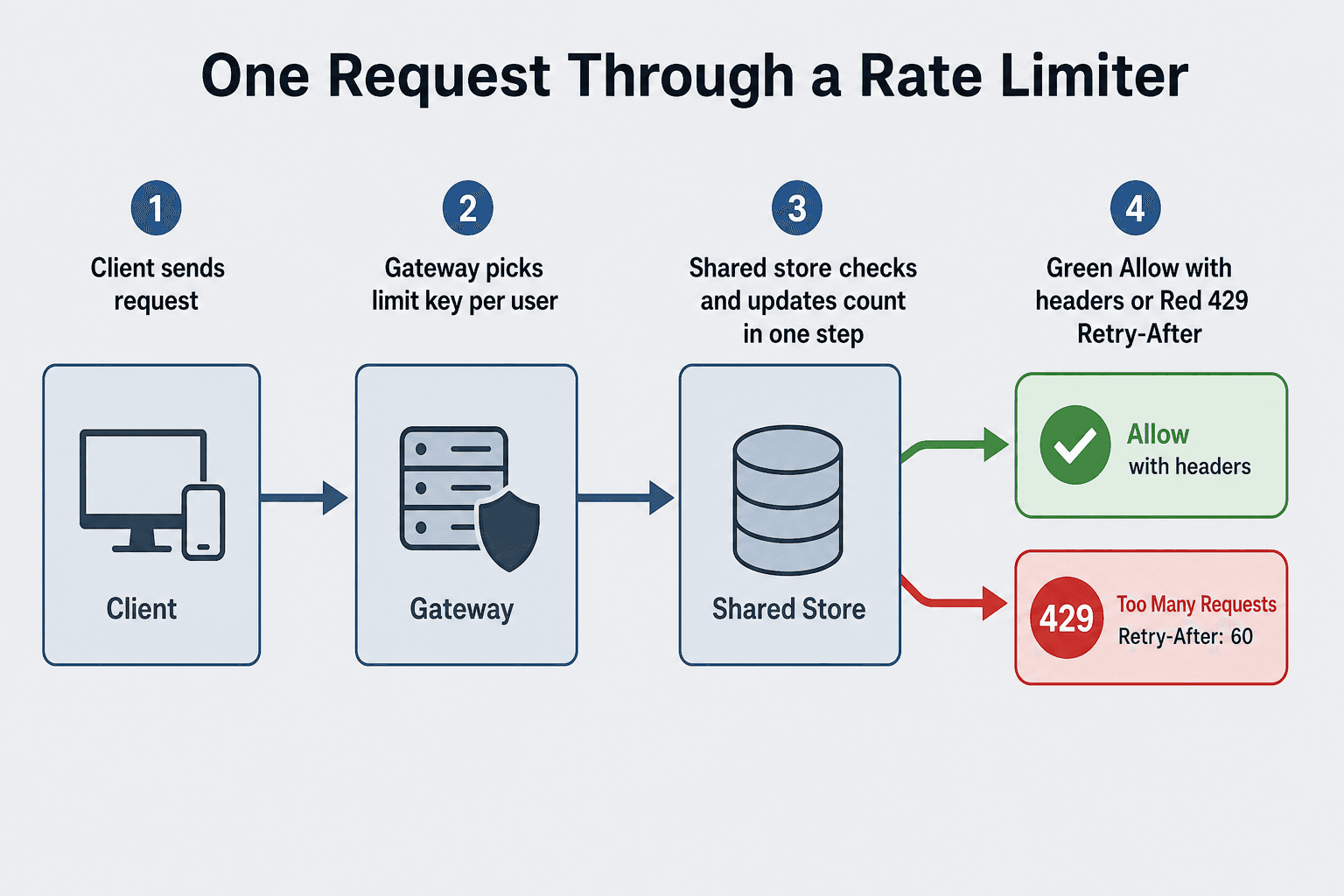
Before comparing algorithms, it helps to picture one request moving through a typical setup. Many products place a front door in front of their application servers. That front door is often called an API gateway. Its job is to receive HTTP requests from the internet, apply security and policy checks, and only then forward allowed traffic to the services that implement business logic.
For rate limiting, the gateway must answer one question before the expensive work runs: “Has this client already used their budget?” If yes, allow the request through. If no, return HTTP 429 (Too Many Requests) and tell the client when it is safe to try again. That retry hint matters: without it, apps often hammer the API again and make overload worse.
The diagram below shows that path in order. Read it top to bottom as a story: client → gateway → shared store → allow or block.
Figure: The limit check happens on the hot path—before the database or payment service is touched.
  [ Client ]
      |
      v
  [ API gateway ] ---- reads/writes ----> [ Shared counter per client key ]
      |                                              |
      | allowed                                      |
      v                                              |
  [ App servers / database ]                         |
                                                     |
      if budget exhausted <--------------------------+
      |
      v
  HTTP 429 + "try again after N seconds"
The per-server counting mistake (one example interviewers love)
This is worth one concrete example—not because “counters are interesting,” but because the wrong placement of a limit fails in production.
When teams first add rate limiting, they often count only inside each server’s memory because it feels fast. That works on a laptop with one server. It breaks when you run two or more copies behind a load balancer—which is normal.
Here is why. Suppose the rule is “100 requests per minute per API key.” A client sends 100 requests that land on server A—all allowed. The same client sends another 100 requests that land on server B. Server B never saw the first 100, so it also allows them. The client just sent 200 requests in one minute while each server believed it was enforcing 100. With ten servers, the cheat factor can approach ten times the intended limit.
The fix is about where the rule is enforced, not counter trivia: every gateway must apply the same budget for the same client before accepting work. In practice that means one shared place all gateways check—often a fast in-memory store like Redis—not separate notebooks per machine. Say that in one sentence; drill into storage details only if they ask you to design it.
Rate limiting is not the same as throttling
People mix these words because both manage traffic. They solve related but different problems.
Rate limiting (in the narrow sense used on many public APIs) usually means: once the budget is gone, new requests are rejected—often with HTTP 429. The client hit a hard wall for now.
Throttling usually means: slow down how fast work is accepted—for example queueing requests, adding delay, or shaping traffic so the downstream system sees a smoother stream—sometimes before you ever reject anyone.
Real products often use both layers. A content delivery network might throttle upload speed for large files. An API gateway might rate limit expensive search endpoints with a hard cap. A login service might rate limit failed attempts per IP while still allowing successful logins. When you answer interview questions, say which layer you mean and what the user or client experiences (slower responses vs clear “you are blocked until time T”).
| Rate limiting (hard cap) | Throttling (smoothing) | |
|---|---|---|
| Typical client experience | Error like HTTP 429; must wait | Slower responses; may still succeed |
| Main goal | Stop abuse; enforce quota | Protect downstream from spikes |
| Example place | Public REST API per API key | Queue in front of workers |
What comes next
You now know why limits exist, where they apply, and where on the path the check runs—including why per-server counting breaks with more than one gateway. The open question is how that budget is counted when bursts and minute boundaries matter—and what clients should see when they hit the wall. That is Chapter 2: Rate limiting algorithms.
Next chapter: Rate limiting algorithms
Series home: Rate limiting
FAQs
Q: Why is limiting only by IP address often unfair?
A: Many mobile users share one carrier IP address. If you limit only by IP, innocent users on the same cell tower can block each other. When you can, key by logged-in user or API key, and use IP as one layer—not the only layer.
Q: Does rate limiting only apply to public APIs?
A: No. Logins, email sending, checkout, and internal admin tools all use limits. The pattern is the same: protect expensive or sensitive paths when traffic can spike or be abused.
Q: Why can’t each server count requests on its own?
A: Load balancers spread clients across machines. Each server’s private count lets one client send the full limit to every server. Global limits need one shared budget per client key (or an honest hierarchy)—see the per-server mistake section above.
Q: What is the difference between rate limiting and throttling?
A: Rate limiting often means a hard reject (HTTP 429) when the budget is gone. Throttling means slowing how fast work is accepted—sometimes before anyone is rejected. Explain what the client feels for each layer.
Key Takeaways
Situation first — login, API partner, flash sale; name who you limit and what the user sees.
Check before expensive work — the gateway asks “still has budget?” before the database or payment service.
One budget per client across gateways — separate counts per server multiply the effective limit.
Hard cap vs smoothing — rate limiting often means 429; throttling means slower acceptance; many products use both.
Application beats mechanics — narrate a row from the examples table in an interview before naming Redis.
What's next?
Keep exploring
Interview system design is a web of trade-offs. Pair this topic with a related fundamentals article or a practice problem while it is fresh.