System Design Topic
Rate Limiting Algorithms: Token Bucket, Windows, and HTTP 429
Compare fixed window, token bucket, leaky bucket, and sliding window rate limiting—and what API clients should see when blocked (429, headers, Retry-After).
Where we left off
The gateway asks whether a client still has budget before expensive work runs. This chapter is about how that budget is counted—and what users and API clients experience when the answer is no.
Four common ways to count requests
Teams use different counting strategies depending on how strict the product wants to be about bursts and fairness. All of them track “how much has this client used recently?” but they differ in what happens at time window boundaries and whether short spikes are allowed.
Read the table below as a map. The “In plain words” column is what you should say in an interview before naming the algorithm.
| Approach | In plain words | Good when | Watch out |
|---|---|---|---|
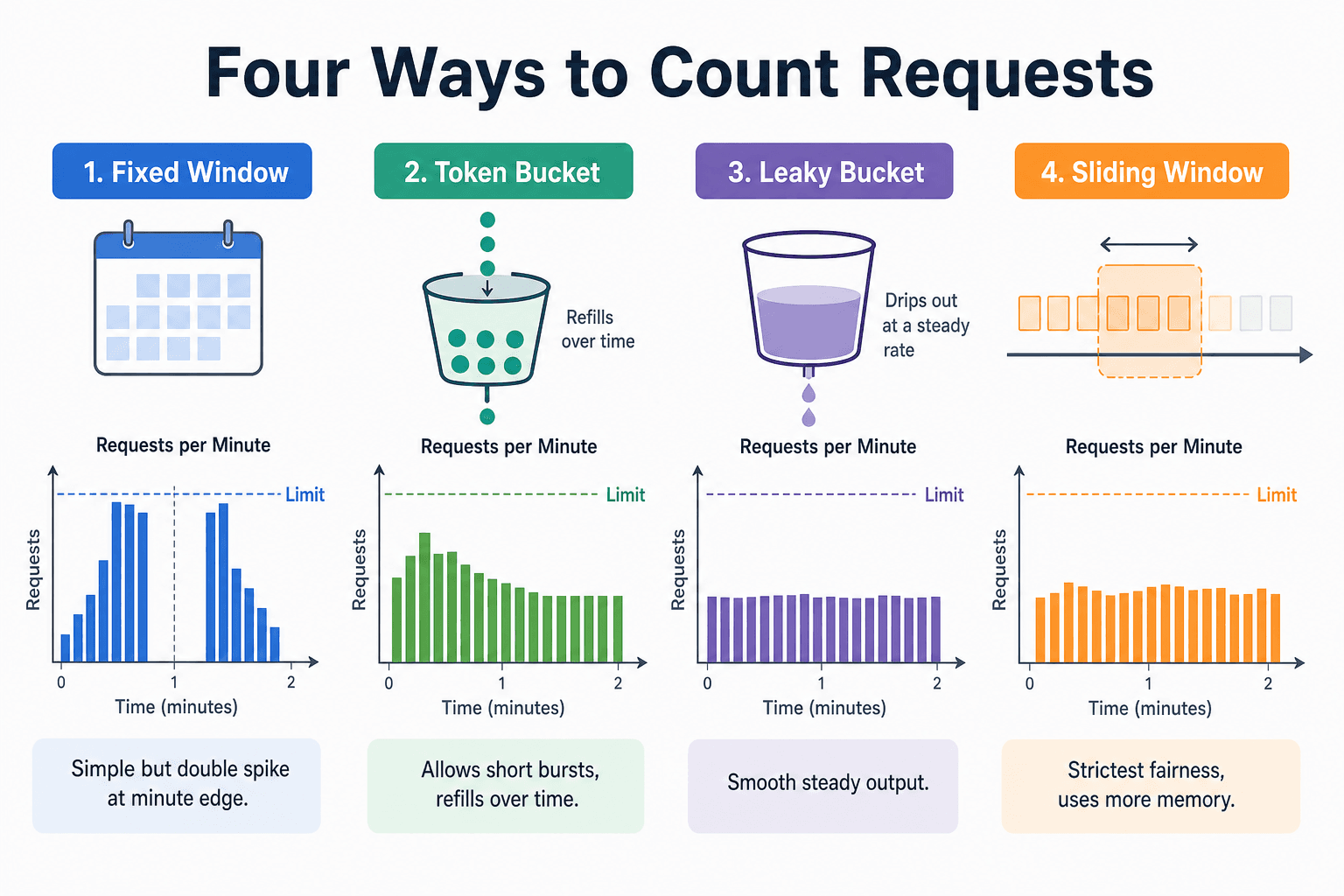
| Fixed window | Count requests in each fixed slice of time (e.g. each calendar minute), then reset to zero | You want something easy to build and explain | A client can send many requests twice—right before and right after the reset—so real traffic can spike above the limit you thought you set |
| Token bucket | Tokens refill at a steady rate; each request spends tokens; you can save up tokens up to a maximum | Public APIs where short bursts are acceptable if average usage stays fair | Product must understand burst behavior; empty bucket means reject (or wait) |
| Leaky bucket | Requests enter a bucket and drain out at a steady rate; if the bucket is full, new requests are rejected | You want smooth, steady traffic into downstream systems | Less friendly to natural burst patterns (e.g. user clicks a few times quickly) |
| Sliding window | Count only requests in the last N seconds rolling forward continuously | You need strict fairness (“never more than X in any rolling minute”) | Stores more state or uses more clever approximations; costs more at huge scale |
The picture at the top of this page summarizes the same four ideas visually. Use it together with the table—not instead of the explanations below.
Fixed window in more detail. Suppose the limit is 100 requests per minute and the window resets at the start of each minute. A client may send 100 requests at second 59 and another 100 at second 0 of the next minute. Each minute looks “fine” on a dashboard, but the database felt 200 requests in two seconds. That does not mean fixed windows are useless; it means you must know this boundary effect exists and decide if your product can tolerate it.
Token bucket in more detail. Imagine a bucket that holds at most 10 tokens and refills 2 tokens per second. A client that was idle can burst up to 10 requests quickly, then is limited to roughly 2 per second afterward. That matches many real APIs where occasional bursts are fine but sustained abuse is not.
Sliding window in more detail. Instead of resetting a counter at each minute mark, you ask: “How many requests happened in the last 60 seconds, including right now?” That closes the boundary cheat but requires remembering timestamps or using approximate structures when you have millions of clients.
For most solid interview answers, naming token bucket or sliding window and explaining burst vs strict fairness is enough depth—if you also explain where the budget is enforced when there are many gateways (see Chapter 1).
What clients should see when they are blocked
A limit is only half a design. The other half is how you tell the client they are blocked, so software and humans do not make the problem worse.
When a request is rejected for quota, servers commonly return HTTP 429 Too Many Requests. Good APIs also return headers such as how many requests remain, when the window resets, or a Retry-After value (seconds to wait). Mobile apps and partner integrations use these signals to back off instead of retrying in a tight loop.
| Header or field | What it tells the client |
|---|---|
X-RateLimit-Limit | Maximum requests allowed in this window |
X-RateLimit-Remaining | How many requests are left (may be approximate) |
X-RateLimit-Reset | When the window resets (often Unix time) |
Retry-After | Seconds (or a date) until the client should try again (especially on 429) |
If you return 429 without guidance, many clients will retry immediately. That retry storm can hurt more than the original traffic spike, because each retry is another request that must be checked and rejected. In interviews, mention 429 plus a clear retry story as part of the design—not as an afterthought.
Errors to distinguish:
- 401 Unauthorized — fix credentials, not backoff.
- 429 Too Many Requests — quota exhausted; use Retry-After.
- 503 Service Unavailable — overload or dependency down; different retry strategy than 429.
What comes next
You can name an algorithm and describe what partners see on 429. The next step is the interview room: requirements, rough numbers, a architecture sketch, tradeoffs, and full Q&A. That is Chapter 3: Rate limiter interview prep.
When you are ready for the full whiteboard case study, continue to the Rate Limiter interview guide.
Next chapter: Rate limiter interview prep
Series home: Rate limiting
FAQs
Q: Which counting method should I say in an interview?
A: There is no single correct name. Choose fixed window if simplicity and coarse caps are enough. Choose token bucket if short bursts are OK. Choose sliding window (or approximate) if the product promises strict rolling fairness. Always pair the name with burst vs boundary behavior.
Q: When would I pick token bucket over a fixed window?
A: When partners or mobile apps burst after idle time but should not sustain abuse—public APIs often fit token bucket. Fixed window is fine for internal abuse caps when you accept spike-at-minute-edge behavior.
Q: What should the HTTP response look like when a client is rate limited?
A: HTTP 429, plus Retry-After and optionally X-RateLimit-Limit / Remaining / Reset. The client should know when to retry without hammering the API again.
Q: Is Redis required for every rate limiter design?
A: Interviews often use Redis as shorthand for a fast shared store all gateways read. The idea that matters is one shared budget per key across servers—not the brand name. Storage details belong in a full design discussion (Chapter 3 and the interview guide).
Key Takeaways
Pick for product shape — fixed window is simple but spiky at boundaries; token bucket allows controlled bursts; sliding window is stricter.
Say the tradeoff out loud — interviewers want *why* you picked an approach, not four names.
429 is half the contract — add Retry-After and limit headers so clients back off.
429 ≠ 503 — throttle vs overload; clients retry differently.
Algorithms sit on the gateway path — counting method and client contract both run before expensive backends.
What's next?
Keep exploring
Interview system design is a web of trade-offs. Pair this topic with a related fundamentals article or a practice problem while it is fresh.