Backend Topic
Rate Limiting & Throttling: API Protection & Trade-offs
Protect APIs from abuse: rate limiting vs throttling, algorithms, distributed enforcement, and implementation trade-offs.
Rate Limiting & Throttling
Why Engineers Care About This
Rate limiting protects your API from abuse, but it also affects legitimate users. When you get it wrong, you either allow attacks (limits too high) or block legitimate traffic (limits too low). Good rate limiting balances protection with usability—preventing abuse without frustrating users.
When your API is overwhelmed by requests, or legitimate users are blocked, or attackers bypass your limits, you're hitting rate limiting problems. These problems compound. Without rate limiting, a single user can overwhelm your API. With rate limiting that's too strict, legitimate users can't use your API. Understanding rate limiting algorithms and trade-offs helps you design systems that protect without blocking.
In interviews, when someone asks "How would you implement rate limiting?", they're really asking: "Do you understand different rate limiting algorithms? Do you know how to implement distributed rate limiting? Do you understand the trade-offs between different approaches?" Most engineers don't. They implement simple rate limiting without understanding algorithms, or avoid rate limiting because it's "too complex."
For a full system design walkthrough—algorithms, shared state, failure modes, and headers—see the Rate Limiter interview guide. For a structured reading path, start with Rate limiting fundamentals and Rate limiting algorithms.
Core Intuitions You Must Build
-
Rate limiting is about preventing abuse, not just "limiting requests." Rate limiting protects your API from DDoS attacks, abuse, and resource exhaustion. But it also affects legitimate users. Design rate limits that are generous enough for normal use but strict enough to prevent abuse. Also, rate limits should be communicated clearly (headers, error messages) so clients can handle them gracefully.
-
Rate limiting and throttling are related but not the same. Rate limiting usually means rejecting or capping once a budget is exhausted—often with 429. Throttling slows how fast you admit work—queues, delays, or leaky-bucket smoothing—sometimes before you ever reject. Production APIs often use both at different layers.
-
Different algorithms solve different problems. Token bucket allows bursts (accumulate tokens over time, use them in bursts). Leaky bucket smooths traffic (requests flow at constant rate). Fixed window is simple but allows bursts at window boundaries. Sliding window is more accurate but more complex. Choose based on your requirements. Token bucket for APIs that need to handle bursts. Leaky bucket for APIs that need smooth traffic.
-
Distributed rate limiting requires shared state. Rate limiting in a single server is easy (use in-memory counters). Rate limiting across multiple servers requires shared state (Redis, database). This adds complexity and latency. Also, distributed rate limiting must handle race conditions (two servers check limit simultaneously). Use atomic operations (Redis INCR) or distributed locks to prevent race conditions.
-
Rate limit headers help clients handle limits gracefully. When a request exceeds the rate limit, return 429 (Too Many Requests) with headers (
X-RateLimit-Limit,X-RateLimit-Remaining,X-RateLimit-Reset) orRetry-After. This tells clients their current limit, how many requests remain, and when the limit resets. Clients can use this information to throttle themselves or retry at the right time. -
Different user types need different limits. Free users might have lower limits (100 requests/hour) than paid users (10,000 requests/hour). API keys might have different limits than authenticated users. Design rate limits that scale with user type. Also, consider burst limits (allow short bursts) vs sustained limits (average over time). Burst limits handle traffic spikes, sustained limits prevent abuse.
-
Rate limiting is a trade-off between protection and usability. Strict rate limits protect your API but can block legitimate users. Loose rate limits allow more traffic but provide less protection. Find the balance—rate limits that prevent abuse without blocking normal use. Also, monitor rate limit violations—high violation rates might indicate limits are too strict or abuse is happening.
Algorithm comparison at a glance
Four algorithms differ mainly in burst tolerance, accuracy, and store cost:
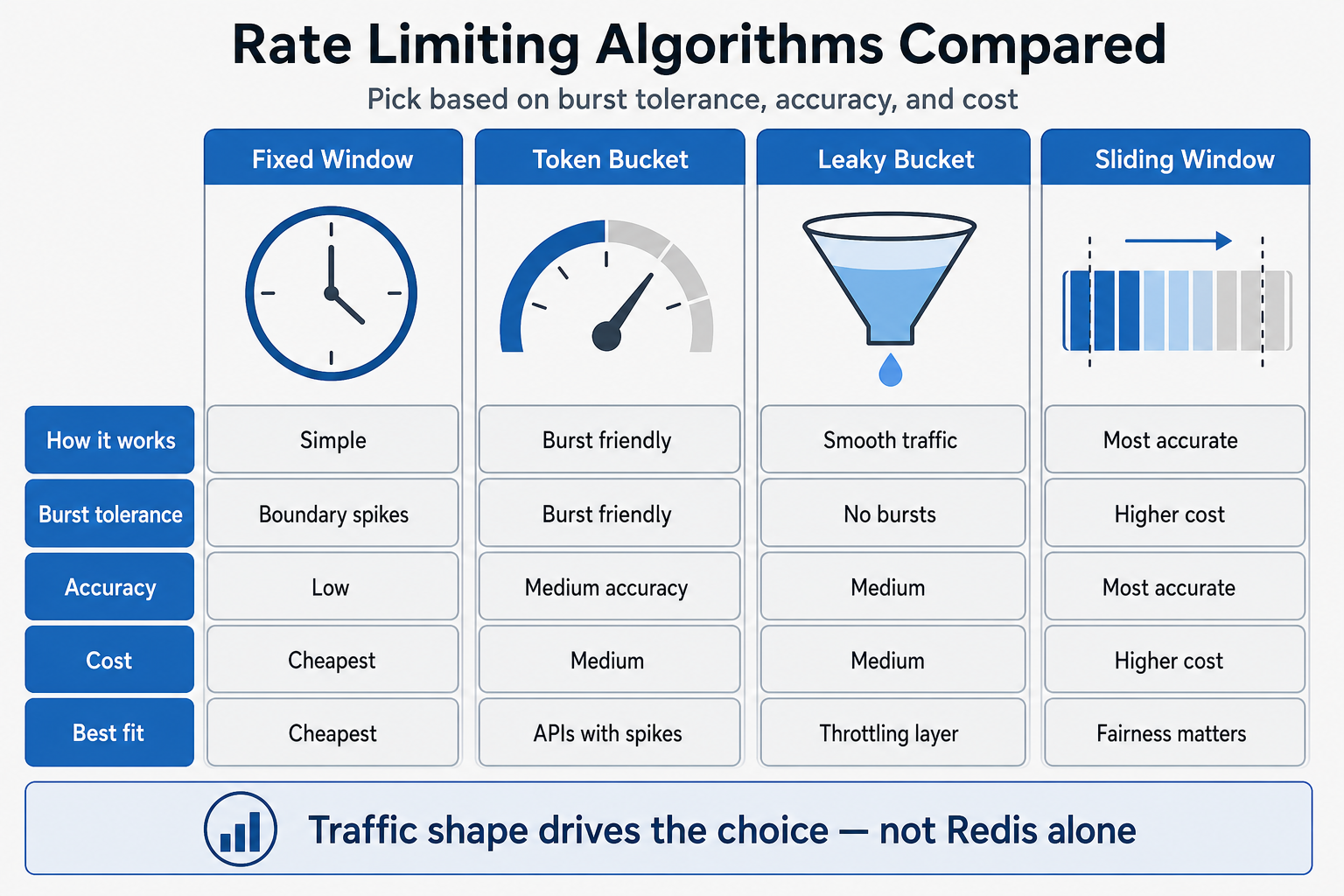
| Pattern | Burst friendly? | Accuracy | Cost / complexity | Pick when |
|---|---|---|---|---|
| Fixed window | Poor (boundary spikes) | Low | Cheapest | Simple internal APIs; spikes at window edge are acceptable |
| Token bucket | Yes | Medium | Medium | Clients need short bursts; mobile or batch callers |
| Leaky bucket | No (smooth) | Medium | Medium | Protect downstream steady rate; throttling before hard reject |
| Sliding window | Medium | High | Higher store cost | Fairness matters; boundary spikes are unacceptable |
Request path (distributed limiter)
Every request should hit the limiter before expensive work. With many gateways, all instances must read the same budget for a given client key:
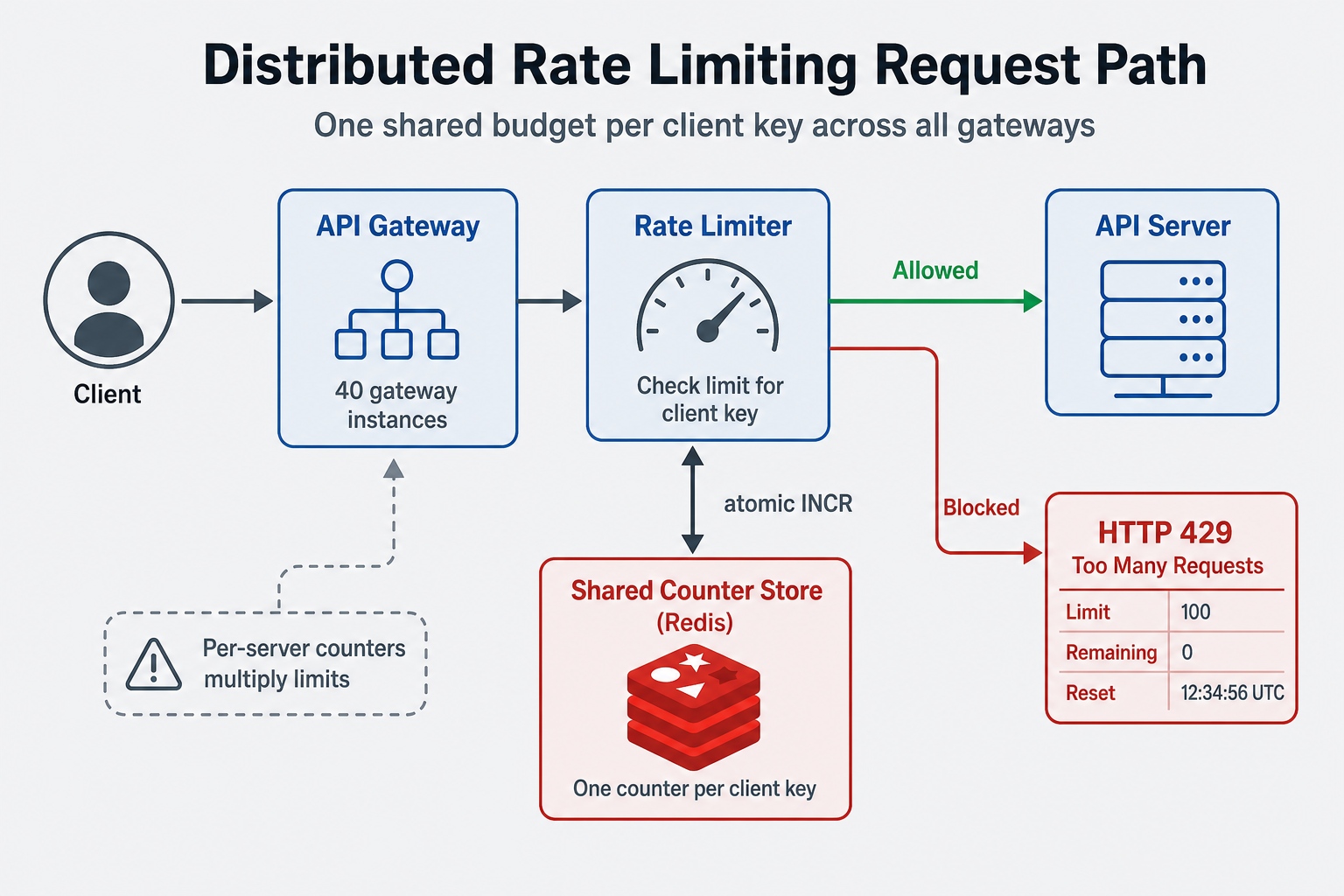
Per-server counters skip the shared store—and quietly multiply how much traffic one client can send.
Subtopics (Taught Through Real Scenarios)
Rate Limiting vs Throttling
What people usually get wrong:
Engineers treat them as synonyms. Rate limiting usually means hard rejection (429) once a budget is gone. Throttling means slowing how fast you accept work—queue, delay, or smooth—sometimes before you ever reject.
How this breaks systems in the real world:
A payment API only hard-rejected at 100 requests per minute. Bursty clients still spiked CPU because every request entered the handler before the counter check at the end of the chain. Moving throttling in front (leaky bucket at the edge) smoothed load; rate limiting stayed as the last-line 429 for abuse. But the real lesson is: where you shed load matters as much as the number on the limit.
What interviewers are really listening for:
They want you to name where in the path you throttle vs reject—edge, gateway, app—and whether clients get Retry-After or silent delay. Junior engineers describe one counter. Senior engineers describe a path with both smoothing and a hard cap.
Token Bucket and Window Algorithms
What people usually get wrong:
Engineers often think "rate limiting is just counting requests." But different algorithms have different behaviors. Token bucket allows bursts—tokens accumulate over time (e.g., 100 tokens per minute), and requests consume tokens. If you have 100 tokens, you can make 100 requests immediately (burst), then wait for tokens to refill. This is useful for APIs that need to handle traffic spikes. Leaky bucket smooths traffic—requests flow at a constant rate, no bursts allowed.
How this breaks systems in the real world:
An API used fixed window rate limiting (100 requests per minute). This worked, but allowed bursts—at the start of each minute, users could make 100 requests immediately, then nothing for the rest of the minute. This created uneven load (high at minute start, low otherwise). During traffic spikes, all users hit the limit at the same time, then waited. The fix? Use token bucket—tokens accumulate gradually, allowing more even distribution of requests. But the real lesson is: different rate limiting algorithms have different behaviors. Choose based on your traffic patterns.
What interviewers are really listening for:
They want to hear you talk about different rate limiting algorithms (token bucket, leaky bucket, fixed window, sliding window) and their trade-offs. Junior engineers say "just count requests per minute." Senior engineers say "token bucket allows bursts, leaky bucket smooths traffic, fixed window is simple but allows boundary bursts, sliding window is accurate but complex—choose based on requirements." They're testing whether you understand that rate limiting algorithms have different behaviors and trade-offs.
Distributed Rate Limiting
What people usually get wrong:
Engineers often implement rate limiting per server (each server has its own counter). This works for single-server deployments, but fails in distributed systems. With 10 servers, a user could make 10x the limit (10 requests per server = 100 requests total). Distributed rate limiting requires shared state (Redis, database) to track limits across servers. This adds complexity and latency, but is necessary for accurate rate limiting.
How this breaks systems in the real world:
A service had 5 servers, each with its own rate limiter (100 requests/minute per server). A user made 100 requests to server 1, 100 to server 2, etc., totaling 500 requests/minute across all servers. The rate limit was supposed to be 100 requests/minute per user, but the user bypassed it by hitting different servers. The fix? Use distributed rate limiting with Redis—all servers check the same Redis counter, ensuring accurate limits across servers. But the real lesson is: distributed rate limiting requires shared state. Per-server rate limiting doesn't work in distributed systems.
What interviewers are really listening for:
They want to hear you talk about distributed rate limiting, shared state, and race conditions. Junior engineers say "just use in-memory counters." Senior engineers say "distributed rate limiting requires shared state (Redis), must handle atomic updates or race conditions, and adds latency but is necessary for accuracy." They're testing whether you understand that rate limiting in distributed systems is more complex than single-server rate limiting.
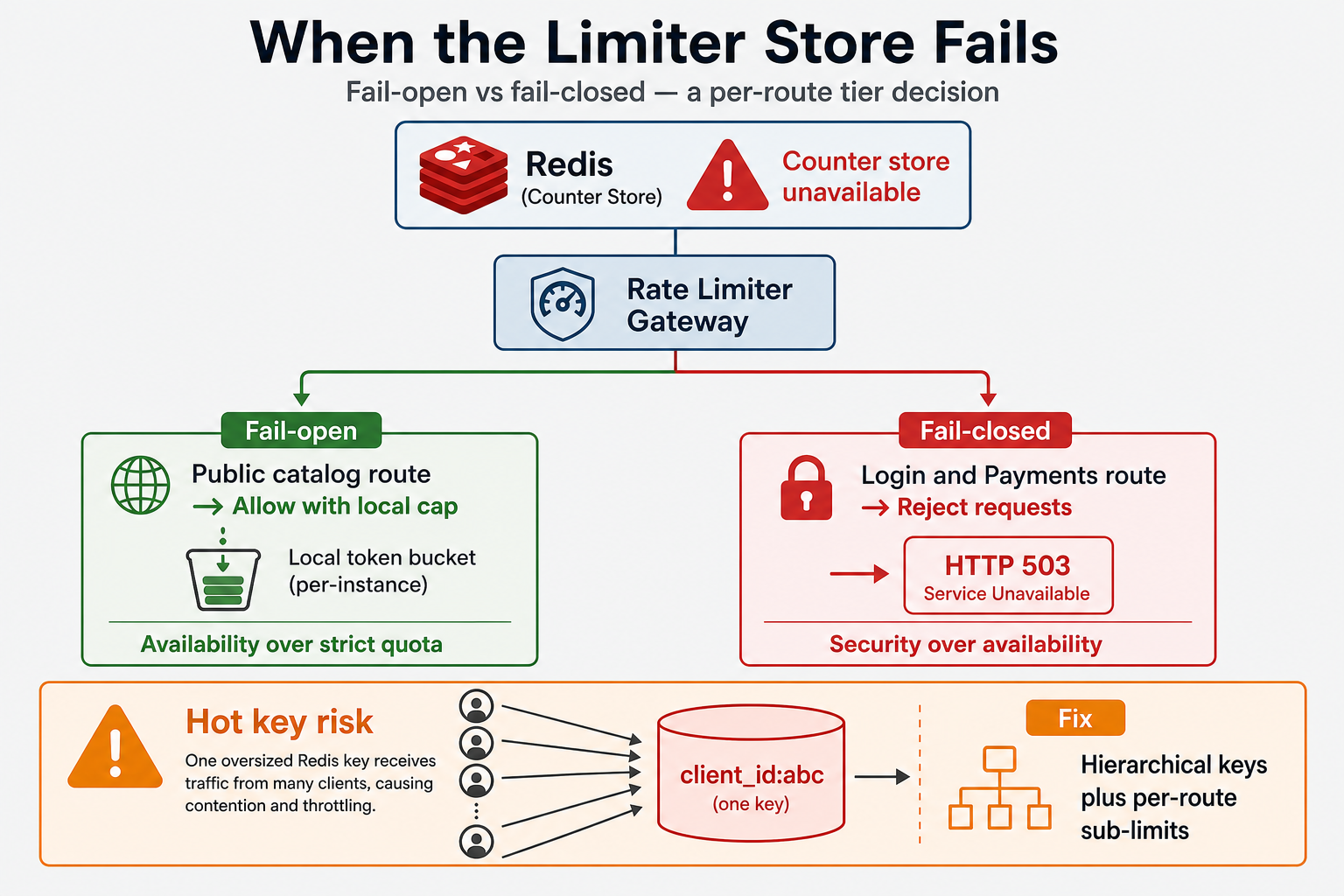
When the limiter dependency fails or one client owns a hot key, protection breaks in different ways:
When the Limiter Store Is Unavailable
What people usually get wrong:
Teams assume Redis is always up and never decide fail-open (allow traffic) vs fail-closed (reject) when the store blips. They also block indefinitely on limiter checks instead of using short timeouts.
How this breaks systems in the real world:
Redis latency spiked during a failover. Gateways blocked on limiter checks; p99 jumped even though backends were healthy. The fix was a product call: public catalog fail-open with a local token bucket cap; login and payments fail-closed with a short timeout. But the real lesson is: the limiter is a dependency with its own failure mode—not a free sidecar.
What interviewers are really listening for:
You state the tradeoff out loud—security vs availability—and pick per route tier, not one global default. Junior engineers say "Redis handles it." Senior engineers say who decides fail-open vs fail-closed and what local fallback cap applies.
Hot Keys and Noisy Neighbors
What people usually get wrong:
One global counter per API key feels fair until a single integration sends most of your traffic—all on one Redis key. The same pattern appears with per-IP limits when one office NAT carries hundreds of users.
How this breaks systems in the real world:
One OAuth client_id saturated a single Redis shard. Other tenants on the same cluster saw elevated latency on unrelated keys. The team added sub-limits per route and hierarchical budgets instead of one flat key per client. But the real lesson is: limit key design is part of rate limiting—not just the number in the limit.
What interviewers are really listening for:
You mention sharding the key space, per-route caps, tiered budgets, or regional limits—not just "we'll scale Redis." Junior engineers pick one key. Senior engineers explain what happens when one client owns the hot key.
Rate Limit Headers and Communication
What people usually get wrong:
Engineers often return 429 (Too Many Requests) without helpful information. But rate limit headers (X-RateLimit-Limit, X-RateLimit-Remaining, X-RateLimit-Reset) help clients handle limits gracefully. Clients can check remaining requests before making requests, or retry at the right time (when limit resets). Also, error messages should explain why the limit was exceeded and when to retry. Don't just return 429—provide information that helps clients handle the limit.
How this breaks systems in the real world:
An API returned 429 without headers or error details. Clients didn't know their limit, how many requests remained, or when to retry. Clients retried immediately (wasting requests) or gave up (poor UX). The fix? Return rate limit headers, Retry-After, and clear error bodies. Clients can now back off instead of hammering the API. But the real lesson is: rate limiting is user-facing. Help clients handle limits gracefully with headers and clear error messages.
What interviewers are really listening for:
They want to hear you talk about rate limit headers, error messages, and client communication. Junior engineers say "just return 429." Senior engineers say "return rate limit headers (Limit, Remaining, Reset) or Retry-After so clients can throttle themselves or retry at the right time." They're testing whether you understand that rate limiting is about communication, not just blocking.
Per-User vs Per-IP Rate Limiting
What people usually get wrong:
Engineers often use per-IP rate limiting (limit requests per IP address). This is simple but has problems—shared IPs (offices, NATs) share limits, and attackers can use multiple IPs. Per-user rate limiting (limit requests per authenticated user) is more accurate but requires authentication. Use per-IP for public endpoints (login, registration), per-user for authenticated endpoints. Also, consider hybrid approaches—per-IP for unauthenticated, per-user for authenticated.
How this breaks systems in the real world:
An API used per-IP rate limiting (100 requests/minute per IP). An office with 100 employees shared one IP. When one employee used the API heavily, they hit the limit, blocking all other employees. The fix? Use per-user rate limiting for authenticated endpoints—each user has their own limit. But the real lesson is: per-IP rate limiting has limitations (shared IPs, IP spoofing). Per-user rate limiting is more accurate but requires authentication.
What interviewers are really listening for:
They want to hear you talk about per-IP vs per-user rate limiting and their trade-offs. Junior engineers say "just limit per IP." Senior engineers say "per-IP is simple but has problems (shared IPs, IP spoofing), per-user is accurate but requires authentication—use per-IP for public endpoints, per-user for authenticated endpoints." They're testing whether you understand that rate limiting strategies depend on your use case.
Interview questions to practice
- Design a rate limiter for a million checks per second across forty gateway instances—where does shared state live, and how do you avoid races?
- Token bucket or sliding window—and what breaks at the window boundary when all clients share the same clock edge?
- Redis is unreachable for thirty seconds—fail open or fail closed, and who owns that call for login vs a public catalog?
- Walk me through the 429 you'd return—what headers does a well-behaved client need to back off?
- One OAuth client drives most of your traffic—how do you key the limit so one hot Redis shard doesn't take down neighbors?
- Free tier and paid tier on the same API—one global cap or hierarchical budgets with burst allowance?
FAQs
Q: What's the difference between rate limiting and throttling?
A: Rate limiting enforces a maximum—often returning 429 when exceeded. Throttling controls how fast traffic is admitted—queues, delays, or leaky-bucket smoothing—without always rejecting. Production APIs often combine both at different layers of the path.
Q: Is Redis always required for rate limiting?
A: Single-server apps can use in-memory counters. Multiple gateways behind a load balancer need shared state (Redis, a dedicated limiter service, or an edge rate limit filter) or each client can send up to N × the intended limit.
Q: Should I fail open or fail closed when the limiter store is down?
A: Fail-closed for auth, payments, and abuse-sensitive routes. Fail-open with a tight local fallback cap is sometimes acceptable for read-heavy public APIs—but state the tradeoff explicitly; it is a product and security decision, not a neutral default.
Q: What headers should a 429 include?
A: At minimum: limit, remaining, and reset (X-RateLimit-*) or Retry-After. Clients use these to back off instead of retrying immediately and wasting quota.
Q: Fixed window vs token bucket—which should I pick in an interview?
A: Name traffic shape first. Fixed window is simple but spikes at window boundaries. Token bucket allows controlled bursts. Sliding window is fairest but costs more in storage and logic. Pick one and say what breaks.
Q: Where do I go for a full rate limiter system design answer?
A: This topic covers fundamentals and trade-offs. For capacity, architecture, and production depth, use the Rate Limiter system design guide and the linked practice problem.
Key Takeaways
One budget per client key — behind a load balancer, local counters multiply limits; shared atomic state keeps one truth
Limiting vs throttling — reject at the cap vs slow admission earlier in the path; production systems often use both
Algorithm matches traffic shape — boundary bursts, burst tolerance, and store cost drive the choice—not "Redis INCR" alone
429 is a client contract — Limit, Remaining, Reset or Retry-After turn rejection into backoff, not blind retries
Limiter outages are your problem too — fail-open vs fail-closed is a per-route tier decision you should say out loud
Hot keys need key design — hierarchical caps and per-route sub-limits beat one flat counter when traffic skews
Related Topics
API Design
Designing 429 responses and rate-limit headers
Caching Strategies
Edge cache reduces origin rate-limit pressure
Circuit Breakers
Fail fast when downstream dependencies overload
Authentication & Authorization
Per-user rate limiting requires identity on the request
Rate limiting fundamentals
Chapter 1: where limits live and why shared state matters
Rate limiting algorithms
Chapter 2: token bucket, leaky bucket, windows, and 429 headers
Rate Limiter system design guide
Full interview walkthrough with architecture and production angles
What's next?
Keep exploring
Backend interviews reward connected thinking. Follow a related topic or practice problem before the details fade.