System design interview guide
Vaccine Booking System Design
Imagine millions of people trying to book a vaccine appointment the moment registration opens. Within seconds, the system receives an enormous spike in traffic, available slots disappear instantly, and thousands of users compete for the same appointment. Designing a system that remains fast, fair, and reliable under this pressure is a classic large-scale system design challenge.
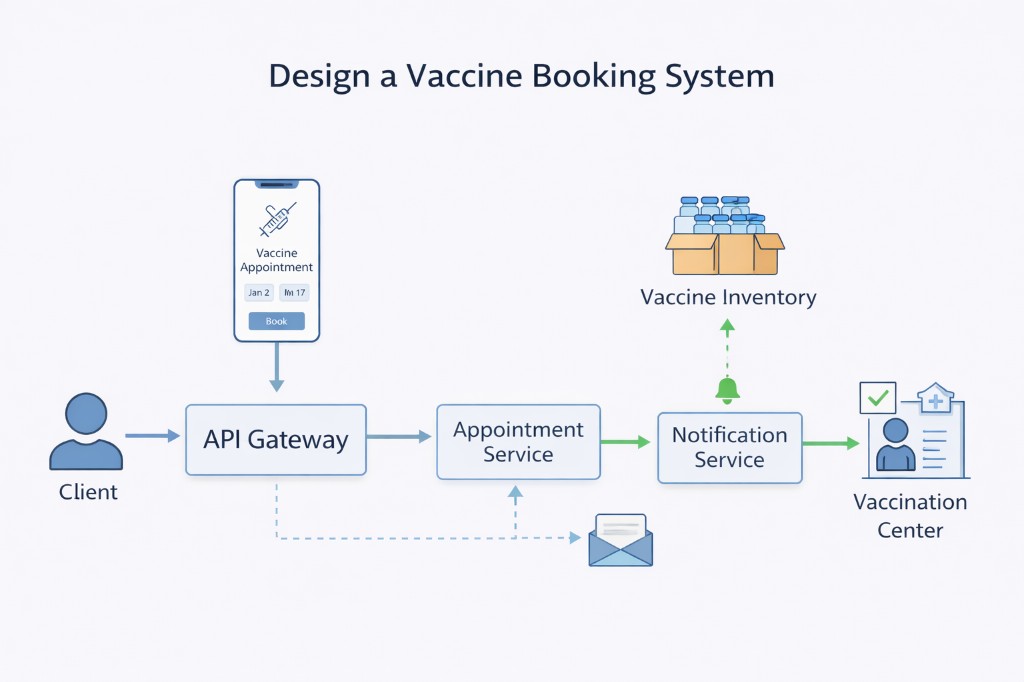
Problem statement
A vaccine booking platform helps users search for vaccination centers and book available slots online. The main challenge is handling millions of users trying to book a limited number of slots at the same time. The system should remain fast, prevent double bookings, keep slot availability accurate, and provide a fair booking experience for everyone.
Introduction
Millions of people open the booking site the moment new appointment times appear. Slots vanish in seconds. Two people can tap “Confirm” on the same last chair at the same moment—and only one of them should get it.
That is the product problem. A vaccine booking site must find nearby clinics, decide who may book, and assign each open time to exactly one person—even when the crowd is huge.
On a quiet day this feels like any scheduling website. On release morning, search, rules, and booking all spike together. If the site confirms the same slot twice, or shows “open” times that are already gone, trust collapses.
Keep three ideas separate:
- Last slot, one winner — When two people race for the final appointment, the system must update the count so it never sells that seat twice.
- Server says yes or no — Age, region, and dose rules can change overnight. The website may show hints; the server makes the final decision at book time.
- Waiting room before the database — Even correct booking logic fails if everyone hits the database at once. Admit people in a controlled way so the core system stays up.
Weak answers say “subtract one from a counter.” That breaks when two servers read the same count. Strong answers walk the last-slot race, name a release-day waiting room, and keep deep eligibility policy for after the first board.
Board path (first read, ~10 min)
Start here if you have never designed a booking flow under flash traffic. Finish this section, then stop and try a mock. Deep eligibility engines, capacity math, and idempotency keys live in After one mock.
What problem are we solving?
On release morning, people fight over a few open chairs. Before you name databases, answer:
“When two users confirm the last slot at the same time, who wins—and how does everyone else get a clear ‘gone’ answer?”
- One winner → that person gets a real appointment row.
- Everyone else → a clear “slot no longer available,” not a silent double book.
Separately: when millions refresh at once, the site must slow the crowd at the door (a waiting room) so search and book do not melt the database.
What to write on the board (start simple)
Write these lines. Plain English is enough for a first mock. No brand names.
- Find / check / book — Browse open times → server checks “may this person book?” → confirm one appointment.
- Last-slot race — Two people, one remaining seat → only one confirmation; the other gets “gone.”
- Waiting room — On release day, people wait in line before heavy search/book hits the database.
- Search may lag; book must not lie — The list of open times can be a second or two behind; confirm always re-checks the real count.
That’s your whole first board. Deep eligibility trees and retry keys come after this mock.
Clarifying questions (identity, last slot, fairness, out of scope)
Start with who may book and how the last seat behaves—every later box hangs off that.
You: “When one slot remains, do we hold it for a few minutes while the user finishes, or confirm in one step—as long as we never double-book?”
Interviewer: “Either hold-then-confirm or a single safe book is fine—just prevent double booking.”
Checkpoint: Write “last slot → one winner” on the board before drawing queues.
You: “On release morning, first-come-first-served, lottery, or priority groups?”
Interviewer: “Pick one fairness model and defend it.”
Checkpoint: Name the model in one sentence (for example: “ordered waiting room, then book”).
You: “Is our booking database the source of truth for online slots, or must every clinic calendar match in real time?”
Interviewer: “Your system is source of truth for online slots; clinics sync later if needed.”
You: “I want to park payment, building the national login network, and a full call-center product—focus on last-slot safety and release-day traffic. Deep eligibility rule engines can wait until after the first board. Does that match?”
Interviewer: “Yes—focus on booking under contention.”
If they push on full policy trees, audit schemas, or retry-key headers—park it. Answer after your requirements mock; those details live under After one mock.
What you can say out loud (next to the board)
- Race: “Two people hit the last slot—only one confirmation; the other gets a clear ‘gone.’”
- Waiting room: “On release day I put a line at the door so millions of refreshes don’t melt the database.”
- Server check: “The server re-checks ‘may book?’ at confirm time—not only what the screen showed.”
- Honesty: “Search can lag a second; book always re-checks the real remaining count.”
First-pass: what should stick
- Last slot, one winner — Never confirm the same chair twice when two requests race.
- Waiting room on spike day — Control admission before search and book hit the core store.
- Book tells the truth — Success means the appointment row is saved—not that a reminder text already arrived.
End of first pass
⏸ End of first pass — stop scrolling.
You have enough for the requirements stage. Practice that now. Do not continue into capacity, deep eligibility, or retry keys until you’ve done a short requirements mock.
→ Practice requirements only (~5–10 minutes)
Ready for depth? Only then open After one mock.
After one mock
Return to Board path if this is your first read.
Everything below is for after one mock—or when the interviewer pushes on eligibility depth, capacity, retries, and production failure modes.
Depth map (read in order):
- How to approach (full clarifying + pacing)
- Capacity (why release day changes the design)
- High-level architecture
- Detailed design (eligibility, inventory, waiting room)
- Dig: last-slot race, then Idempotency-Key after the double-tap story
Skip ahead only if the interviewer is already there.
How to approach
Start the way a user would experience the product, not by listing tools or buzzwords. Spend the first few minutes turning a vague prompt into a contract you can design against. Talk through clarifying questions out loud, then walk one booking end to end before you name databases.
Clarifying questions (say these in the room)
Start with identity and rules, because every later choice (inventory shape, waiting room, audit) hangs off who may book and how slots behave.
You: “How do users sign in—government ID, phone OTP, or an existing health account? That decides what attributes we can trust for eligibility.”
Interviewer: “Assume a verified login that gives age and home region; other form fields may be self-reported.”
That answer tells you the server must re-check trusted attributes at book time, not only trust what the app showed.
You: “When one slot remains, do we hold it for a few minutes while the user finishes checkout, or confirm in one step?”
Interviewer: “Either hold-then-confirm or a single transactional book is fine—just prevent double booking.”
Now you know inventory safety is non-negotiable, and you can pick hold vs single TX with a tradeoff.
You: “On release morning, should we admit users first-come-first-served, run a lottery, or prioritize certain groups?”
Interviewer: “Pick one fairness model and defend it.”
Strong answers name the model out loud and explain how tokens or queue order prove it.
You: “Does the clinic’s own calendar need to match ours in real time, or is our database the source of truth for online bookings?”
Interviewer: “Your system is source of truth for online slots; clinics sync later if needed.”
That keeps you from boiling the ocean on two-phase clinic integration.
You: “I want to leave payment processing, national identity provider internals, and a full call-center CRM out of scope so we can focus on eligibility, inventory, and flash traffic. Does that match what you want?”
Interviewer: “Yes—focus on booking under contention.”
Saying out of scope early stops you from spending the round on adjacent products.
A practical order in the room
- Clarify scope (who can book, reschedule rules, clinic integration, fairness model).
- Explain server-side eligibility and store which rule version was used.
- Walk through two users booking the last slot—only one succeeds.
- Explain release-day traffic: waiting room, admission token, then search and book.
- Explain what support can show when someone asks, “Why was I denied?”
In the room (say this opening in four short lines):
- “Eligibility stays on the server with versioned rules—I’ll deepen the rule engine after the booking race.”
- “Booking updates inventory in one safe step so the last slot cannot be sold twice.”
- “On release day, a waiting room sits in front so refreshes don’t melt the database.”
- “Search may lag a second; book always re-checks. Reminders go out only after the appointment row is saved.”
Out of scope (and why you park these)
Write a short out-of-scope list on the board so the interviewer sees you can bound the problem.
Payment and insurance billing. Charging a card or filing a claim is a real product, but it steals the interview from the hard part: safe inventory under flash traffic. You can note that payment, if needed, should be idempotent and should not lock the slot forever without a timeout.
Building the national identity provider itself. You need verified attributes; you do not need to design the whole login network in this round.
Full CRM / call-center tooling. Support needs an audit read path; they do not need a complete ticket system drawn on the whiteboard.
Perfect real-time sync with every clinic’s internal calendar. Treating your booking database as the source of truth for online slots keeps the design honest. Bi-directional sync is a later integration project.
Capacity estimation
Before you draw architecture boxes, use rough numbers to stay realistic. You do not need perfect statistics. You need a sense of scale so you do not promise something impossible.
On most days, booking traffic is moderate. On slot release day, when a new group becomes eligible, traffic can jump ten times or more compared to a normal day. If you design only for quiet hours, release morning will surprise you.
| Dimension | Rough scale | What this means for your design |
|---|---|---|
| Users when slots open | 10×–100× a normal day | Control traffic before it hits slot search and book |
| Slots at a busy clinic | Often only tens per hour | Many users may fight over the same few rows in the database |
| Booking writes at peak | Thousands per second if ungated | Keep each booking transaction short; split data by clinic or region |
| Audit records | Kept for years | Store audit data separately or partition it over time |
| Reminder messages | Spike the day before visits | Send reminders in the background, not during the book request |
Three practical lessons follow from this table:
- Do not send every reminder email while the user waits on the booking screen.
- Do not let every page refresh hit the main database on release day without a queue or cache in front.
- And when the API returns success for a booking, that should mean the appointment is saved in the database—not that a text message has already been delivered.
High-level architecture
What breaks if you merge everything
Imagine one API that uploads large files, checks eligibility, updates slot counts, sends email, and writes analytics—all in one slow synchronous step. At peak, the user waits on the slowest part. A simple “confirm booking” action could get stuck behind unrelated work.
The design also fails if each application server keeps its own copy of “slots remaining.” Two servers can both think one slot is left and both confirm a booking. Logging readable health data for debugging breaks trust if eligibility is supposed to be private.
What works: separate rules, inventory, and audit
Break the system into clear responsibilities:
Identity answers “who is this person?”—for example through a government login or phone verification. You need that before eligibility and before tying an appointment to a user.
The rules service loads the current policy (age, location, dose rules) as versioned configuration—not scattered if statements in many services. It returns whether the user may book and stores which rule version was used.
Search lets users browse centers and times. This path is read-heavy. It can use copies of data that may be slightly out of date, as long as the final book step re-checks the truth.
Booking updates inventory on the main database in one safe step: confirm eligibility, lock the slot, decrement the count, save the appointment.
Audit keeps a durable record of decisions (especially denials) so support can explain them later.
Notifications send reminders after the appointment is saved, using a background queue so email or SMS delays do not block booking.
[ User ] --> [ CDN / static ] --> [ Waiting room edge ]
                    |
                    v signed admission token (rate limited)
[ Eligibility API ] --> Rules engine (versioned) --> decision + audit
        |
        v
[ Slot search ] --> read-optimized (may be slightly stale)
        |
        v
[ Book slot ] --> [ TX: decrement remaining OR lock row ] --> confirm
        |
        +--> outbox --> reminders / calendar / analytics (async)
The diagram below shows the same flow: users pass through admission control, eligibility runs before browse, and booking commits on the primary database while reminders run later.
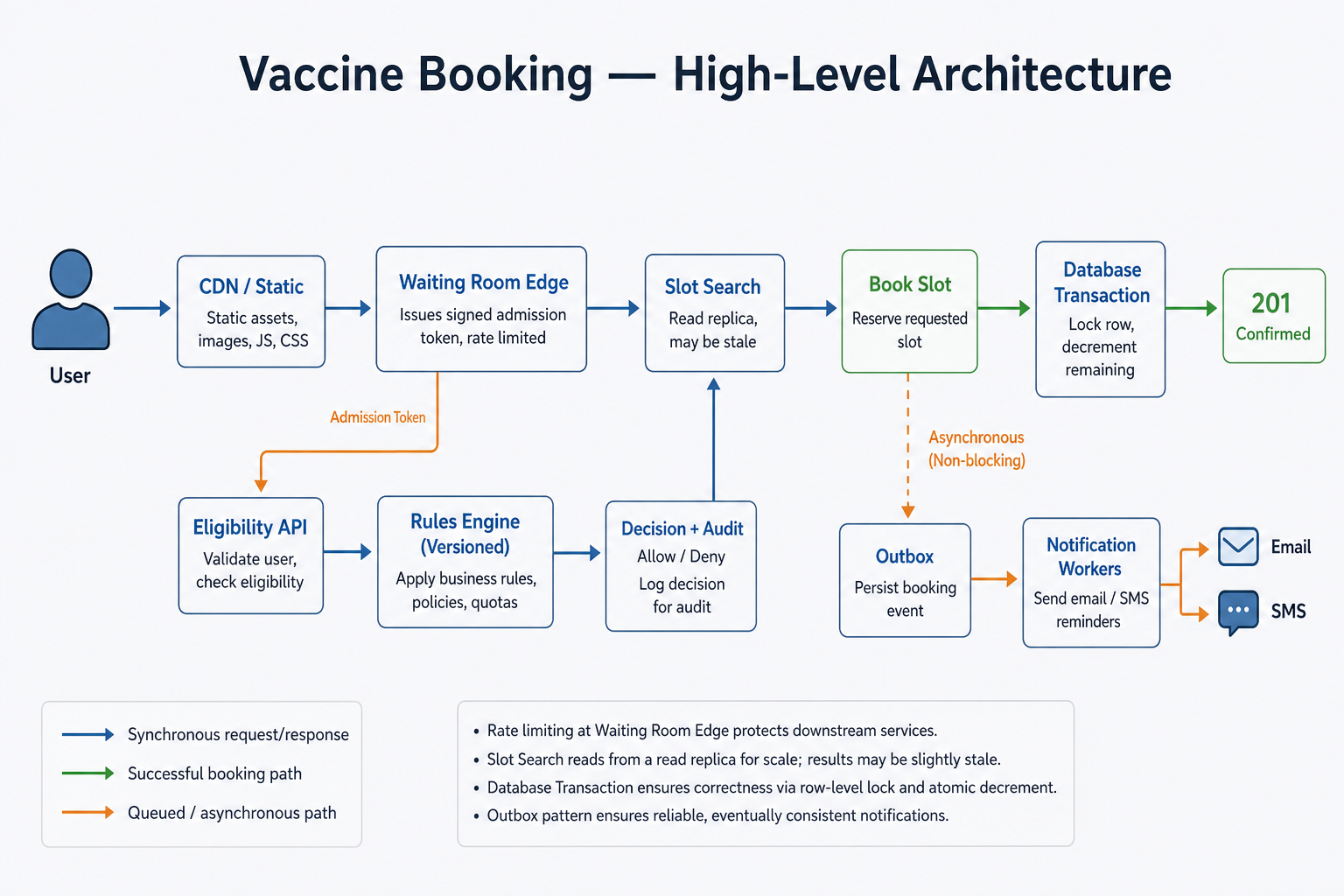
Figure: Search results may lag slightly. Booking always re-checks eligibility and slot count in one transaction on the primary database.
In the interview, three short phrases help you sound precise. Each one answers a follow-up interviewers often ask:
-
A successful book response means the appointment row is saved. When
POST /appointmentsreturns success, you are promising the row exists in the primary database—the slot count was decremented (or the seat row was locked) inside one transaction. That is the contract with the user. Do not describe booking as “done” only because a worker picked up a reminder job or because a push notification was queued. -
Email and SMS come afterward. Confirmation texts and calendar invites run through a background queue or outbox after commit. If the SMS provider is slow or down, the appointment still stands. If booking fails, you do not send a confirmation that would confuse support. Say aloud that reminders are follow-ups, not proof the slot was reserved.
-
Search is a hint; booking is the lock. Slot search can use read copies or cache so millions of users can browse without hammering the primary database. Those results may be a second or two stale—that is acceptable while someone is picking a time. At book time you re-check the current rules and the current slot count on the primary in one safe step. Browsing shows what probably is free; booking is when you take the slot.
Core design approaches
Interviewers want you to compare options, not name one database and stop.
| Approach | Plain idea | Good when | Watch out |
|---|---|---|---|
| Counter per slot | One row per time slot; decrease count only if above zero | Few seats per slot; simple design | One popular clinic can create a hot row many requests fight over |
| One row per seat | Each physical seat is its own row; only one booking allowed | Strong protection against double book under load | More rows; search must add up available seats |
| Hold then confirm | Slot moves from available → held → confirmed with a time limit | User needs a few minutes to finish checkout | Held slots that never confirm need cleanup |
| Waiting room tokens | Edge lets in a fixed number of users per second | National release at a fixed time | Queue order (first-come vs lottery) is a product choice—state yours |
| Rules as data | Policy lives in versioned config, not only in code | Rules change often during rollout | Bad deploy needs quick rollback to prior version |
For the last available slot, use either a safe counter update inside one database transaction or one row per seat with a rule that rejects a second booking.
For release day, control traffic at the edge instead of hoping the database survives unlimited refreshes. When millions of people open the site at the same second, every refresh cannot become a slot search and a book call against the primary database—no amount of “add more app servers” fixes that if each new server just forwards more traffic downstream. Put a waiting room at the CDN or API gateway: admit users at a fixed rate, issue a signed admission token, and only let those requests through to search and book. Users may wait in line, but the database stays writable for the people who actually get in.
Data model
Without a clear data model, “we use a database” is not a design. These are the main records interviewers expect you to name.
Inventory and appointments
| Record | What it stores | Why it matters |
|---|---|---|
clinic | Location, capacity settings | Lets you shard load by site |
slot or seat | Time window, remaining count or one row per physical seat | The row you lock at book time |
appointment | User, slot/seat, status, timestamps | Proof the booking exists |
hold (optional) | Temporary reservation with expiry | Supports hold-then-confirm |
Rule of thumb: If you use a counter, never allow remaining to go below zero. If you use one row per seat, a unique constraint on “this seat is booked” prevents two winners.
Eligibility and audit
| Record | What it stores | Why it matters |
|---|---|---|
rules_vN | Versioned policy (age, region, dose) | Rollback and explainability |
eligibility_decision | decision_id, user, rule_version, allow/deny, reason codes | Support can answer “why was I denied?” |
| Admission token claims | User/session id, expiry, signature | Waiting room proof without trusting the client alone |
Keep audit data separate from noisy application logs. Audit is durable and access-controlled; debug logs are not where private health details belong.
Detailed design
Eligibility
When someone starts booking, they provide details such as age and location—some verified by login, some entered on a form. The server loads the current rules, decides yes or no, and saves a decision record that includes the rule version and reason codes. You may remember that decision briefly in the session to avoid repeating work on every click.
Eligibility is not a one-time stamp you can reuse forever. Someone might pass the check at 9:00 AM—the screen says “you look eligible”—then spend five minutes picking a clinic and a time. By 9:05 AM the policy may have changed: a new age group opened, a zip code was added or removed, or ops rolled back a bad rule deploy. If you only checked once at the start, you could confirm an appointment the current rules would reject.
When the user taps Book, check eligibility again—do not trust the message from five minutes ago.
Do it in the same database step that reserves the slot:
- Load the current rules (
rule_version). - Ask again: is this person still allowed to book?
- Only if yes—take the slot and save the appointment.
The “you’re eligible” screen earlier was just a guide while they browsed. The real decision happens at Book.
Booking
The user picks a slot from search results. Those results come from read copies or cache, so they may be a second or two behind the primary database. That is fine while the user is browsing—they are choosing a time, not taking it yet. Do not treat search as proof the slot is still free.
They submit a book request with an Idempotency-Key—a unique id for that one submit attempt (for example, generated when they tap “Confirm”). Mobile networks drop packets; users double-tap; clients retry on timeout. Without the key, the same person could create two appointment rows for one intentional booking. With it, a retry returns the same result as the first success instead of booking twice.
Inside one database transaction:
- Confirm the user is still eligible under the current rules.
- Lock the slot (or seat) row.
- Confirm at least one slot remains.
- Decrease the count and save the appointment.
- Commit.
Only after commit should the API return success to the user. Then queue reminder messages in the background—email, SMS, calendar invite. A slow text provider must not block the book response, and a failed SMS must not undo a valid appointment.
In the interview, walk the path in order—do not skip the re-checks:
- Eligibility first — rules may have changed since the user started.
- Search second — fast browse; results may lag; that is expected.
- Book last — one transaction on the primary database with a fresh eligibility check and a fresh slot count. That is when you take the lock.
Architectural dig: booking the last slot
This is the interview meat: what happens inside the boxes when two users race, and why naive designs fail.
1) Waiting room and admission
Owns: Slowing the crowd before search and book hit origin.
Lifecycle: User joins queue → edge admits at a fixed tokens-per-second rate → signed admission token with expiry → only requests with a valid token reach eligibility/search/book.
Why not “just add web servers”? More origin servers mean more callers hammering the same inventory rows unless you throttle admission first.
Interview land: “Release day is an admission-control problem before it is a database-capacity problem.”
2) Race on the last slot (bad vs great)
Bad design: read count, subtract, write
t0  User A reads remaining = 1
t0  User B reads remaining = 1
t1  A writes remaining = 0 and confirms
t1  B writes remaining = 0 and confirms
    two families, one chair
Great design: one short transaction
BEGIN
  re-check eligibility for current rule_version
  LOCK slot/seat row
  IF remaining > 0 (or seat free)
    decrement / mark booked
    INSERT appointment
    COMMIT → 201
  ELSE
    ROLLBACK → 409 Conflict
Interview land: “Search can be stale. Book is the lock—one transaction, one winner.”
3) Idempotency on retries
Mobile networks drop responses. Without an Idempotency-Key, a timeout retry creates a second appointment for the same intent. Store the key with the first successful book and return the same appointment on replay.
4) Async after commit
Reminders, calendar invites, and analytics run from an outbox or queue after the appointment row exists. Slow SMS must not block the HTTP response, and a failed SMS must not erase a valid booking.
Key challenges
| Challenge | What users see if it goes wrong | What to say in the interview |
|---|---|---|
| Rules changed since last check | “I was eligible earlier but denied now” | Re-check eligibility and inventory together at book time |
| Double click or retry | Two confirmations for one attempt | Idempotency-Key plus database uniqueness rules |
| Bots | Slots gone in seconds; real users shut out | CAPTCHA, rate limits, staggered release windows |
| Reporting | News about leaked health data | Aggregate reporting with strict access controls |
| Clinic calendar sync | Desk disagrees with the app | Your saved appointment is source of truth; sync calendars in the background |
Correct inventory and clear explanations matter more than extra features in public-health booking systems. Users forgive a long queue more easily than a wrong denial or a double-booked chair—and journalists and regulators will ask for proof, not a prettier homepage.
Scaling the system
Regions: Some countries require health and identity data to stay in-country. Serve browse traffic from nearby infrastructure when you can, but run booking writes on the authoritative database for that region. Do not let a user in Region A book inventory rows that legally must live only in Region B.
Read copies: Use read copies for slot search so millions of users can browse without every refresh hitting the primary database. Run booking writes only on the primary so you never decrement inventory against a stale count. Search shows what was probably free a moment ago; book asks the primary what is free right now.
Split by clinic or region: Store slot data partitioned by site_id or region_id so one very busy hospital does not block the whole country. A famous clinic on the evening news can become a hot row—many requests fight over the same few inventory records unless data is sharded.
Background workers: Scale reminder workers based on queue depth, not only web server CPU. Reminder volume spikes the day before appointment day; that load should not compete with live booking traffic on the same workers.
Watch how often bookings fail with “slot gone” (HTTP 409) per clinic. A high 409 rate at one site often means stale search, a hot inventory row, or demand far above supply—not necessarily “users are impatient.”
Failure handling
| Scenario | What the user sees | What to build |
|---|---|---|
| Rules service down | Cannot start a new booking | Often block new eligibility checks until recovered |
| Database trouble in one region | Booking fails there | Fail closed in that region; do not guess slot counts |
| Reminder email fails | No email, but appointment still exists | Retry reminders; alert if messages pile up dead |
| Wrong rules deployed | Wrong people booked or denied | Pause bookings; roll back rule version; re-check affected users |
When in doubt about booking correctness, fail closed. If eligibility is unclear, or the database in a region is unhealthy, or you cannot verify slot count safely—stop new bookings rather than guess. A long queue frustrates users; assigning two patients to one chair breaks trust and creates a support nightmare that lasts far longer than a wait screen.
API design
A minimal API surface looks like this:
| Endpoint | Role |
|---|---|
POST /v1/eligibility:evaluate | Check rules; return decision id and rule version |
GET /v1/slots | Search by location and time |
POST /v1/appointments | Book a slot; requires Idempotency-Key |
DELETE /v1/appointments/{id} | Cancel per policy |
GET /v1/slots parameters
| Param | Role |
|---|---|
lat, lng, radius_km | Find centers near the user |
from, to | Time window |
rule_version | Optional hint; server still validates |
The usual flow runs in three steps: check eligibility (server decides with rule_version), browse slots on the read path (knowing results may lag slightly), then book in one safe transaction on the primary with Idempotency-Key. Do not merge browse and book into one ambiguous “reserve” call that leaves inventory unclear.
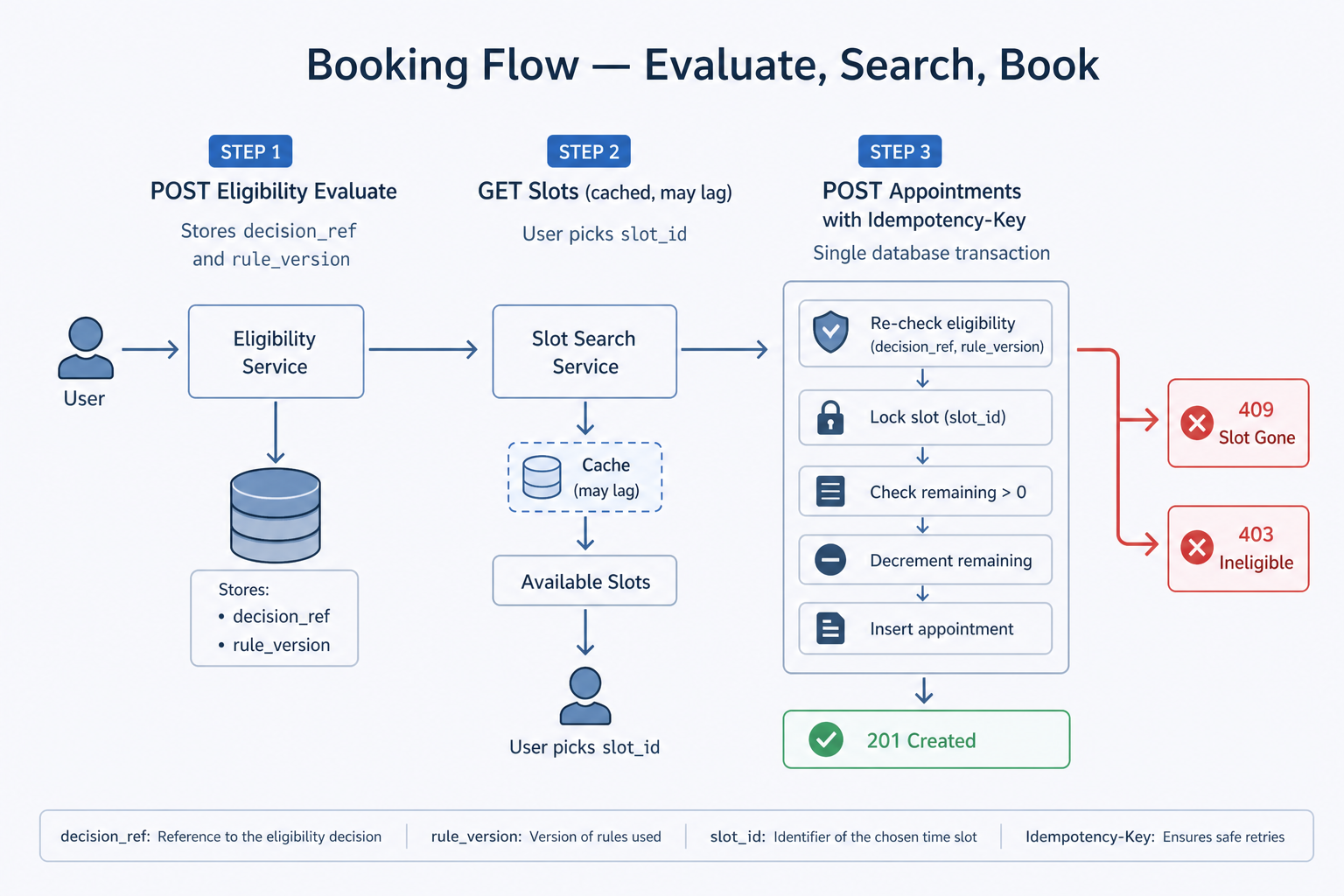
Figure: Idempotency-Key makes duplicate submits safe. HTTP 409 means the slot is gone—ask the user to pick another time.
Important errors: 409 slot no longer available; 403 not eligible under current rules; 429 too many requests or invalid queue token.
If the same Idempotency-Key is sent twice—common on mobile retry—the server must return the same appointment id as the first success, not create a second row. The client treats that as “already booked” and the user stays safe.
Security and abuse
Authenticate before eligibility and booking so anonymous callers cannot burn slots or probe other people’s appointments. Prefer verified login attributes over self-reported fields when the rule depends on them. Rate-limit eligibility evaluate and book endpoints; pair the waiting room with bot controls (CAPTCHA, device signals) when release-day abuse is likely. Do not put age, medical history, or other sensitive details in ordinary searchable application logs—save structured reason codes and rule_version in an access-controlled audit store instead. Support reads the audit record; engineers debug with redacted logs. Stolen sessions need revoke paths; admin rule deploys need canary and rollback, because a bad age rule is a security and fairness incident, not only a config mistake.
Cost awareness
Every double booking wastes clinics, trust, and overtime support. Every release-day outage wastes political and public capital even if “servers were busy.” Waiting rooms trade user wait time for database capacity—that is an explicit cost you accept to keep writes correct. Read replicas and caches make search cheap; overusing them for inventory writes creates expensive 409 storms and angry callers. Audit storage costs money for years—store compact reason codes, not full profiles, and partition by time. Reminder senders should scale on queue depth so SMS spend and worker cost spike the day before appointments, not during the live book request.
Green Dashboard. Angry Users. The Production Mindset System Design Interviews Expect.
Textbooks teach boxes and arrows. On-call teaches this: the graph can look fine while users are furious.
One service returning 200 is not a finished booking. A push notification marked “delivered” is not proof the slot was saved. Interviewers love this gap—it separates diagram-only answers from people who have thought about launch day.
Three nightmares that look “healthy” on a dashboard:
| What the dashboard shows | What is actually happening |
|---|---|
| The status page says every system is operational. | Users sit in a virtual queue for hours because almost no traffic is reaching the booking APIs. |
| The book API reports a low error rate and normal latency. | Two families receive confirmation emails for the same clinic chair at the same time. |
A log line only says not eligible with no other detail. | Support and angry callers have no way to explain which rule blocked the booking. |
Track the whole journey—queue → book → appointment row—not one green metric in the middle.
Scene 1: The queue that never moves
The moment: A new age group opens at 8:00 AM. National news runs the story. The homepage loads. Twitter fills with “the site is broken.”
The trap: Your servers look idle because most users never get past the waiting room. The real bottleneck is at the front door—not the database. The queue may let in too few people per second, reject valid users because server clocks do not match, or block older app versions that stopped sending a required header. Teams often test only the book API in a lab and never follow the full path a real phone takes: join queue → get token → search slots → book.
What to build:
- Watch how many queue tokens you hand out, how often they fail, and how many people who leave the queue actually finish a booking—not just whether your servers are busy.
- Give the waiting room its own on-call owner and runbooks (widen admission when policy allows).
- Rehearse the full browser funnel before every known release day.
Scene 2: Two families, one chair
The moment: Support gets the call nobody wants—two confirmation emails for the same clinic slot.
The trap: Two book requests both read “1 slot left” before either write finished. Or search/cache still showed the slot after the primary database sold it. Payments may be idempotent while inventory is not—money safe, trust gone.
What to build:
- One short transaction: lock row → check count → decrement only if still positive → insert appointment (else 409).
- A database rule that forbids negative inventory.
- Treat every duplicate or negative row as a severity incident, not background noise.
Scene 3: “Not eligible”—with no explanation
The moment: An upset caller—or a reporter—asks which rule blocked the booking. The log only says not eligible.
The trap: Rules lived only in code with no version history. Support has no read-only view. Engineers removed PII from logs and accidentally removed every useful detail.
What to build:
- An audit store with
rule_version+ plain reason codes (“below minimum age”, “outside eligible zip”). - Strict access controls—separate from noisy debug logs.
- Support reads the audit record; users get a human answer.
Scene 4: CPU is calm. The funnel is not.
Queue-wait alerts fire. Application CPU sits idle. The team adds web servers—but the bottleneck was never origin capacity.
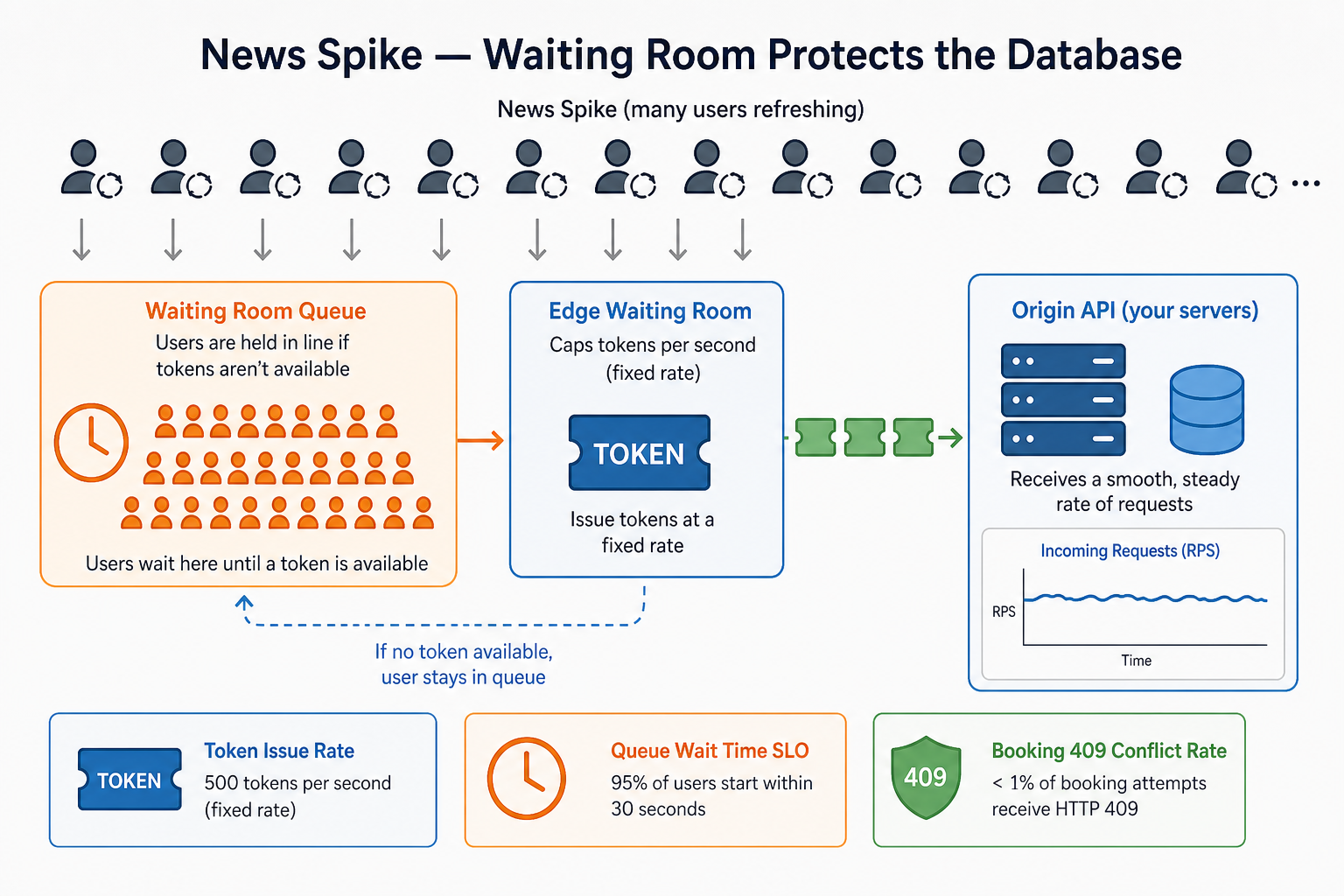
Figure: A flat CPU graph can hide a queue that is hours deep.
Watch end to end: queue wait → time to committed row → 409 rate at checkout → audit write delay → rule errors by rule_version. Compare regions so one bad edge config does not look like a national outage.
In the interview: Pick one scene. Tell it like a short story—what users felt, what metric lied, what you would ship next. You do not need all four; you need to sound like someone who knows green is not the same as done.
Bottlenecks and tradeoffs
Fairness vs velocity
The tension: On release day you want slots to fill fast—but users also need to believe the process was fair. If people think bots or insiders jumped the line, the site can stay online and you still lose public trust.
What “fair” can mean (pick one and say it aloud in the interview):
- First come, first served — whoever reaches the book step first gets the slot, backed by queue order and timestamps.
- Lottery — demand is too high for everyone to refresh at once; random winners from the eligible pool when slots are scarce.
- Priority groups — certain groups go first by policy (age, job, location), with clear rules everyone can read.
What to build: Whatever model you choose, the system must prove it in records—queue position, admission token time, lottery draw id, or priority rule version. Support should answer “why did they get it and I didn’t?” without guessing.
In the interview: Name your fairness model first, then explain how code enforces it (waiting room, tokens, audit rows)—not just “we use a queue.”
Stale search vs fresh booking
Slot search can use read copies or cache to stay fast during spikes. Those results may be a second or two behind the main database. That is usually fine for browsing if booking always checks the main database in one safe step.
Users get frustrated when they select a slot, wait on checkout, and then hear it is already taken. Clear UI copy (“availability confirmed at checkout”), a fresh check at book time, and tracking how often this happens help you tune caching.
In the interview, say the line plainly and explain what each half means:
-
Search is a hint — When users browse times, the app reads from fast copies or cache so the site does not melt under load. That list can be a second or two out of date: someone else may have just booked the slot you still see. That is OK while the user is only looking. Tell the interviewer you never treat search results as a promise—the screen shows what was probably free a moment ago.
-
Booking is the lock — When the user taps Confirm, you stop guessing. In one transaction on the primary database, re-check eligibility and ask again: is this slot still free? If yes, take it and save the appointment. If no, return 409 (“slot gone—pick another time”). That is the only moment the slot truly becomes theirs—or belongs to whoever won the race.
Interview tips
You have the full design in mind now. These five back-and-forths are how interviewers test whether you can defend it under pressure. Each one starts with a tempting shortcut, an interview push, and a clear answer.
The app can show “you look eligible” — only the server may decide
You might say: “The app checks age on the phone and only shows eligible slots.”
Interview Push: “What if the user changes the request or uses a script—can they still book?”
Land here: The app can guide the user, but only the server decides. At book time, the server loads the current rules, checks age, location, and dose requirements from trusted data, and saves a decision record that includes which rule version was used. If someone tampers with the client, the server still runs the real check. The phone is for convenience, not authority.
Two people can both see “1 slot left” — only one booking can succeed
You might say: “We read how many slots remain, subtract one, and save.”
Interview Push: “Two requests hit the last slot at the same time—what happens?”
Land here: Both requests can read “1 slot left,” both subtract one, and both confirm—unless you prevent it. Use one database transaction: lock the slot row, confirm the count is still above zero, decrement, insert the appointment, then commit. The second request should get a clear 409 Conflict response, such as “slot no longer available.” Also use an Idempotency-Key on the book request so a double-click from the same user does not create two appointments.
Millions refresh at the same second — more web servers will not save the database
You might say: “We add more web servers when traffic spikes.”
Interview Push: “Ten million users refresh at 8:00 AM—what protects the database?”
Land here: More web servers mean more callers hitting the database unless you slow the crowd down first. Use a waiting room at the edge that admits users at a fixed rate and gives each admitted user a signed token. Only those requests reach slot search and book. Waiting in line is frustrating, but it is better than a site that crashes for everyone.
A wrong age rule can let the wrong people book before anyone notices
You might say: “We can change eligibility rules in production anytime—just update the config and deploy.”
Interview Push: “Ops sets the minimum age to 18 by mistake instead of 65. Thousands already booked overnight. What do you do?”
Land here: Treat it like an incident, not a quick code tweak.
- Stop new bookings until you know how bad it is—you do not want to make the mistake worse.
- Switch back to the previous rule version—the one you trust.
- Look up who booked under the bad rule using your audit log (
rule_versionon each decision). Cancel or fix appointments if policy says you must. - Tell users honestly what went wrong and what you are doing about it.
This is why eligibility rules are versioned and every decision saves which version applied. Without that, support is guessing—and reporters will ask questions you cannot answer.
Support must explain a denial—without dumping health data in logs
You might say: “When booking fails, we log the full user profile so engineers can debug faster.”
Interview Push: “A user calls support: ‘Why was I denied?’ Your log only says not eligible. What do you tell them—and what are you allowed to store?”
Land here: Separate debugging from explaining.
- Do not put age, medical history, or other sensitive details in normal application logs that every engineer can search.
- Do save a small audit record for each decision: which rule version ran and a plain reason code (for example, “below minimum age” or “outside eligible area”).
- Give support read access to that audit store—not to raw debug logs.
- Everywhere else, hide or hash sensitive fields.
That way support can answer the user in plain language, and you stay within privacy rules—without guessing what the system meant at booking time.
After each interview push, close with one real part of the design you would build—such as a versioned rule check, one safe booking transaction, or a signed queue token—not a vague line like “we will scale it later.”
What should stick
After reading this guide, you should be able to explain:
- Versioned rules — The server decides eligibility; each decision records which rule version applied.
- Safe inventory updates — One transaction locks the slot and decreases the count; no unsafe read-then-write outside that step.
- Traffic control on release day — A waiting room limits how fast users reach book APIs.
- Clear denials — Reason codes explain “why not?” without health data in ordinary logs.
- Reminders after save — Email and SMS run in the background; a missed text does not cancel the appointment.
Tell it in the room: “Eligibility runs on the server with versioned rules and audit. Spike traffic hits a waiting room. I book in one safe transaction with an idempotency key. Search may lag; book never lies.”
Related Topics
- Booking Waitlist System Design - Offering cancelled slots without racing the book API
- Airbnb Reservation System Design - Holds and preventing double bookings in reservation systems
- Rate Limiter System Design - Admission control patterns behind public APIs
- Notification Service System Design - Async reminders after the database commit
- Rate Limiting and Throttling - How edge rate limits support waiting rooms
Frequently asked follow-ups
- How do you handle flash traffic when slots open?
- How do you prevent double booking on the last slot?
- Where and how do you check eligibility?
- How do second-dose rules work?
- How do reminders and no-shows fit the design?
Deep-dive questions and strong answer outlines
How do you handle a flash open when millions refresh at once?
I would not let every browser hit slot search and book APIs at full spike rate. A waiting room at the edge admits users in batches and issues a signed admission token at a fixed tokens-per-second rate. Only requests with a valid token reach origin slot search and book. That trades honest queue wait for a database that stays up. I would measure token issue rate, validation failures, and end-to-end funnel from queue exit to committed appointment row—not only origin CPU.
Walk through booking the last available slot under concurrency.
Two users can both see "1 slot left" from a slightly stale search result. Booking must be one short database transaction: begin, re-check eligibility for the current rule_version, lock the slot row (or seat row), verify remaining > 0, decrement, insert the appointment, commit. The second request gets 409 Conflict with clear retry guidance. I would also require Idempotency-Key on POST so the same user double-submitting does not create two rows. Optional pattern: one row per seat with a unique booking constraint instead of a counter—stronger against lost updates.
How do you enforce eligibility without trusting the client?
The mobile app may show a friendly "you look eligible" hint, but only the server decides. On evaluate, load versioned rules (rules_vN), compute eligibility from verified attributes, and persist an eligibility_decision with decision_id, rule_version, and structured reason codes. At book time, re-check inside the transaction—rules may have changed since yesterday. Support and regulators get explainability from the audit record, not from debug logs full of personal health fields.
How do second-dose scheduling rules fit the model?
Link appointments for the same user. Store vaccine type and dose number on the appointment row. Rules enforce minimum interval between doses and matching product type. When dose one is confirmed, the system can auto-offer eligible second-dose slots in a later window—still through the same transactional book path so inventory stays exact. Cancelling dose one may invalidate or reschedule linked dose-two holds per policy.
What happens on no-show or cancellation?
A scheduled job marks no-shows after grace period and returns inventory in the same transactional style as booking (increment remaining or free the seat row). Optional waitlist workers get an event from the outbox and offer the slot to the next person—again with atomic claim. Track no-show counts per user if policy limits repeat offenders. Reminders are async after commit; a missed SMS does not delete the appointment.
How is this different from designing Ticketmaster?
Both have flash demand, virtual queues, and inventory that must not double-sell. Vaccine booking adds policy engines (age, zip, dose rules), public trust and media scrutiny, and often lower slots per site but higher stakes on eligibility mistakes. Contention per slot may be lower than a stadium, but the explainability and audit bar is higher. The queue and atomic book patterns rhyme; the rules and compliance layer do not.
AI feedback on your design
After a practice session, InterviewCrafted summarizes strengths, gaps, and interviewer-style expectations—similar to a written debrief. See a static example report, then practice this problem to get feedback on your own answer.
FAQs
Q: How do walk-ins work alongside online booking?
A: Treat walk-ins as a separate inventory pool at each site—either reserved seats per hour or a walk-in counter not exposed to the public API. Staff tools book from that pool with the same transactional decrement so online and walk-in never share one counter without coordination. In the interview, say you would separate pools early so flash online traffic does not starve clinic walk-ins.
Q: Do you need multi-language support?
A: User-facing copy and notification templates should use i18n keys, not hard-coded English in the booking service. Eligibility reason codes stay stable machine identifiers; the UI maps them to localized strings. That keeps audit logs language-neutral while support can still explain a denial in the caller's language.
Q: How do you think about HIPAA and sensitive data?
A: Encrypt personal fields at rest, minimize what each service stores, and keep raw health attributes out of application logs. The audit trail stores rule_version, decision inputs you are allowed to retain, and reason codes—not a dump of the full medical record. Access to audit data is role-based. In the interview, name structured reason codes plus encryption; do not hand-wave "we comply."
Q: How does this compare to a ticket sale system?
A: Ticketmaster-style systems taught the industry about virtual queues and holding inventory during checkout. Vaccine booking often has fewer seats per time slot but stricter eligibility and more regulatory attention. The inventory math is similar; the versioned rules engine and immutable audit layer are the extra depth interviewers expect here.
Q: Should slot search show exact remaining counts?
A: Search can come from a read replica or cache and may be slightly stale. That is acceptable for browsing if book time re-validates inside a transaction. Honest UX copy ("availability updates at checkout") reduces anger when someone gets 409. Measure stale conflict rate—how often users see a slot then lose it at book—to tune caching versus freshness.
Q: What does HTTP 201 mean versus email sent?
A: 201 Created means the appointment row committed in the database. Email and SMS reminders run after commit via an outbox and queue workers. If notification fails, the appointment is still valid; workers retry and alert on dead-letter queues. Say this clearly in the interview so you do not confuse inventory truth with SMTP success.
Practice interactively
Open the practice session to use the canvas and stages, then review AI feedback.