Networking Topic
HTTPS Internals: Concepts, Internals & Interview Use Cases
Learn how HTTPS works: TLS encryption, certificate validation, and secure communication.
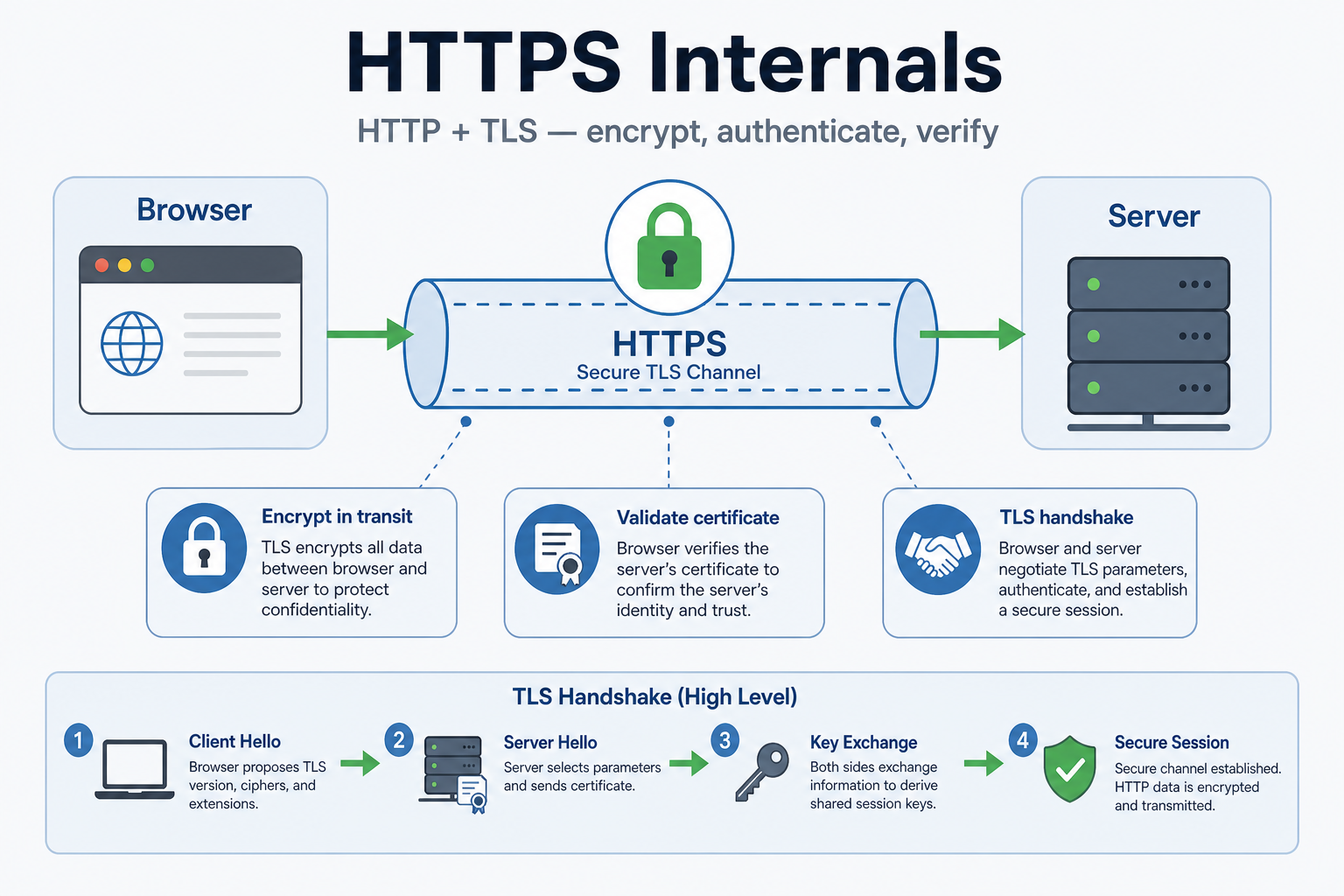
HTTPS Internals
Why This Matters
Think of HTTPS like sending a letter in a locked box. HTTP is like sending a postcard—anyone who sees it can read it. HTTPS is like sending a letter in a locked box—only the recipient has the key to open it. HTTPS encrypts your data so that even if someone intercepts it, they can't read it.
This matters because without HTTPS, your data travels in plain text. Anyone on the network (your ISP, WiFi provider, or an attacker) can see what you're sending and receiving. HTTPS encrypts this data, protecting your privacy and security. Also, HTTPS verifies that you're talking to the real server (not an impostor) using certificates.
In interviews, when someone asks "How does HTTPS work?", they're testing whether you understand TLS/SSL, certificates, and encryption. Do you know how the handshake works? Do you understand certificate validation? Most engineers don't. They just use HTTPS and assume it works.
HTTPS secures the channel between client and server — for who asks and who answers, see Client-Server Architecture first.
What Engineers Usually Get Wrong
Most engineers think "HTTPS is just HTTP with encryption." But HTTPS involves more than encryption—it includes certificate validation (ensuring you're talking to the real server), key exchange (establishing encryption keys), and handshake (negotiating encryption parameters). Understanding these helps you debug HTTPS issues.
Engineers also don't understand certificate validation. When a browser connects to a site, it checks the certificate to ensure it's valid and issued by a trusted authority. If the certificate is invalid or expired, the browser shows a warning. Understanding this helps you troubleshoot certificate issues.
How This Breaks Systems in the Real World
A service was using HTTPS but had an expired certificate. Users saw security warnings in their browsers. Some users ignored the warnings and continued, but others didn't trust the site. The service lost users. The fix? Monitor certificate expiration and renew before expiration. Set up alerts for certificates expiring within 30 days.
Another story: A service was using HTTPS but wasn't validating certificates when making outbound requests. An attacker set up a fake server with a self-signed certificate. The service connected to it, thinking it was the real server. The attacker intercepted all data. The fix? Always validate certificates. Don't disable certificate validation, even in development (use proper certificates instead).
How HTTPS establishes a secure channel
HTTPS wraps HTTP inside TLS. Before any login or API payload travels, client and server complete a TLS handshake to agree on encryption and prove the server's identity.
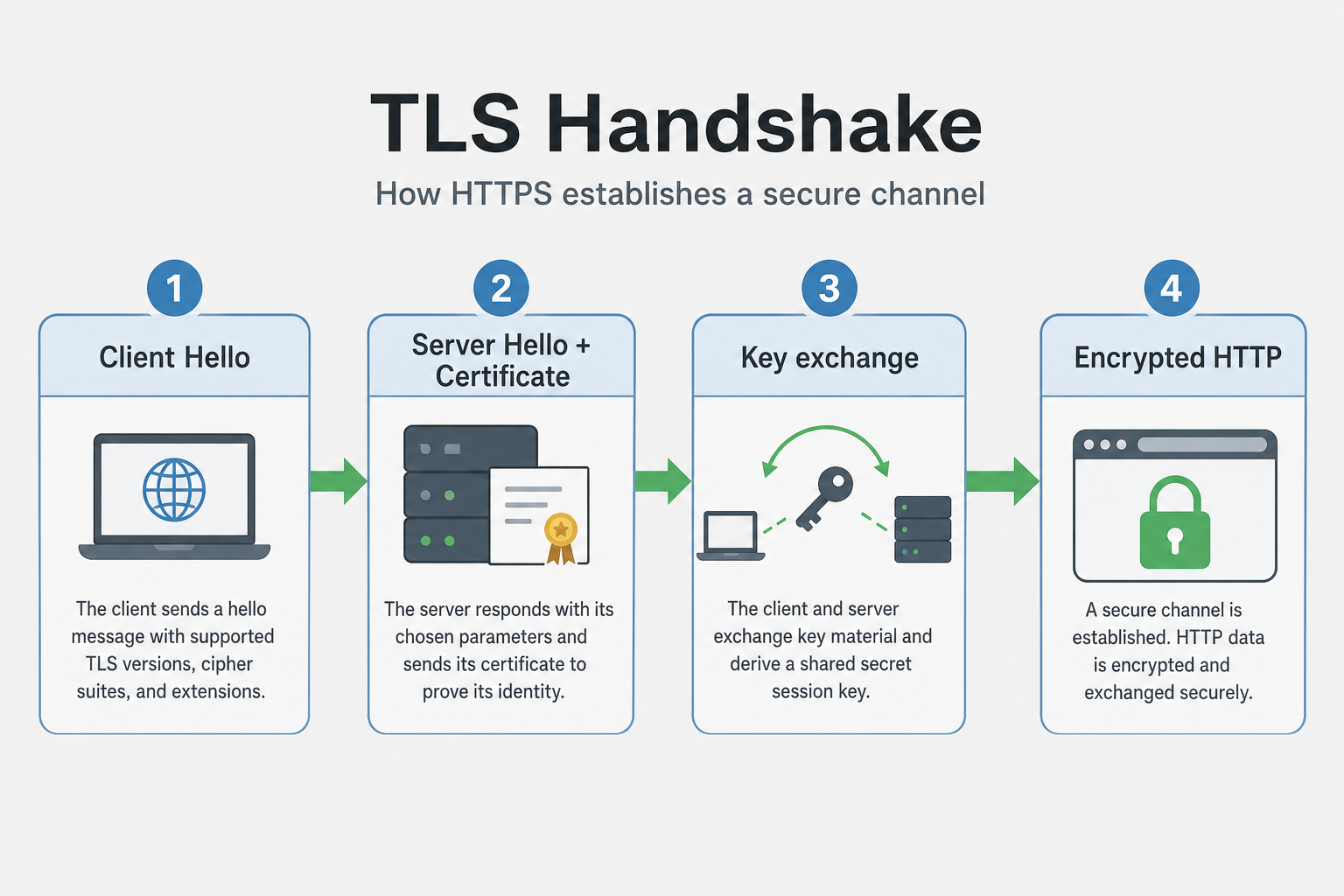
- Client Hello — client sends supported TLS versions and cipher suites
- Server Hello + certificate — server picks parameters and sends its certificate chain
- Key exchange — both sides derive shared session keys
- Encrypted HTTP — requests and responses flow inside the TLS tunnel
Certificate validation
The browser does not trust a certificate just because it exists. It walks the chain of trust from the server cert to a root CA in its trust store and checks domain name and expiration.
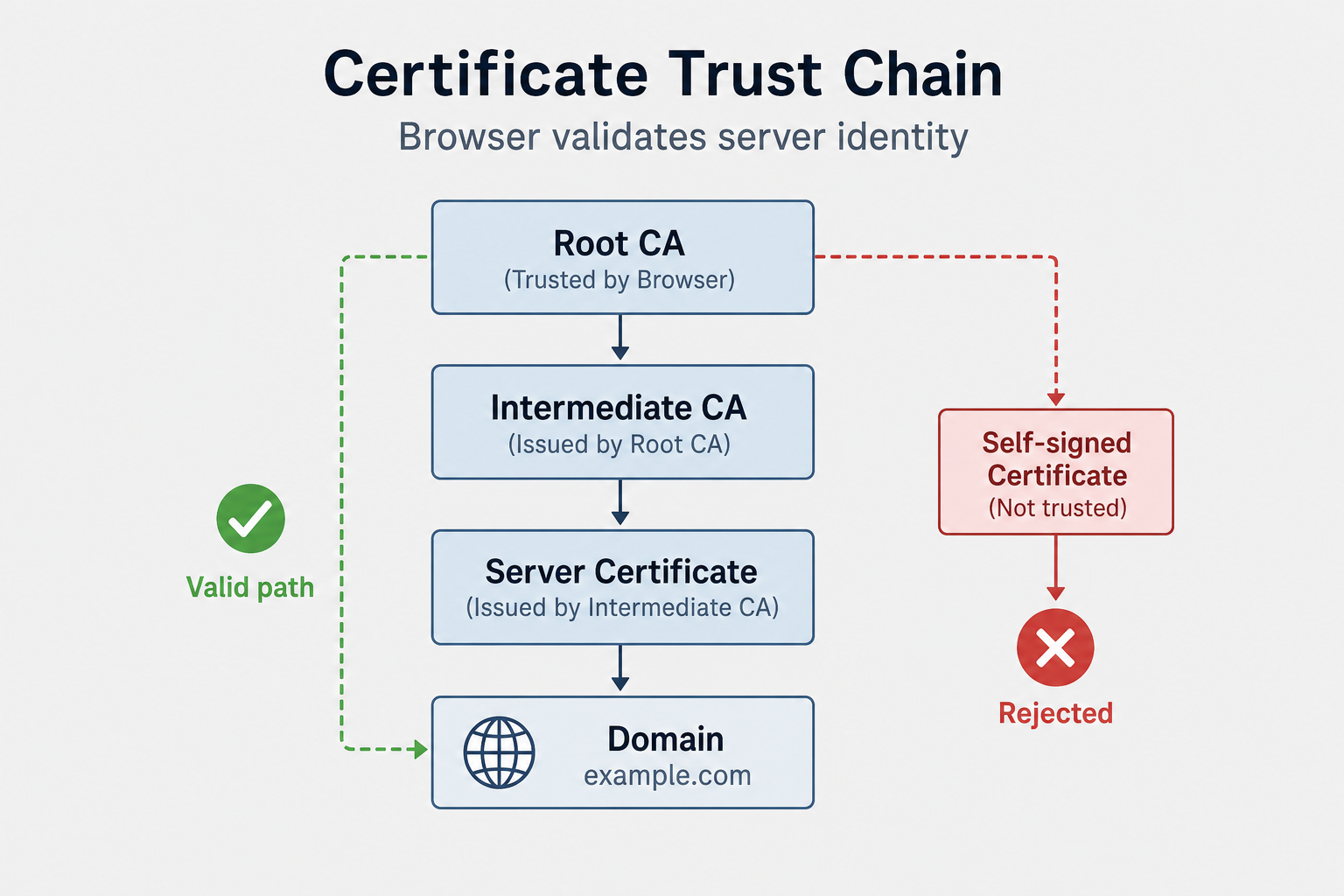
If validation fails — expired cert, wrong domain, or self-signed in production — users see warnings or connections abort. That is why monitoring expiration and never disabling validation in outbound clients matters.
Common Pitfalls
- [Common mistake 1 and how to avoid it]
- [Common mistake 2 and how to avoid it]
- [Common mistake 3 and how to avoid it]
Interview Questions
Beginner
Q: [Beginner-level question about the topic]
A: [Comprehensive answer with explanation]
Intermediate
Q: [Intermediate-level question with practical scenario]
A: [Detailed answer with implementation details]
Senior
Q: [Senior-level system design or complex scenario question]
A: [In-depth answer with architecture, trade-offs, and best practices]
Failure Stories You'll Recognize
The Expired Certificate: A service was using HTTPS but had an expired certificate. Users saw security warnings in their browsers. Some users ignored the warnings and continued, but others didn't trust the site. The service lost users. The fix? Monitor certificate expiration and renew before expiration. Set up alerts for certificates expiring within 30 days.
The Certificate Validation Bypass: A service was using HTTPS but wasn't validating certificates when making outbound requests. An attacker set up a fake server with a self-signed certificate. The service connected to it, thinking it was the real server. The attacker intercepted all data. The fix? Always validate certificates. Don't disable certificate validation, even in development (use proper certificates instead).
The TLS Version Mismatch: A service was using an old TLS version that was no longer supported by browsers. Users couldn't connect. The service had to upgrade TLS, but this required updating libraries and testing. The fix? Keep TLS libraries updated. Monitor TLS version support. Test with different browsers and clients.
What Interviewers Are Really Testing
They want to hear you talk about HTTPS as more than just encryption. Junior engineers say "HTTPS encrypts data." Senior engineers say "HTTPS encrypts data using TLS, validates certificates to ensure you're talking to the real server, and negotiates encryption parameters through a handshake. Always validate certificates. Monitor certificate expiration. Keep TLS libraries updated."
When they ask "How does HTTPS work?", they're testing:
- Do you understand TLS/SSL and the handshake?
- Do you understand certificate validation?
- Can you troubleshoot HTTPS issues?
Key Takeaways
HTTPS encrypts data using TLS/SSL to protect privacy and security
Certificate validation ensures you're talking to the real server, not an impostor
TLS handshake negotiates encryption parameters and establishes secure connection
Always validate certificates—don't disable validation, even in development
Monitor certificate expiration and renew before expiration to avoid user warnings
Related Topics
Client-Server Architecture
Who initiates requests and where business logic lives before securing the wire
TLS/SSL Handshake
HTTPS uses TLS/SSL for encryption, understanding the handshake explains HTTPS security
HTTP/1 vs HTTP/2 vs HTTP/3
HTTPS is HTTP over TLS, understanding HTTP versions helps configure HTTPS
Three-Way Handshake (TCP)
HTTPS connections require TCP handshake before TLS handshake, understanding both explains HTTPS connection establishment
QUIC Protocol
HTTP/3 uses QUIC which integrates TLS, understanding QUIC explains modern HTTPS implementations
What's next?
Keep exploring
Protocols make more sense in sequence. Pick the next topic in the hub when a concept still feels fuzzy.