Networking Topic
Client-Server Architecture: Concepts, Tradeoffs & Interview Use Cases
How phones and browsers ask servers for work, where business logic belongs, thin vs thick clients, and the app-store trap.
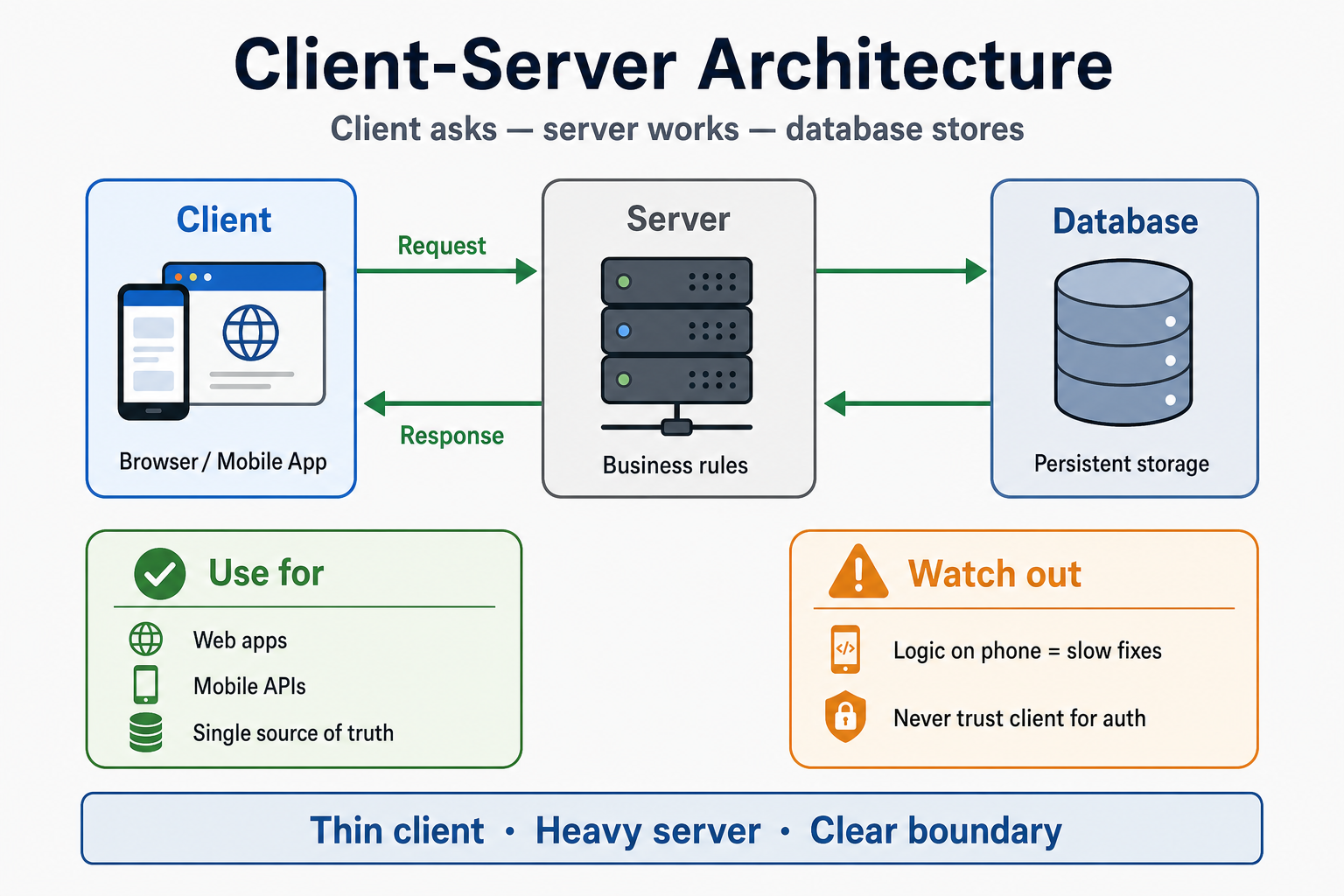
Client-Server Architecture
Why This Matters
Your app stops working when the server is down — but users only see a broken screen on their phone. That gap is the heart of client-server architecture: the client (browser or mobile app) is what people touch; the server is where most of the real work happens over the network.
Almost every product you use follows this pattern. You tap "Log in," the phone sends a request, a server checks your password against a database, and the answer comes back as success or failure. When candidates blur "what runs where," they design systems that are hard to secure, hard to update, and painful to debug in interviews.
In interviews, when someone asks "Explain client-server architecture," they are testing whether you can name the roles, trace one request end to end, and say where business logic should live. Most engineers repeat "frontend talks to backend" without a clear line between presentation and rules.
Core Intuitions You Must Build
-
The client always starts. It sends a request; the server listens and responds. The server does not push work to an idle phone unless you add something extra (WebSockets, push notifications).
-
Business rules usually belong on the server. Pricing, permissions, inventory, and fraud checks need one source of truth. If two clients compute price differently, you get support tickets and revenue loss.
-
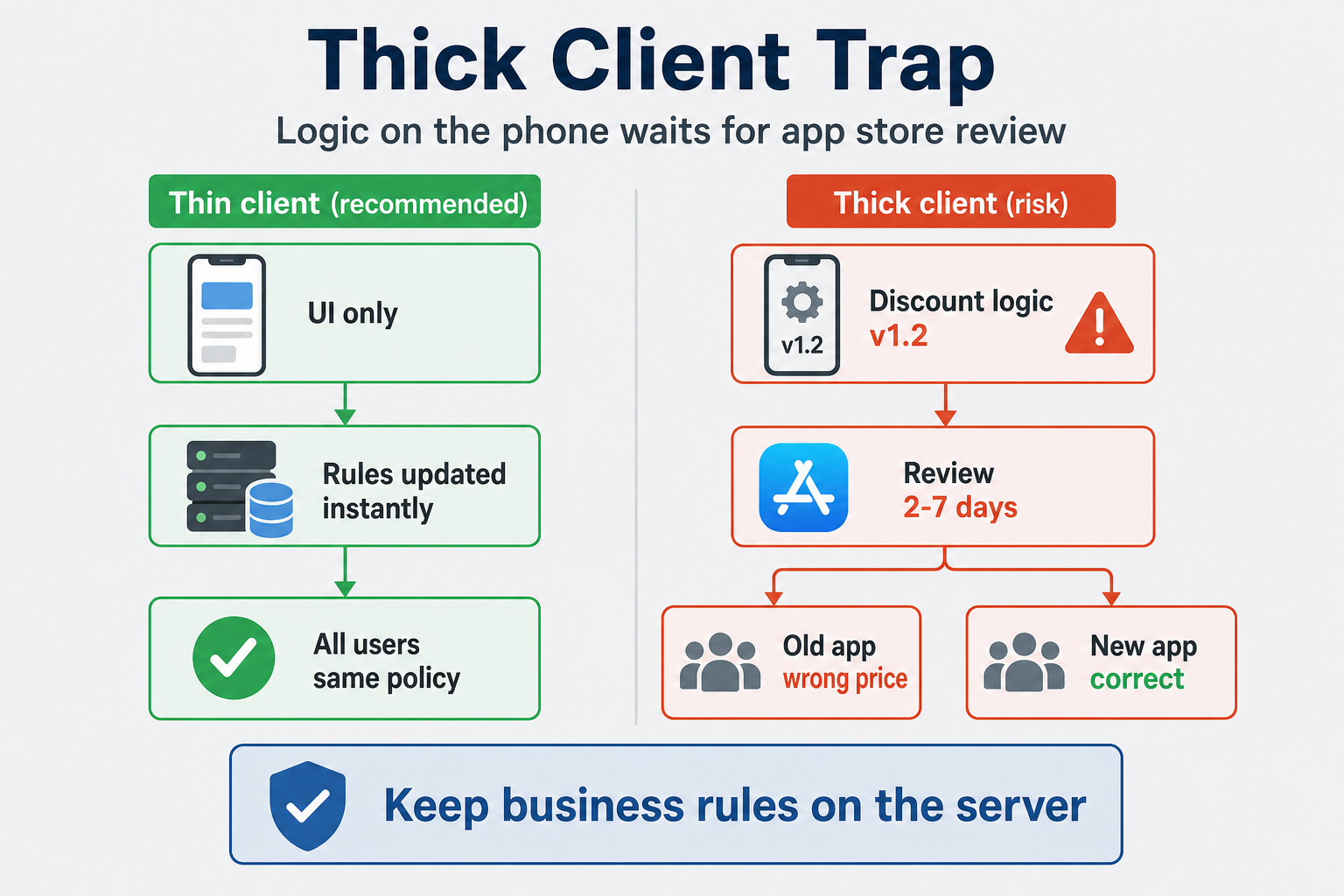
Thin client, heavy server is the default for web and mobile APIs. The client shows UI and collects input; the server validates, decides, and stores. That keeps fixes deployable without waiting on app store review.
-
Thick client is a tradeoff, not a virtue. More logic on the device can feel faster offline, but every rule change may need a new app release and splits behavior across versions in the wild.
-
The network is unreliable. Timeouts, 503 errors, and partial failures are normal. Good designs assume the server might be slow or down and tell the user something honest.
-
Security follows the boundary. Anything on the client can be inspected or tampered with. Never trust the phone for authorization — verify on the server every time.
What Engineers Usually Get Wrong
Most engineers treat client and server as two boxes with an arrow labeled "API." That is not wrong, but it is too shallow for interviews. Senior answers name what crosses the wire (request body, headers, response codes) and what stays server-side (validation, business rules, database writes).
Another common mistake is putting all logic on the phone because "it feels faster." Every bug fix then waits for app store review. Users on old versions run different rules than users on new ones. The server cannot enforce policy if the client never calls home.
Engineers also confuse client-server architecture with HTTP or REST. HTTP is how messages travel; client-server is who runs which code. You can use gRPC, WebSockets, or HTTP/3 — the split between client and server roles stays the same.
How This Breaks Systems in the Real World
A retail app computed discounts on the device to "reduce server load." During a flash sale, product managers changed the discount rules in the admin panel. Server-side cart APIs used the new rules, but thousands of users still had the old formula in their installed app. Some shoppers saw wrong prices at checkout; others abandoned carts when totals changed at the last step.
The fix? Treat discount rules as server-owned. The client displays what the server returns. But the real lesson is: logic on the client is a release channel you do not fully control.
Another story: A dashboard web app put authorization checks only in the frontend — hiding admin buttons for non-admin users. A curious user called the same API endpoints with a crafted request and performed admin actions. The fix? Enforce every permission on the server, regardless of what the UI shows.
How a Single Action Flows
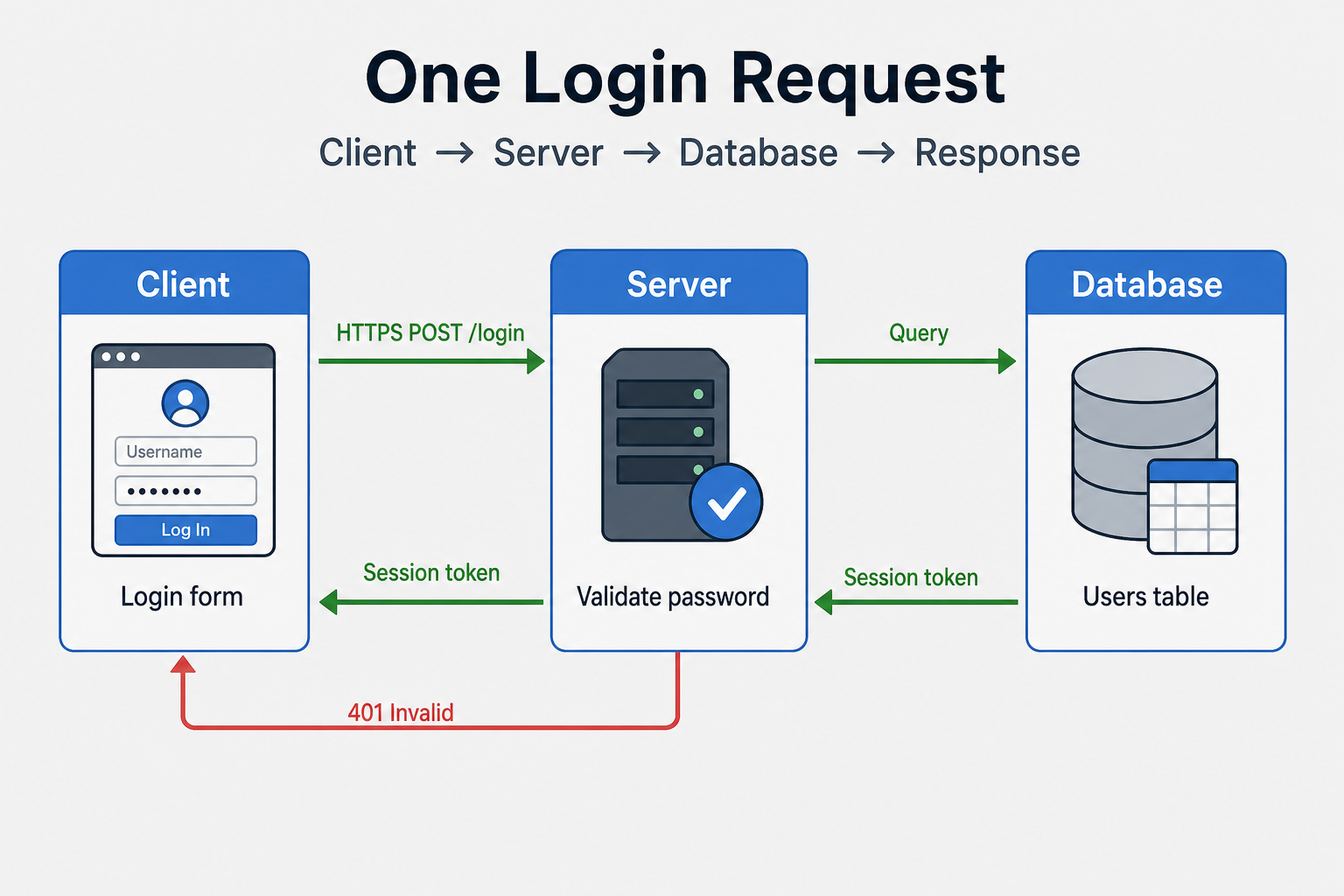
One login is enough to explain the whole model:
User taps "Log in"
    → Client sends email + password (HTTPS request)
    → Server validates format, checks credentials against database
    → Server returns session token or error
    → Client stores token and shows home screen or error message
The client never talks to the database directly in a classic setup. The server is the gatekeeper: it alone holds connection strings, runs queries, and applies rules.
| Layer | Typical responsibility | Example (login) |
|---|---|---|
| Client | UI, input, display errors | Login form, show "Invalid password" |
| Server | Validation, business rules, orchestration | Check password hash, issue session |
| Database | Durable storage | User row, session record |
Subtopics (Taught Through Real Scenarios)
Thin client vs thick client
What people usually get wrong:
Teams pick thick client because offline mode sounds impressive, without counting the cost of version skew — five app versions in the wild, each with different bugs. Thin client sounds "boring" but matches how most SaaS and e-commerce backends actually ship.
How this breaks systems in the real world:
A field-service mobile app cached work orders and pricing locally for offline technicians. When headquarters changed billing rules, technicians in rural areas synced days later and submitted invoices under obsolete rates. Finance had to reconcile manually for a month.
The fix? Offline cache as a read-only snapshot; pricing and submission always confirmed with the server when connectivity returns. But the real lesson is: thick client wins offline; thin client wins policy consistency.
What interviewers are really listening for:
Junior engineers say "mobile app calls the API." Senior engineers say "default thin client — server owns rules; thick only where offline or latency truly requires it, with explicit sync and conflict rules."
Where business logic should live
What people usually get wrong:
Duplicating validation on client "for UX" without mirroring it on the server. Client-side checks help users fix typos early; server-side checks are mandatory for security and correctness. Skipping server validation because "the app already checked" is how data corruption and fraud happen.
How this breaks systems in the real world:
A signup form blocked weak passwords in the browser. A script posted directly to /api/signup with a one-character password. Accounts flooded the database before alerts fired.
The fix? Same rules on server; client validation is optional convenience. But the real lesson is: the server is the only enforcement point.
What interviewers are really listening for:
They want a clear sentence: "Client validates for experience; server validates for truth." Mention idempotency or rate limiting on sensitive endpoints if the role is backend-leaning.
When the server is down or slow
What people usually get wrong:
Assuming users understand "500 Internal Server Error." From the user's perspective, the app is simply broken. Teams also retry without backoff and amplify outages.
How this breaks systems in the real world:
A status page depended on the same API cluster as the product. When the API failed, the status page failed too — users saw a blank screen instead of incident communication.
The fix? Separate hosting for status, circuit breakers, cached read-only fallbacks where safe, and human-readable error copy on the client. But the real lesson is: design what the client shows when the server cannot answer.
What interviewers are really listening for:
Mention timeouts, retry with backoff, graceful degradation (read-only mode), and never infinite spinners. Connect to load balancers and health checks as the next layer of resilience.
Security at the boundary
What people usually get wrong:
Storing API keys or admin flags in mobile app binaries, or trusting a isAdmin: true field sent from the client. Anything shipped to the device is attacker-readable.
How this breaks systems in the real world:
A mobile game embedded a "god mode" flag checked only in the client. Players patched the binary and flooded leaderboards. Leaderboards were reset; trust in the product took longer to repair.
The fix? Server-authoritative state; signed tokens with short TTL; sensitive operations always re-checked server-side. But the real lesson is: treat the client as a hostile environment.
What interviewers are really listening for:
HTTPS for transport, authentication on the server, least-privilege tokens — and the distinction between "encrypting the channel" (HTTPS Internals) and "trusting the client" (never).
Thin vs thick client — pick when
| Style | Client holds | Best when | Watch out |
|---|---|---|---|
| Thin | UI + API calls | Web apps, most mobile APIs, fast policy changes | Needs network; server load |
| Thick | UI + rules + cache | Offline-first, games, creative tools | App store lag, version skew |
| Hybrid | UI + cache + server sync | Maps, messaging, field apps | Conflict resolution, sync bugs |
Interview questions to practice
- Walk me through login from button tap to database and back — what runs on the phone vs the server?
- We need offline mode for technicians — what logic moves to the client, and what must stay on the server?
- Our mobile team wants to validate payments only on the device to save latency — what do you say?
- The API is returning 503s — what should the client show, and what should it not do?
- How is client-server different from peer-to-peer? When would you not use client-server?
FAQs
Q: What is client-server architecture in one sentence?
A: The client (browser or app) asks for something over the network; the server does the work, often with a database, and sends back a response.
Q: What is the difference between thin and thick client?
A: A thin client mostly displays data and sends user actions to the server. A thick client runs substantial business logic locally — useful for offline or latency, but harder to update and keep consistent.
Q: Is client-server the same as REST or HTTP?
A: No. Client-server describes who runs which code. HTTP is one way messages travel; REST is one API style. You can use other protocols and still have client-server roles.
Q: Why not put all logic on the client for speed?
A: You cannot trust or update all users instantly. App store review delays fixes; attackers can bypass client-only checks. Keep authoritative rules on the server.
Q: What should the client do when the server is down?
A: Stop retrying blindly, show a clear message, use cached read-only data only if it is safe, and respect timeouts. Do not pretend success.
Q: How does this relate to load balancers and proxies?
A: Client-server is the logical split. Proxies and load balancers sit in front of servers to route, terminate TLS, and scale — they do not change who initiates requests.
Key Takeaways
Client starts, server responds — requests flow out from the device; the server waits and answers
Server owns truth — business rules, auth, and database access belong on the server in most designs
Thin client by default — fast policy changes without app store bottlenecks
Thick client is a tradeoff — offline and latency benefits vs version skew and slow fixes
Never trust the client — validate and authorize on the server; HTTPS protects the wire, not your logic
Plan for failure — timeouts, clear errors, and graceful degradation when the server is unavailable
Next hops — HTTP versions, TLS, proxies, and load balancers build on this foundation
Related Topics
HTTP/1.1 vs HTTP/2 vs HTTP/3
How requests travel once client and server roles are clear
HTTPS Internals
Securing the channel between client and server
Proxy vs Reverse Proxy
What sits in front of the server before traffic hits your app
Load Balancers (L4 vs L7)
Scaling the server side when one machine is not enough
DNS Resolution Flow
How the client finds the server's address before the first request
What's next?
Keep exploring
Protocols make more sense in sequence. Pick the next topic in the hub when a concept still feels fuzzy.