Real Engineering Stories
The Message Queue Lag That Overwhelmed Our Order Processing
Flash-sale Kafka lag hit six hours; catch-up burst overwhelmed PostgreSQL and added three hours of order-processing outage.
This is a story about event-driven architecture's hidden failure mode: when your consumer falls behind, it doesn't just delay processing—it stores work in the queue. When that backlog finally drains, it can hit downstream systems as a burst that looks nothing like steady-state traffic. We learned that the hard way during a flash sale.
Related reading on this site: For queue fundamentals and consumer groups, see Message Queues. For throttling catch-up and protecting origins, read Rate Limiting & Throttling and Circuit Breakers. For a different load-amplification pattern on the database, see The Cache Stampede That Took Down Our API. For observability gaps that let lag grow unnoticed, use Monitoring & Observability.
Context
We ran an e-commerce order pipeline: the order service published order-created events to Kafka; a consumer group wrote inventory reservations and payment holds to PostgreSQL. Under normal load—about 100 orders per minute—consumer lag stayed under one minute across three partitions.
Original Architecture:
The pipeline looked healthy on dashboards: producers kept publishing, consumers kept committing offsets, and the database handled ~100 writes/second sustained. What we missed was that lag is stored work—and our consumer was configured to process as fast as possible when it finally caught up.
Technology Choices:
- Broker: Kafka (3 partitions, replication factor 2)
- Consumer: Java service, single consumer group, batch size 500
- Database: PostgreSQL (primary, 50-connection pool)
- Monitoring: Lag alert at 10,000 messages (we had never hit it)
Assumptions Made:
- Consumer could always catch up when traffic eased
- Database could handle any burst we'd realistically see
- Lag was a delay problem, not a blast-radius problem
- Message count thresholds were enough (we didn't alert on lag duration)
The Incident
Symptoms
What We Saw:
- Consumer Lag: Grew from <1 min to ~6 hours (360,000 messages)
- Processing Rate: Steady ~150 msg/sec during sale; spike to ~1,000 writes/sec at catch-up
- Database CPU: 80% during sale; pegged at 100% during catch-up burst
- Connection Pool: 50/50 exhausted for 25 minutes
- Error Rate: 0.2% during sale; 40% during catch-up outage
- User Impact: ~45,000 orders stuck in "pending" for 3+ hours after sale ended
How We Detected It:
- Lag dashboard showed six-hour offset—but no page until DB errors spiked
- Database latency alert fired when p99 exceeded 2 seconds
- Support tickets spiked when customers saw paid orders not confirmed
Monitoring Gaps:
- No alert on lag duration (only message count threshold at 10K—never tripped meaningfully)
- No alert on consumer processing rate vs. producer rate
- No downstream protection when DB latency rose during catch-up
- No correlation between "sale ended" and expected backlog drain
Root Cause Analysis
Primary Cause: Consumer designed for steady-state throughput, not controlled catch-up. When lag cleared, it processed as fast as possible and overwhelmed PostgreSQL.
How lag became a second incident:
During the sale, producers outpaced consumers by ~850 orders/min. Kafka happily buffered the difference—lag is invisible to users until the consumer runs. When the sale ended at 3:00 PM, producers dropped to normal, but the consumer still had 360K messages. With no rate cap, it opened large batches and issued parallel writes. The database sized for 100 writes/sec saw 1,000 writes/sec for several minutes.
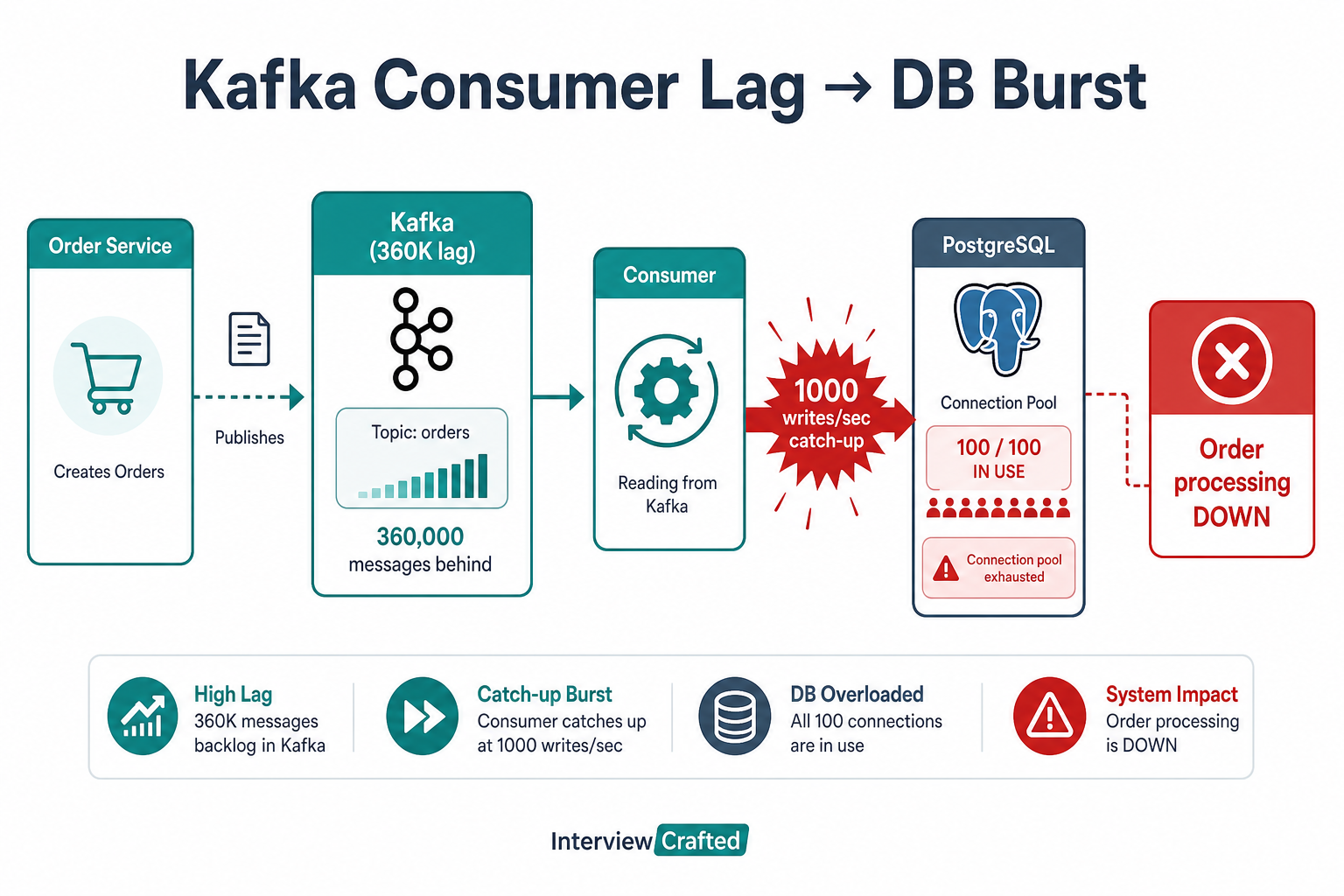
Lag is stored work—when the consumer caught up, it released six hours of orders in a flood the database could not absorb.
Flash sale → consumer falls behind → lag = stored writes → sale ends → catch-up burst → pool saturated → outage
What Happened:
- Order rate jumped 10×; consumer throughput stayed ~150 msg/sec
- Lag grew ~850 messages/min for six hours (360K total)
- Consumer had no backpressure—kept pulling from Kafka regardless of DB health
- When inbound rate dropped, consumer maximized throughput to "clear lag fast"
- Burst writes exhausted the 50-connection pool and spiked disk I/O
- Failed writes retried, amplifying load (similar to a cache stampede on the write path)
Why It Was So Bad:
- No consumer rate limiting: Catch-up treated as unlimited
- No circuit breaker on DB path: Consumer kept pushing when latency spiked
- Batch size too large for catch-up (500 messages per poll)
- Single consumer group with no auto-scale trigger on lag duration
Contributing Factors:
- Alert on message count, not time-based lag
- Database connection pool sized for steady state only
- No idempotent bulk-write path for replay safety
- Ops assumed "sale ended = problem over"
Fix & Mitigation
Immediate Fixes (During Incident):
- Paused consumer briefly to let DB recover
- Deployed rate limiter on consumer: max 200 writes/sec regardless of lag
- Reduced batch size from 500 to 50 for catch-up mode
- Scaled consumer instances from 3 to 6 (after rate limit was in place)
Long-Term Improvements:
| Strategy | What it does | Best when |
|---|---|---|
| Consumer rate limiting | Cap writes/sec even when lag is high | Any queue draining into a capacity-bound DB |
| Lag-duration alerts | Page on minutes/hours behind, not just message count | Variable message sizes or bursty producers |
| Horizontal consumer scaling | More partitions + instances during peaks | Lag grows linearly with traffic spikes |
| Circuit breaker on DB path | Slow or pause consumption when DB latency exceeds SLO | Prevent retry amplification—see circuit breakers |
| Adaptive batching | Smaller batches when downstream is hot | Catch-up after large backlogs |
-
Backpressure & Rate Limiting:
- Consumer enforces max 200 writes/sec (configurable per environment)
- Adaptive batch size: shrinks when DB p99 > 500ms
- Pairs with rate limiting patterns on the write path
-
Consumer Lag Monitoring:
- Alerts at 1 min, 5 min, and 15 min lag duration per partition
- Dashboard: producer rate vs. consumer rate vs. lag slope
- Auto-scale consumers when lag > 5 min for 10+ minutes
-
Database Protection:
- Connection pool increased to 80 with per-consumer caps
- Bulk insert batching for inventory updates
- Circuit breaker opens when pool usage > 85% or p99 > 1s
-
Process Improvements:
- Flash-sale runbook: pre-scale consumers, lower batch size, enable rate limit
- Load test that simulates catch-up burst, not just steady peak
- Dead-letter queue for poison messages after 3 retries
Architecture After Fix
Key Changes:
- Lag-duration alerts and auto-scaling on sustained backlog
- Consumer-side rate limiting and adaptive batching
- Circuit breaker between consumer and database
- More partitions and consumers for flash-sale headroom
- DLQ for failed messages after bounded retries
Key Lessons
-
Lag is stored work: Message count alone is misleading—always monitor lag duration and drain rate.
-
Catch-up is a traffic spike: When backlog clears, downstream sees a burst unrelated to current producer rate.
-
Backpressure is mandatory: Consumers must slow down when the database can't keep up—speed is not free.
-
Rate limit the drain: Throttling catch-up adds delay but prevents a second outage; users prefer slow confirmation over total failure.
-
Test the replay path: Load tests should include "consumer 6 hours behind" scenarios, not only live sale peaks.
-
Circuit breakers on the write path: Same lesson as read-path stampedes—stop retrying into an overloaded origin.
-
Flash-sale runbooks: Pre-scale consumers, tighten batches, and enable limits before the event.
Interview Takeaways
Common Questions:
- "What happens when a Kafka consumer falls behind?"
- "How do you prevent consumer lag from taking down the database?"
- "What is backpressure in event-driven systems?"
What Interviewers Are Looking For:
- Distinction between lag as delay vs. lag as stored load
- Consumer rate limiting and adaptive batching
- Monitoring lag duration, not just offset
- Circuit breakers and DB protection on async write paths
- Scaling consumers and partitions for bursty producers
What a Senior Engineer Would Do Differently
From the Start:
- Alert on lag duration per partition, not arbitrary message counts
- Rate-limit consumer writes with a configurable ceiling below DB capacity
- Add circuit breakers on the database path—pause consumption when latency spikes
- Auto-scale consumers on sustained lag, with enough partitions to scale out
- Load-test catch-up: simulate draining a six-hour backlog into PostgreSQL
- Flash-sale playbook: pre-warm consumers, reduce batch size, enable throttling
The Real Lesson: Queues decouple producers and consumers in time—which is powerful until the consumer releases hours of work in minutes. Design the drain, not just the pipe.
How I'd answer in interviews
"We had Kafka in front of PostgreSQL for order processing. During a flash sale the consumer fell six hours behind—about 360K messages—because we sized for 100 writes/sec steady state. When the sale ended, the consumer tried to clear lag as fast as possible and hit the database with roughly 1,000 writes/sec, exhausting the connection pool. I'd fix it with lag-duration alerts, consumer-side rate limiting and adaptive batching, circuit breakers when DB latency spikes, more partitions with auto-scaling, and load tests that simulate catch-up bursts—not just peak publish rate. The key insight is backlog is stored load; draining it needs the same capacity planning as live traffic."
Related reading on this site
- Message Queues — consumer groups, partitions, delivery semantics, and DLQs in fundamentals form.
- Rate Limiting & Throttling — token buckets and admission control for catch-up bursts.
- Circuit Breakers — pause or slow consumption when downstream is unhealthy.
- Monitoring & Observability — lag slope, golden signals, and alert design for async pipelines.
- The Cache Stampede That Took Down Our API — another pattern where retries amplify load on a saturated database.
FAQs
Q: Is consumer lag always bad?
A: Small lag under load is normal. Dangerous lag is sustained and large in duration—that means stored work that will hit downstream as a burst when you drain it. Monitor lag in minutes/hours, not just message count.
Q: Should consumers always process as fast as possible to clear lag?
A: No. Uncapped catch-up can overwhelm databases and downstream APIs. Rate-limit the drain to stay within downstream capacity—even if confirmation is slower.
Q: How is this different from a cache stampede?
A: Cache stampede is parallel reads on a cold cache. Queue catch-up is parallel writes (or side effects) from a backlog. Both need throttling, pooling limits, and circuit breakers on the origin.
Q: What's the best metric to alert on for Kafka consumers?
A: Consumer lag duration per partition (e.g., alert at 1, 5, 15 minutes). Complement with producer rate vs. consumer rate and processing error rate.
Q: When should you add more partitions vs. more consumer instances?
A: Consumers in one group can't exceed partition count. If you need more parallel consumers, add partitions first (with rebalancing plan), then scale instances.
Q: How do circuit breakers work with message queues?
A: When DB latency or error rate exceeds a threshold, the consumer pauses polling or commits offsets slowly—applying backpressure upstream instead of retry-storming the database. See Circuit Breakers.
Q: Should we drop messages to clear lag faster?
A: Almost never for order/payment flows. Prefer throttling, scaling, and DLQs for poison messages. Dropping should be explicit, audited, and rare.
Keep exploring
Real engineering stories work best when combined with practice. Explore more stories or apply what you've learned in our system design practice platform.