Real Engineering Stories
The DNS Change That Pointed Production at Staging
A staging DNS change applied to production routed live traffic wrong for 45 minutes—8,200 stray writes and 65 minutes to recover.
This is a story about how a single DNS A-record change—copy-pasted from a staging Terraform plan into production—routed live traffic to staging for 45 minutes. Roughly 540,000 production requests hit staging infrastructure; ~8,200 writes landed in the staging PostgreSQL cluster before we caught it. The blast radius was not just "wrong servers"—customers saw missing features, stale catalog data, and orders that never appeared in production billing.
The lesson we took away: DNS is a distributed switch with no undo button. TTL and resolver caches mean rollback is measured in minutes, not seconds, and "it's just a config change" is the most dangerous phrase in operations.
Related reading on this site: For how DNS resolution and TTLs affect failover speed, see DNS Resolution Flow. For safe rollout patterns that reduce blast radius, read Deployment Strategies. For a sibling routing mistake at the load-balancer layer, see The Misconfigured Load Balancer. For environment separation during migrations, compare The Strangler Pattern in Production.
Context
We were migrating our B2B API from us-east-1 to eu-west-1. The plan: validate new EU servers in staging, then cut production DNS during a Saturday maintenance window. Traffic flowed through Route 53 → regional ALB → eight API pods → PostgreSQL primary with two read replicas. Peak traffic was ~12,000 requests/minute on weekdays.
Original Architecture:
Staging and production looked almost identical on paper—same hostname pattern (api.internal.example.com vs api-staging.internal.example.com), same Terraform modules, same dashboard colors. The only guardrail was discipline.
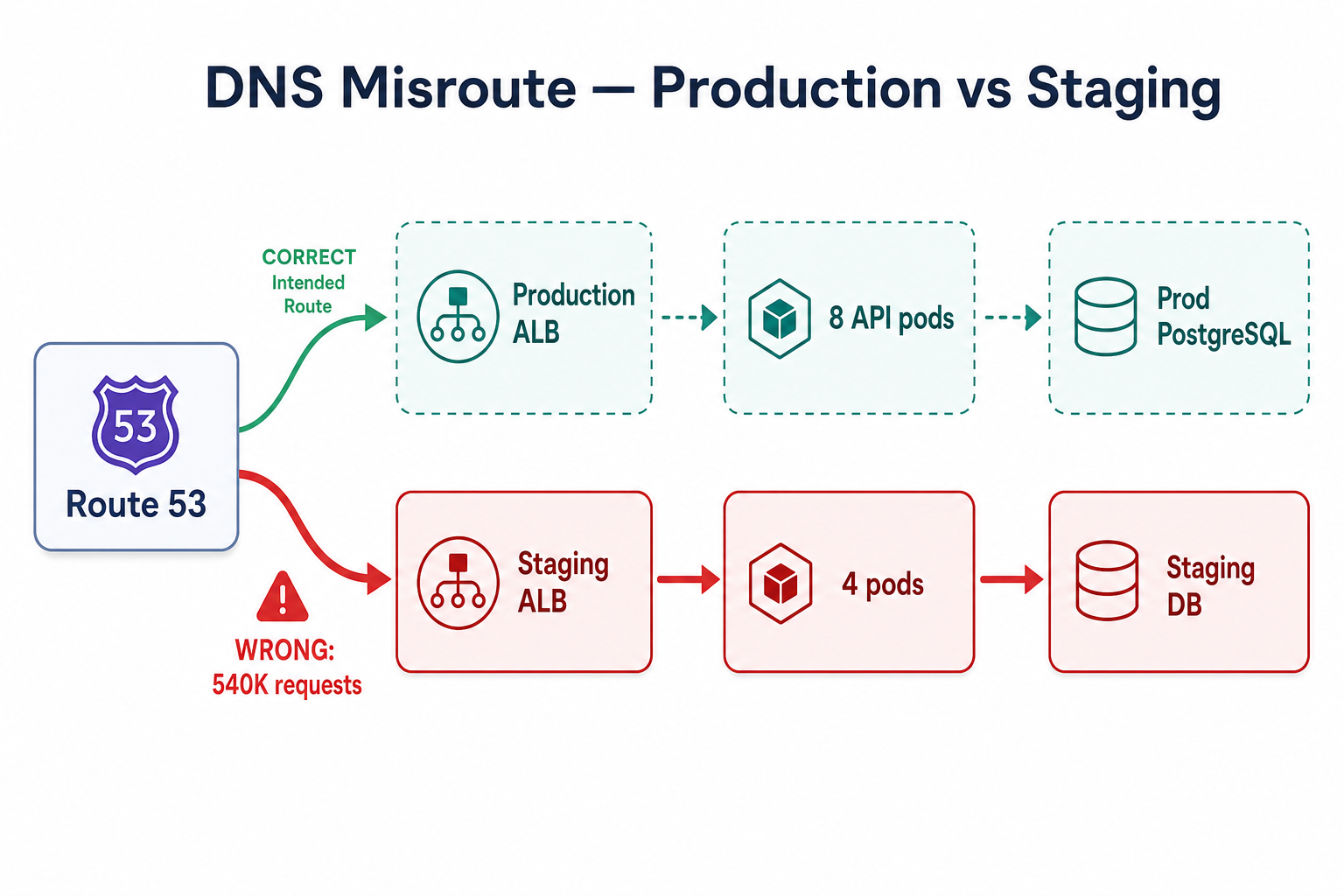
One wrong A-record sent ~540K production requests to staging—and 8,200 writes into the wrong database.
Technology Choices:
- DNS: AWS Route 53, TTL 300 seconds (5 minutes) on the production A record
- API: Kubernetes on EKS, identical Helm charts for staging and prod
- Database: PostgreSQL 14; staging was a single-node instance with anonymized seed data
- Change process: Terraform apply with peer review—no separate approval gate for DNS
Assumptions Made:
- Engineers would apply changes to the correct AWS account (staging vs production)
- Staging and production credentials were different enough to block cross-writes (they were not—shared IAM role on CI)
- A 5-minute TTL meant "fast rollback" (ignored resolver caching and mobile app DNS caches)
- Staging could never receive production traffic because hostnames differed (true until someone changed the wrong record)
The Incident
api.example.com A record pointed to staging EU ALBSymptoms
What We Saw:
- Traffic shift: Staging ALB request rate jumped from ~50/min to 12,000/min in 5 minutes
- Error rate: Staging API errors rose from 0.2% to 8% (production JWT secrets worked, but schema migrations differed by 3 versions)
- Data anomalies: 8,200 INSERT/UPDATE operations in staging DB with production customer IDs
- User reports: "Invoice missing," "plan shows Free instead of Enterprise," mobile app force-refresh loops
- Production metrics: Looked healthy—because almost no traffic was reaching production anymore
How We Detected It:
- Support Slack channel exploded before Grafana did
- Engineer compared Route 53 change audit log to the maintenance ticket
- Staging RDS
write_iopsalert fired at 09:31 (threshold: 500 IOPS; hit 2,100 IOPS)
Monitoring Gaps:
- No alert when production DNS record value changed
- No synthetic check comparing DNS resolution to expected ALB endpoint
- No guardrail blocking writes to staging from production JWT issuers
- Dashboards only watched production—staging spike was invisible to the main NOC wall
Root Cause Analysis
Primary Cause: Human error during a DNS cutover—staging ALB endpoint applied to the production hosted zone.
Mechanism chain:
- Engineer ran
terraform applyagainst the production workspace while holding the staging EU ALB target from the validated plan. - Route 53 updated
api.example.comwithin seconds—authoritative DNS was wrong immediately. - Clients and intermediate resolvers still cached the old production IP for up to TTL (300s) plus mobile OS DNS cache (often 15–30 minutes).
- Traffic split unpredictably: some users on staging, some on production, during the rollback window.
- Staging PostgreSQL accepted writes because the API used the same signing keys and connection strings were environment-tagged only in Helm values—not enforced at the database layer.
Wrong Terraform workspace → prod A record → staging ALB → staging DB writes → split-brain user experience
Why It Was So Bad:
- Identical-looking environments made the mistake easy to miss
- Low TTL is not instant rollback—resolver and device caches extend impact
- No write firewall on staging—any valid token could persist data
- Production dashboards stayed green—we watched the wrong cluster
Contributing Factors:
- Shared CI IAM role could apply to both accounts
- No mandatory second approver for Route 53 changes
- Staging DB restore from prod snapshot 6 months ago—schemas had diverged
- Runbook listed "update DNS" but not "verify record value before apply"
Fix & Mitigation
Immediate Fixes (During Incident):
- Reverted Route 53 to production ALB endpoint (09:39)
- Lowered TTL preemptively on the record to 60s for faster convergence (kept for 24h, then restored)
- Quarantined staging writes: Exported 8,200 affected rows to S3 for manual reconciliation—did not auto-merge into prod
- Posted status page: Declared partial outage; advised customers to avoid billing changes for 2 hours
Long-Term Improvements:
| Strategy | What it does | Best when |
|---|---|---|
| Separate AWS accounts | Staging and prod in different accounts with SCP deny on cross-account DNS | Any regulated or multi-env shop |
| DNS change approval workflow | Route 53 changes require second engineer + automated diff | Small teams without full GitOps |
| Synthetic DNS monitoring | External pollers assert A/AAAA matches expected ALB | Catching misroutes before users |
| Distinct production domain | api.example.com vs api.staging.example.net—visually unmistakable | Preventing wrong-record paste |
| Staging write guard | Reject mutations unless X-Environment: staging header from internal tools only | Shared schemas between envs |
| Pre-cutover TTL lowering | Drop TTL to 60s 48h before migration; raise after stable | Planned region migrations |
- Environment isolation: Moved staging to a separate AWS account; production DNS changes require break-glass role
- Infrastructure as Code guards: Terraform
workspacename must matchvar.environment; CI blocks apply on mismatch - DNS monitoring: Synthetic checks every 60s from 5 regions; page if resolved IP ∉ allowlist
- Runbooks: Cutover checklist includes "read record value aloud to second engineer"
- Data reconciliation: Playbook for quarantined writes; weekly drill on merge vs discard decisions
Architecture After Fix
DNS changes now flow through GitOps with mandatory review; synthetic monitors sit outside our AWS account so we detect misroutes even when internal dashboards look fine.
Key Changes:
- Production and staging in separate AWS accounts with SCP policies
- Synthetic DNS monitoring with IP allowlist alerts
- Staging write guard rejects production-issued tokens for mutations
- GitOps + dual approval for any Route 53 change
- Migration TTL playbook: lower TTL 48 hours before cutover
Key Lessons
-
DNS propagation is slow and uneven—TTL is a lower bound, not a guarantee. Plan rollback in tens of minutes, not seconds.
-
Identical environments invite identical mistakes—use different accounts, domains, and colors so wrong-target applies are obvious.
-
Watch staging during migrations—if production looks quiet during a cutover window, that may be the problem.
-
Staging must refuse production writes—network isolation alone is not enough when tokens and schemas overlap.
-
Automate dangerous changes—human apply of DNS records should require diff review and a second pair of eyes.
-
Lower TTL before you need to—a 300s TTL during an emergency rollback extends customer impact.
-
Quarantine, don't auto-merge—8,200 stray writes needed human reconciliation; blind merge would have corrupted billing.
Interview Takeaways
Common Questions:
- "How does DNS caching affect failover and rollback?"
- "How would you isolate staging from production?"
- "What change management would you use for DNS updates?"
What Interviewers Are Looking For:
- Understanding of TTL, resolver caches, and split traffic during propagation
- Environment isolation beyond "different hostnames"
- Change management: approvals, GitOps, synthetic verification
- Awareness that ops mistakes can look like application bugs to users
What a Senior Engineer Would Do Differently
From the Start:
- Separate AWS accounts for staging and production with deny policies on cross-environment DNS
- Synthetic DNS checks asserting resolved IPs match expected load balancers
- Distinct domains so a staging ALB hostname cannot satisfy a production record by accident
- Write guards on staging—refuse mutations from production credentials
- TTL playbook embedded in every migration runbook
The Real Lesson: DNS is global configuration with local caches. Treat every record change like a production deploy—with review, verification, and a rehearsed rollback.
How I'd answer in interviews
"We were cutting over API DNS during a region migration. An engineer applied the staging ALB target to the production hosted zone—Route 53 updated in seconds, but TTL and mobile DNS caches meant traffic split for over an hour. About twelve thousand requests per minute hit staging; eight thousand writes landed in the wrong database because tokens and schemas overlapped. I'd fix it with separate AWS accounts, synthetic DNS monitoring against an IP allowlist, GitOps with mandatory review for Route 53, visually distinct domains, staging write guards, and a TTL-lowering playbook before any migration—not just 'be careful with Terraform.'"
Related reading on this site
- DNS Resolution Flow — DNS layers, TTL trade-offs, and why resolver caching affects failover.
- Deployment Strategies — canary and blue-green patterns that shrink DNS cutover blast radius.
- Infrastructure as Code — workspace guards, drift detection, and approval workflows.
- The Misconfigured Load Balancer — when traffic routing breaks without touching DNS.
- Disaster Recovery — RTO/RPO thinking for data quarantine and reconciliation after wrong-environment writes.
FAQs
Q: Why didn't a 5-minute TTL make rollback fast?
A: TTL only controls how long authoritative answers are cached. Recursive resolvers, corporate proxies, and mobile OS DNS caches often hold records longer. During our incident, ~40% of traffic still hit staging 20 minutes after Route 53 was corrected.
Q: How do you prevent applying staging config to production?
A: Use separate AWS accounts, Terraform workspace guards that fail CI on mismatch, mandatory second approver for DNS, and visually distinct target hostnames. Never rely on "I'll double-check the tab."
Q: Should staging ever share database credentials with production?
A: No. Even with different connection strings, shared signing keys let production tokens write to staging. Staging should reject production JWTs for mutations and use obviously different domains.
Q: What's the difference between DNS misconfiguration and a load balancer misconfiguration?
A: DNS sends clients to the wrong IP/hostname globally (slow to unwind). Load balancer misconfiguration routes traffic that already arrived at the edge (often faster to fix). Both cause outages; DNS mistakes add cache propagation delay—see The Misconfigured Load Balancer.
Q: How do you monitor DNS health?
A: Run synthetic checks from multiple regions that resolve your public names and compare results to an allowlist of expected endpoints. Alert on any Route 53 change in production zones.
Q: When should you lower DNS TTL?
A: 48 hours before a planned migration or cutover, drop TTL to 60 seconds. After traffic is stable for 24–48 hours, raise it again to reduce query load.
Q: What do you do with writes that landed in the wrong environment?
A: Quarantine first—export affected rows, analyze schema diffs, reconcile manually or discard. Auto-merging into production risks duplicate charges and corrupted audit trails.
Keep exploring
Real engineering stories work best when combined with practice. Explore more stories or apply what you've learned in our system design practice platform.