Real Engineering Stories
The SSL Certificate That Expired at Midnight
An expired TLS certificate blocked all HTTPS for four hours—no expiry alerts, no automation, customers reported first.
This is the story every engineer has heard but hopes never to live through: our one-year commercial TLS certificate expired at 00:00 UTC on a Sunday, and every HTTPS client—~3,200 active integrations and 50,000 daily API calls—started failing TLS handshakes immediately. Internal monitoring showed green (we only health-checked HTTP on port 80 behind the load balancer). Customers found out 8 hours before we did.
The blast radius was total: 100% of HTTPS traffic failed for 4 hours after the business day started, until we purchased, validated, and installed a replacement. The lesson: "We'll renew when the calendar reminder fires" is not a strategy—certificates are time bombs with a definite detonation time.
Related reading on this site: For what happens during a TLS handshake and why clients fail closed, see TLS/SSL Handshake. For layering health checks that catch TLS issues, read Health Checks & Monitoring. For automating renewals in Kubernetes, pair with Kubernetes fundamentals. For a sibling edge-routing failure, see The Misconfigured Load Balancer.
Context
We ran a B2B REST API behind an AWS Application Load Balancer with SSL termination at the ALB. Traffic averaged 50K requests/day (~35 req/s peak) from server-to-server integrations—no browser users, so no one saw a friendly error page, only SSL certificate problem: certificate has expired in logs.
Original Architecture:
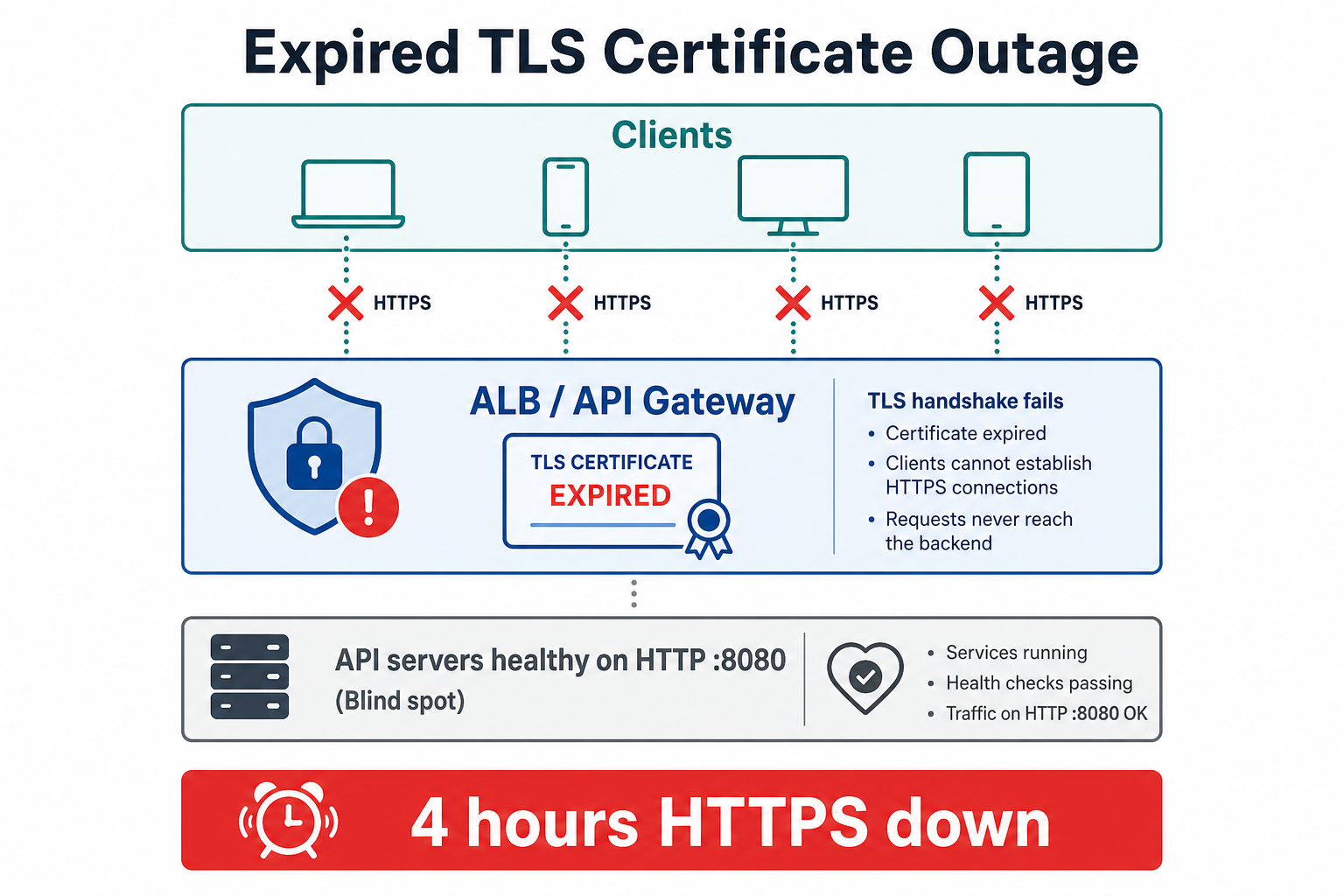
HTTPS failed at midnight; internal health checks on HTTP :8080 stayed green—so we learned from customers, not alerts.
Technology Choices:
- Certificate: DigiCert commercial cert, 398-day validity (purchased annually)
- Termination: ALB holds the cert; backends spoke HTTP on port 8080
- Renewal: Manual—finance purchased, engineer validated domain, uploaded to ACM
- Monitoring: Uptime check on
http://internal-health:8080/healthonly
Assumptions Made:
- Calendar reminders at 60/30/7 days were sufficient lead time
- Someone would act on reminders even during vacation season (August)
- Expiry at midnight UTC would affect few users (wrong—Asia-Pacific integrations peaked at midnight UTC)
- ACM import would be instant (validation and approval added 2.5 hours)
The Incident
CERT_HAS_EXPIREDSymptoms
What We Saw:
- Client errors:
certificate has expired,unable to get local issuer certificatein customer logs - Success rate: External HTTPS synthetic check would have shown 0%—we didn't have one
- Internal health: 100% green on port 8080
/health(TLS problem was invisible) - Support volume: 34 tickets in 4 hours; 3 enterprise customers threatened SLA credits
- Failed requests: ~8,400 failed API calls during outage (retries excluded)
How We Detected It:
- Customer support Slack channel, not Grafana
- On-call ran
openssl s_client -connect api.example.com:443and readnotAfterdate
Monitoring Gaps:
- No certificate expiry monitoring (no 90/60/30/14/7-day alerts)
- Health checks did not validate the public HTTPS endpoint
- No dashboard for
days_until_cert_expiry - Calendar reminders were not tied to an on-call rotation or escalation policy
Root Cause Analysis
Primary Cause: Expired TLS certificate with no automated renewal and no expiry alerting.
Mechanism chain:
- Commercial cert reached
notAfterat midnight UTC—ALB presented an expired leaf certificate. - Clients validate the chain during the TLS handshake and fail closed—no HTTP layer is reached.
- Internal health checks hit HTTP on port 8080, bypassing the certificate entirely.
- Manual renewal process depended on email reminders and a single engineer—vacation and release week blocked action.
- Emergency purchase added finance approval and domain validation latency on top of the overnight expiry.
Manual renewal + no expiry alerts + HTTP-only health checks → customers detect outage before ops
Why It Was So Bad:
- Total HTTPS failure—no graceful degradation for TLS
- Silent internally—monitoring watched the wrong layer
- Global impact at midnight UTC—peak for APAC batch jobs
- Manual purchase path—2.5 hours to get a new cert vs minutes with auto-renewal
Contributing Factors:
- Cert metadata lived in a finance spreadsheet, not in IaC or ACM tags
- No runbook for emergency renewal
- ALB listener used imported cert, not ACM-managed auto-renewal
- Reminder emails had no PagerDuty escalation after 7 days unactioned
Fix & Mitigation
Immediate Fixes (During Incident):
- Emergency cert purchase and ACM import (09:00–10:30 UTC)
- ALB listener updated with new certificate ARN
- Status page posted; advised customers to retry with exponential backoff
- Verified chain with
openssl s_clientand SSL Labs from external VPS
Long-Term Improvements:
| Strategy | What it does | Best when |
|---|---|---|
| ACM + DNS validation | AWS-managed renewal for ALB-attached certs | ALB/CloudFront on AWS |
| cert-manager + Let's Encrypt | In-cluster auto-renewal for Kubernetes ingress | EKS/GKE workloads |
| Expiry monitoring (SSL Labs / custom) | Alert at 90, 60, 30, 14, 7, 1 days | Any manual or hybrid cert |
| HTTPS synthetic checks | External probe validates full TLS handshake | Catching termination-layer failures |
| IaC for cert metadata | notAfter in Terraform tags + CI drift check | Auditable lifecycle |
| On-call escalation on reminders | Unactioned 30-day alert pages engineer + manager | Teams that still use commercial certs |
- Migrated to ACM-managed certificate with DNS validation and auto-renewal
- Deployed cert expiry monitoring: Prometheus
ssl_exporter+ alerts at 90/60/30/14/7 days - HTTPS synthetics from 3 regions every 60s on
https://api.example.com/health - Runbook for emergency renewal if ACM validation fails
- Removed calendar reminders—replaced with monitored tickets auto-created at 90 days
Architecture After Fix
Certificates are now ACM-managed with DNS validation; external synthetics exercise the full TLS path so port-8080 health checks cannot hide expiry again.
Key Changes:
- ACM auto-renewal replaces annual manual purchase
- External HTTPS synthetics—not just internal HTTP health
- Expiry alerts at multiple thresholds with PagerDuty escalation
- Cert metadata in Terraform tags for audit and drift detection
- Emergency runbook tested quarterly
Key Lessons
-
Certificates expire on a schedule, not on a reminder—automate renewal or alert aggressively.
-
Health-check the same path customers use—HTTP :8080 green while :443 is broken is a false sense of security.
-
Users will find out first if you don't monitor TLS externally—treat expiry like a ticking SLO breach.
-
Manual renewal has hidden latency—finance, validation, and install time stack on top of detection delay.
-
Assign cert ownership to a role, not a person—vacation coverage must be explicit.
-
Prefer short-lived auto-renewed certs (Let's Encrypt, ACM) over annual commercial certs when possible.
-
Test renewal before expiry—staging should renew monthly to prove the pipeline works.
Interview Takeaways
Common Questions:
- "How do you prevent certificate expiry outages?"
- "What would you monitor for TLS health?"
- "ACM vs Let's Encrypt vs commercial certs—trade-offs?"
What Interviewers Are Looking For:
- Understanding that TLS failures happen before HTTP
- Automation over calendar reminders
- Layer-appropriate health checks (HTTPS synthetics)
- Escalation policies for operational toil
What a Senior Engineer Would Do Differently
From the Start:
- ACM or cert-manager on day one—no manual annual purchase
- Expiry monitoring with page-level alerts at 30 days, not email at 60
- HTTPS synthetics from outside the VPC
- Cert metadata in IaC—
notAftervisible in PRs and dashboards - Quarterly renewal drill in staging
The Real Lesson: Operational excellence means automating what humans forget. Certificate expiry is a classic "forgot to do the thing" incident—the fix is never "remember better."
How I'd answer in interviews
"We terminated TLS at an ALB with a one-year commercial cert renewed manually via calendar reminders. It expired at midnight UTC; internal health checks only hit HTTP on port 8080, so everything looked green while every HTTPS client failed for four hours. I'd use ACM or cert-manager for auto-renewal, ssl_exporter or synthetics for ninety/sixty/thirty-day alerts, external HTTPS health checks, cert metadata in Terraform, and a quarterly staging renewal drill—customers should never be your monitoring system."
Related reading on this site
- TLS/SSL Handshake — why clients fail closed when
notAfterpasses. - Health Checks & Monitoring — liveness vs readiness vs external HTTPS probes.
- Monitoring & Observability — SLOs, alerting tiers, and synthetic monitoring.
- Infrastructure as Code — tracking cert ARNs and expiry in version control.
- The Misconfigured Load Balancer — another edge-layer failure invisible to app health checks.
FAQs
Q: How do you monitor certificate expiry?
A: Use ssl_exporter or cloud-native tools to scrape notAfter, alert at 90/60/30/14/7 days, and run external HTTPS synthetics that validate the full chain. Email reminders alone are not monitoring.
Q: Why didn't internal health checks catch this?
A: They hit HTTP on port 8080 behind the ALB. TLS termination happens at the ALB on :443—the cert can expire while backends respond 200 OK.
Q: ACM vs Let's Encrypt—which should I use?
A: ACM is simplest for ALB/CloudFront on AWS (auto-renew, no pod restarts). cert-manager + Let's Encrypt fits Kubernetes ingress. Commercial certs make sense for legacy constraints—not because they're more reliable.
Q: What's the difference between cert expiry and cert misconfiguration?
A: Expiry is time-based—valid chain until notAfter. Misconfiguration is wrong chain, hostname mismatch, or weak cipher suite—can happen with a fresh cert. Both fail TLS handshakes; monitoring and synthetics catch both.
Q: How far in advance should you alert?
A: Page at 30 days for manual certs; warn at 90 and 60. Auto-renewed certs should still alert at 14 days if renewal fails—Let's Encrypt retries, but DNS validation can break silently.
Q: Can clients retry through a cert outage?
A: Retries don't help until a valid cert is installed—handshake fails before HTTP. Communicate via status page; fix forward, don't wait for clients to "recover."
Q: Should we use longer-validity certs to reduce renewal toil?
A: Prefer shorter-lived auto-renewed certs (90 days with Let's Encrypt) over multi-year manual certs—frequent automated renewal exercises your pipeline; rare manual renewal rusts it.
Keep exploring
Real engineering stories work best when combined with practice. Explore more stories or apply what you've learned in our system design practice platform.