System design interview guide
WhatsApp System Design
Billions expect private chat that feels instant—delivery ticks, ordering you trust, and E2E so the server never reads plaintext. Fan-out, offline inboxes, and key rotation break naive designs before you draw one message broker box.
Problem statement
Mobile messaging at billions: E2E, delivery, groups, media, presence.
Introduction
You text “running late” on a bad train connection. One checkmark shows up, then two, then nothing. For half a minute your friend thinks you ignored them. At the same time, a family group of forty people shares a video and everyone’s phone gets hot.
That is what users feel. The interview asks: can your design handle slow networks, big groups, and privacy?
Interviewers do not care how many boxes you draw. They want to hear three ideas:
- Two paths — small control messages (text, receipts) vs big files (photos, video). Do not mix them on one slow lane.
- Real encryption — the server stores scrambled text (ciphertext). It does not keep readable messages “for debugging.”
- Order per chat — each conversation gets its own message numbers. You do not need one global clock for the whole world.
Weak answers hide plain text in logs. Strong answers explain the inbox, how live connections deliver to online users, and why push notifications are not the same as “message received.”
If you remember one thing: Delivery, order, and privacy are three separate problems. Solve them separately before you name Kafka or Redis.
How to approach
Talk like you are walking through one user action, not listing every service name.
- Ask scope — How big can a group be? How deep should you go on encryption (high level vs full crypto math)?
- One send, 1:1 — Phone encrypts → server saves → friend gets it on live connection or waits in inbox.
- Offline — Message lives in inbox first. Push is often just “you have mail,” not the message text.
- Groups — Copy message to every member’s inbox (small groups) vs read from one place (huge groups). Say when you cap group size.
- Media — Upload big files separately. The fast path only carries a pointer to the file.
- Extra topics — More phones per user, key rotation, multiple regions—only if they ask.
In the room: “I’ll ask about group size and encryption depth, then walk through sending one text message before groups and video.”
If you remember one thing: Start with one send story. Groups and media come after that works.
Interview tips
Five common back-and-forths in interviews. Each has: what you might say, what they ask next, and how to answer clearly.
Message ordering
You: “Messages are ordered by timestamp.”
They ask: “Two phones, two time zones, bad clocks—what do you actually sort by?”
Land here: The server gives each message a rising number in that chat (seq). If two messages tie, use msg_id. Do not sort by the phone’s clock—clocks disagree across time zones.
Retries on bad networks
You: “At-most-once is simpler.”
They ask: “User hits send in an elevator, the network retries—do you drop the message or show it twice?”
Land here: Use at-least-once: the network may retry, so the client sends a unique client_msg_id. The server ignores duplicates so the chat does not show two copies.
Push notifications
You: “Push delivers the message.”
They ask: “If messages are encrypted end-to-end, what can you put in the notification?”
Land here: Usually only “New message”—not the text. The real proof is the message row in the inbox on the phone. Push just tries to open the app.
Logging and support
You: “We log message text to help support.”
They ask: “What can the server know if chat is end-to-end encrypted?”
Land here: The server only stores and moves scrambled bytes. Keys stay on phones. For abuse, use who sent to whom, rate limits, or user reports—do not claim the server can read chats.
Presence and “typing…”
You: “We send typing updates to everyone in the contact list.”
They ask: “What happens to database writes at a billion daily users?”
Land here: Slow down typing and online updates (e.g. only when the app is open). Sample or batch them. Respect hide last seen.
If you remember one thing: After each question, name one real piece of the design—sequence numbers, duplicate IDs, inbox sync, encrypted storage, or throttled presence—not “we’ll scale later.”
Capacity estimation
Rough numbers stop you from promising impossible things—like copying one “hello” into fifty thousand inboxes in a single instant.
| Axis | Rough scale | What it means for design |
|---|---|---|
| Peak messages | ~600K per second (example) | Split data by chat or user inbox; batch writes when you can |
| Storage | Petabytes of history | Archive old chats, support delete for everyone, compress old data |
| Live connections | ~100M+ open sockets (order of magnitude) | Regions of connection servers; tune for many open sockets |
| Media | Much bigger than text | Put files in object storage + CDN; keep the text path small and fast |
So we cannot: treat a stadium-sized group like a chat with ten friends. Either you write one copy per member (expensive writes) or read from one shared log (expensive reads)—product must set limits. We also cannot send a huge video on the same fast path as “typing…”
If you remember one thing: At huge scale you need rules (max group size, separate media path)—not only more machines.
High-level architecture
What breaks if you merge everything
One API that takes full video uploads and read receipts on the same urgent path will choke at peak. Handshakes, database writes, and push notifications all fight for the same few milliseconds. If you also log readable messages for “debugging,” you fail the encryption question before scale even matters.
What works: two lanes
Picture two roads:
- Fast lane — short messages: text, who read what, “user is online,” connection events.
- Truck lane — photos and video: upload to file storage, download via CDN.
The server moves scrambled bytes. It does not read the chat content.
How it fits together:
Phones keep a long-lived connection (WebSocket, MQTT, or similar over TLS) to connection servers in each region. The chat service receives encrypted text + small metadata, assigns msg_id and a sequence number per chat (seq), and saves to a database split across many machines (by chat id or by each user’s inbox). If the friend is online, send over the live connection. If offline, save to their inbox first, then send APNs/FCM push. For media, the phone uploads with a pre-signed URL; the fast lane only carries a file id.
Who does what:
- Connection servers — Keep sockets alive, heartbeats, limit queue size per user so one slow phone does not blow memory.
- Chat / inbox service — Owns message order (
seq), saves messages reliably, tracks sent / delivered / read. - Object store + CDN — Stores files; supports resume if upload breaks.
- Push service — Maps user → phone tokens; respects notification settings.
- Keys (sketch) — Stores public keys per device. Never log readable messages.
Simple version: text uses the fast lane; photos and video use the truck lane.
[ Mobile client ]
      |
      | 1) TLS + long-lived conn (signaling)
      v
[ Edge / Connection cluster ] ──► [ Chat / Inbox service ]
      |                                    |
      |                                    | persist ciphertext + metadata
      |                                    v
      |                             [ Message store shards ]
      |                                    |
      | 2) notify online peers             +--> [ Push ] --> APNs/FCM (offline)
      |
[ Same client or peer ] ◄── ack / delivery / read events

  Media path (async, large):
  Client --presigned PUT--> [ Object storage ] --> CDN URL in message body (encrypted)
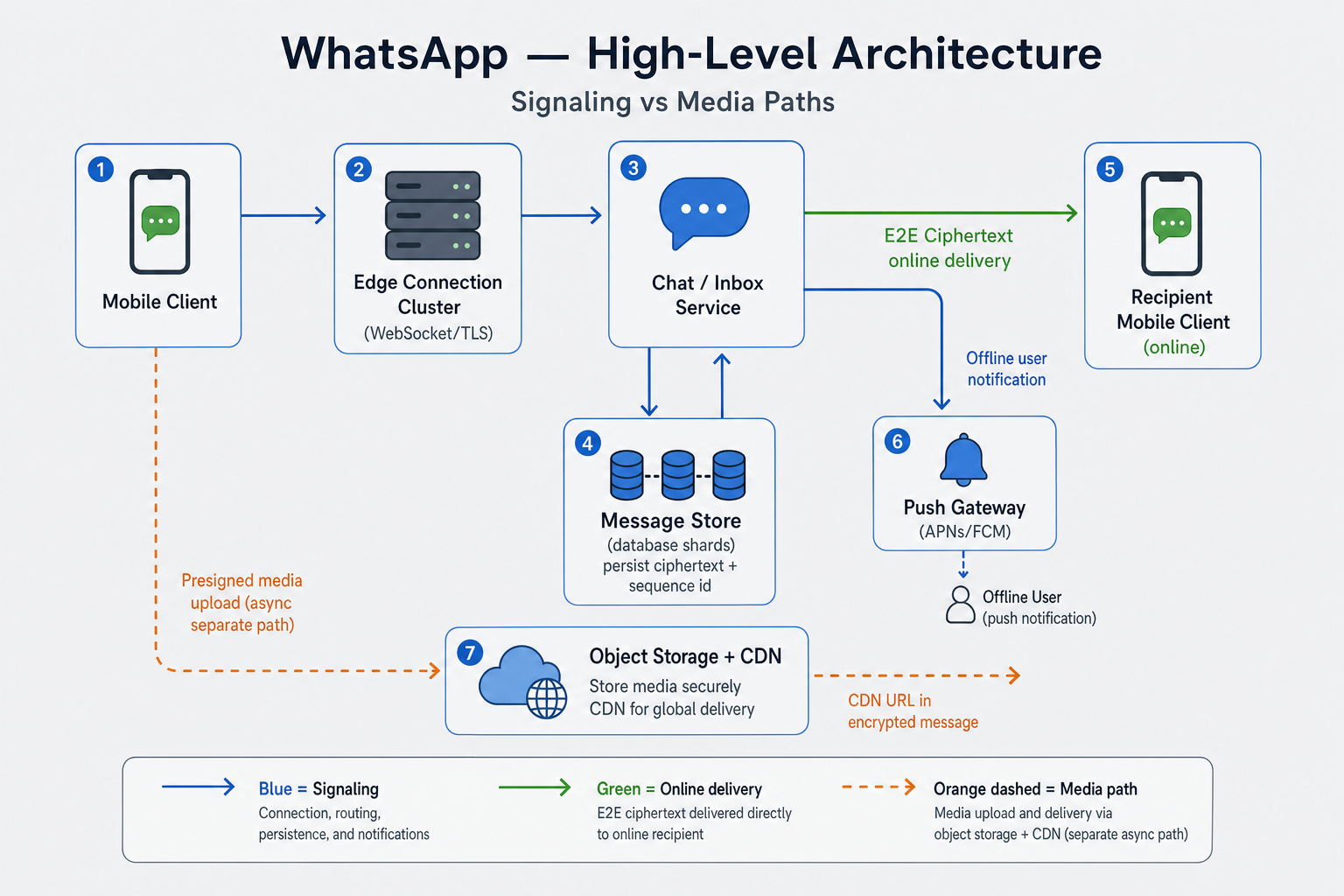
Figure: Fast lane for text (blue), delivery to online users (green), and separate upload path for media (orange). The server only stores scrambled message bytes.
In the room: Start with the fast lane (text, receipts). Then the truck lane (big files, resume upload). Say honestly: with end-to-end encryption, search on the server is limited unless the phone builds its own index.
If you remember one thing: Text path and media path are different—different size, speed, and ways to fail.
Core design approaches
1:1 messaging
Alice sends one line to Bob. Her phone encrypts, creates a client_msg_id (so retries do not duplicate), and calls SendMessage. The server skips duplicates, assigns seq, saves to Bob’s inbox, then either sends on Bob’s open connection or sends a simple push (“new message”). Bob’s phone decrypts and sends delivered / read when the UI allows.
Order is per chat, not one clock for the whole app.
Group messaging
A group of twelve can copy each message into twelve inboxes and still feel fine. A stadium with fifty thousand people cannot—one “hello” would mean fifty thousand writes unless you change the model.
Copy on send: Each member gets a row in their inbox. Good for small groups. Cost grows with member count.
Read from one place: Store the message once for the group; members fetch what they have not seen. Good for huge groups. Cost moves to reads.
If you remember one thing: Say your max group size and which model you use above that limit.
Receipts
- Delivered — server got it to the friend’s connection or inbox.
- Read (two blue ticks) — the friend’s app says they opened it.
In very large groups, combine read receipts or relax the rules—one read event per member per message does not scale.
If you remember one thing: Receipts are several steps, not one bit—and encryption limits what the server can know about “read.”
Detailed design
Walk one text message step by step. Each step is where networks retry or break.
Write path (text message)
- Phone encrypts; sends
client_msg_id,conversation_id, scrambled body, and type (text / image pointer). - Server checks: have we seen this
client_msg_idfor this chat? If yes, return the old result (no duplicate row). - Server assigns
msg_idandseq, saves to inbox storage (one shared thread or two inboxes—say which you pick). - Later, in the background: abuse checks on metadata only (who, when, size)—not reading message text if E2E.
If you remember one thing: Same client id on retry + server sequence number = correct order on bad networks.
Read path (when app is open)
- After reconnect, phone asks for everything after sequence X (or after cursor).
- Server returns a batch of scrambled messages; phone decrypts and shows them.
- New messages arrive live over the socket (or long poll).
Offline
- Message is saved to inbox on the server. That is the promise.
- Push might not wake the phone (Do Not Disturb, battery saver, old app token).
- When user opens the app, download in pages until caught up.
Push means “please open the app,” not “the user definitely read it.”
In the room: Draw once: save to inbox, then notify (socket or push).
If you remember one thing: Offline = inbox saved + sync on open. Push is optional help.
Key challenges
For each item, say what the user sees if you get it wrong.
- Encryption + many phones per user — Encrypt for each of the friend’s devices. Missing keys means awkward “waiting for message” repair. Support cannot read the chat from the database.
- Order when the network retries — Same send retried must not sort above a newer message. Sort by
seq, thenmsg_id. - Big groups — One viral message: either too many writes or too many reads. Caps are a design choice, not an afterthought.
- “Typing…” at scale — Every keystroke to every contact is millions of writes. Throttle, sample, or only send when app is in foreground.
- Video on bad Wi‑Fi — Upload in chunks, resume if it fails. Do not use the same timeout as a text message.
If you remember one thing: Hard topics are keys, order, groups, and push—not which message queue brand you pick.
Scaling the system
- Split the database by chat id (until one chat is “celebrity hot”) or by user id (inbox per user). Watch one partition getting all traffic.
- Connection servers — Add more machines; keep the same user on the same box when needed; cap queue size per connection; disconnect abusers.
- Multiple regions — Some countries require data to stay local. Order across regions is hard—say you may be briefly inconsistent during failover.
- Push — Separate workers; respect Apple/Google rate limits; delete dead device tokens.
If you remember one thing: One hot chat or one hot database partition hurts more than average traffic—measure that.
Failure handling
Many problems do not show as “500 error.” Users care if things are slow vs lost.
| What happens | What user sees | What to build |
|---|---|---|
| Connection drops | “Sending…” on phone | Reconnect with backoff; resend same client_msg_id |
| Video upload stops halfway | Stuck on one tick | Resume upload; expire broken partial uploads |
| Push only, no live connection | Message late | Inbox sync when app opens—normal |
| Whole region down | Delay, odd order briefly | Fail over; admit order may glitch during recovery |
Real outage = cannot send at all, or messages disappear. Saving to inbox before ack prevents loss.
If you remember one thing: Users will tap send again—your design must handle duplicate sends.
API design
These are the main calls the mobile app uses (often gRPC or similar over TLS).
Messages
| Endpoint / RPC | Role |
|---|---|
SendMessage | Upload ciphertext + metadata; returns msg_id, seq |
SyncMessages(cursor) | Paginated since cursor |
AckDelivered / AckRead | Receipt pipeline |
Query params (sync):
| Param | Role |
|---|---|
cursor | Opaque last seen position |
limit | Max messages per response (capped server-side) |
conversation_id | Thread scope |
Media
| Step | Role |
|---|---|
POST /v1/media:prepare | Returns pre-signed upload URLs + media_id |
PUT to object storage | Client uploads encrypted blob |
SendMessage references media_id | Pointer only on signaling path |
In simple terms: save the scrambled message to the database, then either push on the live socket or send “new message” to the phone.
Diagram (send hot path):
Client --SendMessage(ciphertext)--> Chat svc --> DB commit
                                        |
                                        +--> if peer online: conn push
                                        +--> if offline: Push "new message"
Errors: 429 too many requests; 413 metadata too large; 409 duplicate client_msg_id → return the same msg_id as the first send (so retry is safe).
In the room: Walk SendMessage → save → online path vs offline push. Say 409 is intentional: “same send twice is OK.”
If you remember one thing: Mobile networks retry. APIs must support duplicate detection and “give me messages since cursor.”
Production angles
Dashboards can look green while users still see “connecting…” The database saved the row. Push said “accepted.” The message still is not on screen. Real ops cares about live connections, one overloaded database partition, and the gap between bytes delivered and user saw it.
Messages feel slow but APIs look fine
What users saw — Time from one gray tick to message on screen got worse. Chat API success rate looked fine. Database and cache were not maxed out. Phones showed “connecting…” often during evening peak or right after a connection server deploy.
Why — Live sockets (WebSocket, MQTT, etc.) fail in different ways than normal HTTP. Connection machines can choke on TLS or garbage collection. Bad mobile networks hurt long-lived connections more than one-off HTTP requests. If you only alert on HTTP errors, you miss slow delivery to the socket.
What good teams do — Track time from database save to phone receiving on the socket; do not rely only on “API returned 200.” Load-test connection pools before peak. Plan for many reconnects at once after a deploy and use backoff so reconnects do not amplify the outage. Remember: message queue lag zero does not mean the user saw the message.
Push says delivered but user saw nothing
What users saw — Apple or Google dashboards show delivered, but the user says there was no notification. Common causes: Do Not Disturb, battery saver, app uninstalled but old token still registered, iOS notification summary grouping.
Why — Push only tries to wake the phone. It is not proof the app decrypted and showed the message. With encryption, the server often cannot put message text in the notification. The inbox on the device is the truth for “this message exists.”
What good teams do — Treat push as help, not proof of delivery to human eyes. Drive unread badges from synced inbox rows. Measure push failures separately from app UI bugs. In interviews, say clearly: “delivered to Apple” ≠ “user read the chat.”
One huge group overloads one database partition
What users saw — Live event or viral group: messages lag or fail. One chat id drives hundreds of messages per second, one database shard maxes out, sequence numbers become a bottleneck, and “typing…” updates make write load worse.
Why — Splitting data by conversation id works until one conversation is enormous. Order per chat means that chat shares one logical pipe—correct for ordering, but a hot spot at scale.
What good teams do — Rate limit messages per group. Use announcement mode (only admins post) or split huge channels. Cap group size, or move stadium-scale chat to another product surface. Chart traffic per database partition, not only global QPS.
Server runs out of memory because phones read slowly
What users saw — Random disconnects, apps reloading old messages and making load worse, server memory spikes while CPU looks normal.
Why — Each open connection has an outbound queue of frames waiting to send. A phone on a slow network or in the background reads slowly, the queue grows, and eventually the server must slow down, drop, or disconnect.
What good teams do — Limit queue size per connection. Merge repeated “typing…” events into fewer updates. Disconnect gracefully and give a resume token so the client does not replay the entire history blindly. Watch queue depth and time from save to first byte sent to the phone.
When traffic spikes, unsent data piles up per connection until the server must drop clients—sometimes worse than a slow HTTP API.
[ Message rate spike ] → [ per-connection outbound queue ]
       → slow consumers → memory ↑ → disconnect / drop / shed
How to use this in an interview — Pick one path: “saved to database → fan-out → live connection → push.” For each step, name one failure that does not show as HTTP 500. End with: you do not need global order—one rising number per chat is enough, and say why.
Bottlenecks and tradeoffs
Encryption vs search and moderation
The tension — Users want private chats; the product also wants search, abuse detection, and support tools.
What breaks — The server cannot read message text if chat is truly end-to-end encrypted.
What teams do — Search on the phone (client-side index), or use user reports plus metadata (who, when, size, rate)—not the body.
Say in the interview — Name what you give up on the server. Do not pretend you can “just log messages for support.”
Same order on every device vs speed and cost
The tension — Users expect the same thread order on phone, tablet, and web; perfect sync everywhere can cost extra round trips and delay.
What breaks — Brief moments where two devices show slightly different order until sync catches up.
What teams do — Many products accept good enough order that converges in a few seconds; stronger guarantees cost more engineering and latency.
Say in the interview — Pick a bar: “good enough for chat” vs “strict linear order everywhere”—and justify it.
Small groups vs stadium groups (write vs read cost)
The tension — Copying each message to every inbox feels simple and fast for small groups; at stadium scale, writes explode.
What breaks — One viral group can overload one database partition.
What teams do — Cap size, switch to one shared log and read with a cursor for huge groups, or use a different product mode for broadcasts.
Say in the interview — Group size is not a footnote—it picks your storage model.
If you remember one thing: Every extra feature under encryption has a privacy cost. Every group size picks write cost or read cost. Name both out loud.
What should stick
You do not need to memorize every box. You should leave knowing:
- Two paths — Fast lane for text and control; truck lane for photos and video. Never block checkmarks on a huge upload.
- Inbox before push — Message is safe in the inbox on the server. Push only tries to wake the app.
- Server numbers per chat — Use
seqfor order,client_msg_idso retries do not duplicate. - Groups need a plan — Small groups: copy to each inbox. Huge groups: read from one place or cap size.
- Ops is not only API errors — Watch connection delay, hot database partitions, and queue depth.
Tell it in the room: “I split text and media. One send: encrypt, save to inbox with a sequence number, notify online user on the socket or offline user with push. Groups: I pick copy-on-send or read-from-shared-log and state a max size. Encryption means the server only stores scrambled bytes and push cannot carry the full message.”
Reference diagram
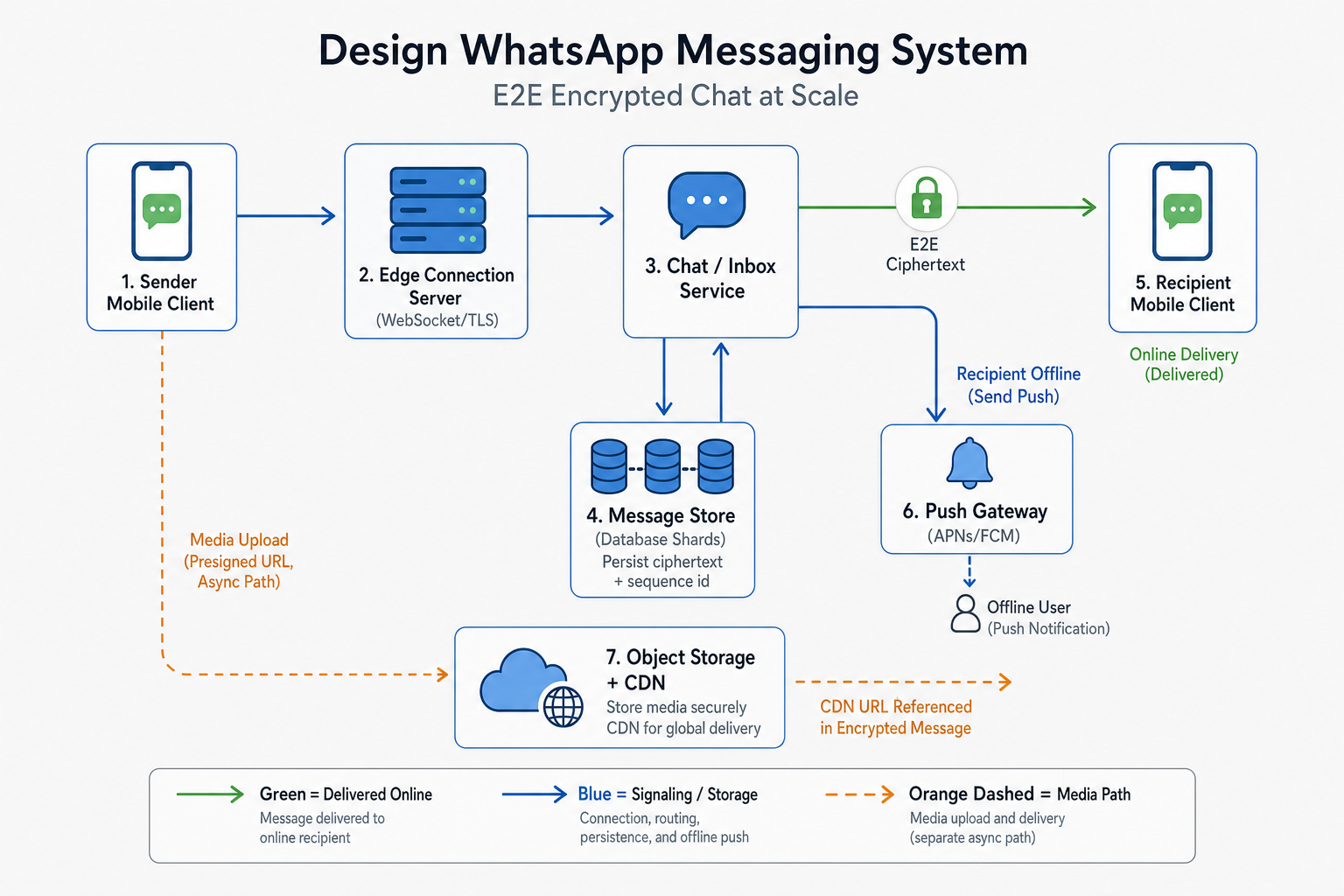
What interviewers expect
Two paths text vs media; per-chat seq; at-least-once + client_msg_id; inbox source of truth.
Interview workflow (template)
- Clarify requirements. Confirm functional scope, users, consistency needs, and which non-functional goals matter most (latency, availability, cost).
- Rough capacity. Estimate QPS, storage, and bandwidth so your data model and partitioning story are grounded.
- APIs and core flows. Define a minimal API and walk 1–2 critical read/write paths end to end.
- Data model and storage. Choose stores for each access pattern; call out hot keys, indexes, and retention.
- Scale and failure. Add caching, sharding, replication, queues, or fan-out as needed; say what breaks in failure modes.
- Tradeoffs. Name alternatives you rejected and why (e.g. strong vs eventual consistency, sync vs async).
Frequently asked follow-ups
- E2E with server routing?
- Message order?
- Large groups?
- Offline?
- vs feed design?
Deep-dive questions and strong answer outlines
Send text 1:1?
Encrypt client-side; client_msg_id; server assigns msg_id+seq; store ciphertext in recipient inbox; push or poll.
Read receipts scale?
Delivered vs read events; throttle in large groups; combine counts.
500-member group?
Shared log + cursors vs per-member inbox copy; cap size; announcement mode.
E2E routing?
Server forwards ciphertext + metadata only; push is generic.
Offline?
Inbox durable first; sync pages on reconnect; push is wake-up only.
AI feedback on your design
After a practice session, InterviewCrafted summarizes strengths, gaps, and interviewer-style expectations—similar to a written debrief. See a static example report, then practice this problem to get feedback on your own answer.
FAQs
Q: Double Ratchet detail?
A: Only if pushed—name forward secrecy then move on.
Q: Kafka on hot path?
A: Often custom storage + sockets for latency.
Q: SMS signup?
A: One sentence unless asked.
Q: Connection scale?
A: Shard gateways; sticky routing; backpressure.
Practice interactively
Open the practice session to use the canvas and stages, then review AI feedback.